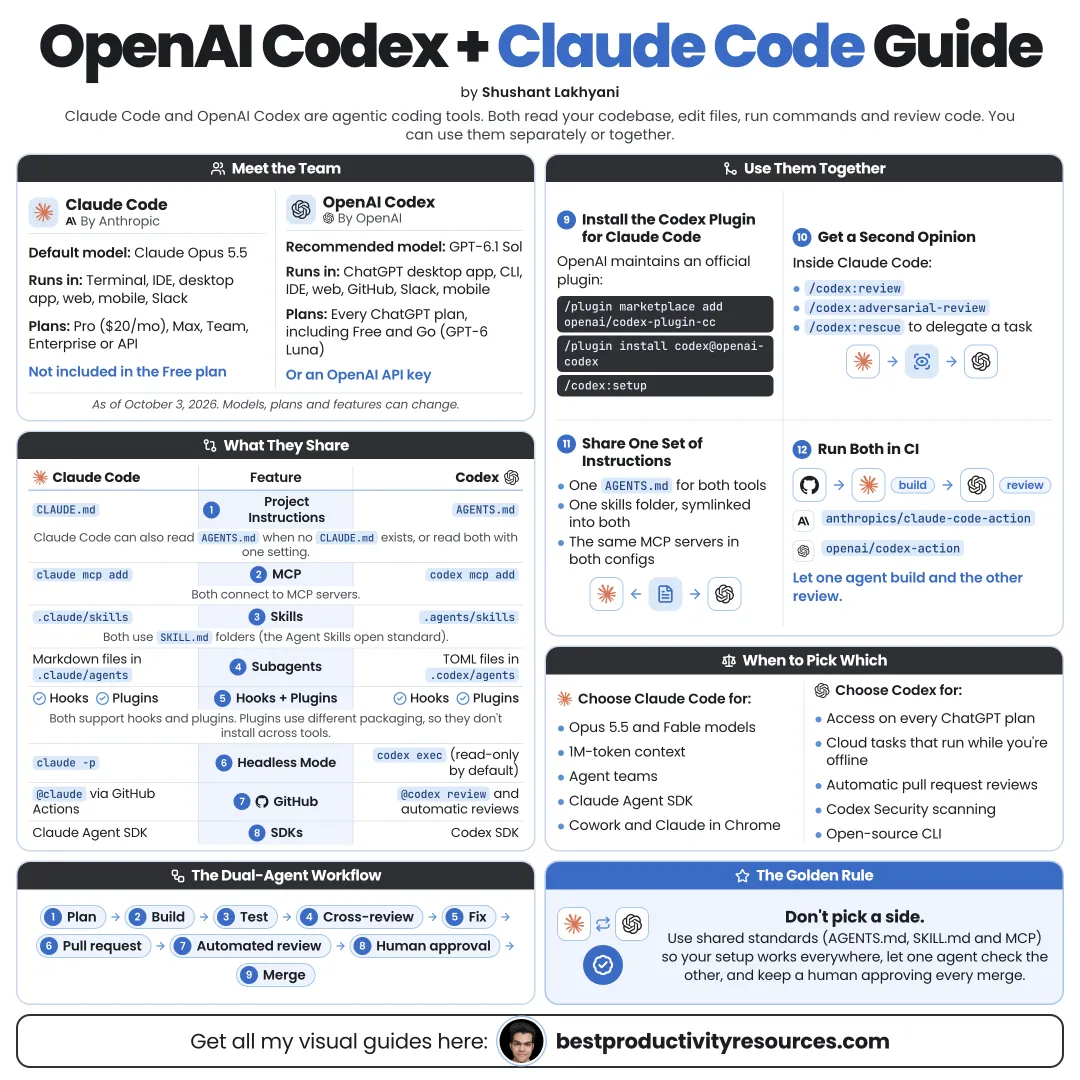
Turn two leading coding agents into one reliable workflow
20 bite-sized sections
6 min read
Free, no signup
Short answer
A free guide to using OpenAI Codex and Claude Code together: how they compare, shared AGENTS.md instructions, the official Codex plugin for Claude Code, cross-reviews, parallel worktrees, skills, MCP, plans, safety and a master two-agent prompt.
Both also offer Windows installers, Homebrew, and npm. Run codex and claude inside your project folder to sign in.
05
Share one instructions file
Keep a single source of truth so both agents work from the same rules.
Put your project rules in AGENTS.md
Let Codex read AGENTS.md automatically
Let Claude Code read AGENTS.md when no CLAUDE.md exists (v2.1.277 or later)
Add @AGENTS.md to CLAUDE.md to import the shared file if you need both
One rulebook, two agents. Never keep two copies of the same rules.
06
Write rules both agents can obey
Cover these in AGENTS.md:
What the project does
Setup and install commands
Test, lint, and build commands
Code style and naming conventions
Folders and files to leave alone
Actions that require human approval
Commit message format
What counts as done
Keep it short and specific. By default, Codex caps combined AGENTS.md content at 32 KiB.
07
Run Codex inside Claude Code
OpenAI publishes an official open-source plugin that runs Codex from within Claude Code. It calls the Codex CLI already on your machine, using your current login and settings.
You need a ChatGPT subscription (Free included) or an OpenAI API key, plus Node.js 18.18 or later.
08
Learn the plugin commands
/codex:review
Run a standard read-only review of your current changes
/codex:adversarial-review
Run a review that challenges design choices and assumptions
/codex:rescue
Hand Codex a bug investigation, fix, or follow-up task
/codex:transfer
Convert the current Claude Code session into a Codex thread
/codex:status
List running and recent Codex jobs
/codex:result
Display the output of a finished job
/codex:cancel
Stop a background job mid-run
09
Cross-review every important change
The simplest high-value pattern: one agent builds, the other reviews.
Claude Code makes the change
You run /codex:review or /codex:adversarial-review
Claude Code fixes the valid findings
You check the final diff and tests
Or flip it: Codex builds, and Claude Code reviews the diff.
Treat every review as evidence to verify, not a verdict to accept.
10
Plan with one, build with the other
For bigger features:
Have one agent draft a detailed plan
Ask the other to poke holes in it
Merge the best ideas yourself
Have one agent build from the final plan
Have the other review the result
Disagreement between the agents helps. It points you to the real decisions.
11
Work in parallel without conflicts
Never let two agents edit the same files at once.
Put each agent on its own Git branch
Use separate Git worktrees for parallel work
Assign tasks that do not overlap
Merge changes one at a time
Run tests after each merge
In Codex, /worktree runs a chat in a fresh Git worktree.
12
Play to each tool’s strengths
Codex Cloud
Run several tightly scoped tasks remotely, then review what comes back.
Codex GitHub review
Mention @codex review on a pull request or switch on automatic reviews.
Claude Code skills and hooks
Package workflows and enforce checks before or after each action.
Claude Code routines
Run scheduled jobs in the cloud, even while your computer is off.
Both
MCP connections, subagents, and terminal-based workflows.
Test both tools on your own codebase. Real tasks tell you more than benchmarks.
13
Share skills across both
Both tools define skills in a SKILL.md file with a name and a description.
Codex loads skills from .agents/skills
Claude Code loads skills from .claude/skills
Shared logic belongs in scripts both can run
Tool-specific notes stay short
Check each tool’s docs for format differences before you copy a skill across.
14
Connect shared tools with MCP
Both support the Model Context Protocol, so you can wire the same docs, issue tracker, or database into each one.
Codex
codex mcp add
Claude Code
claude mcp add
Give each agent only the servers its role requires.
15
Set safe permissions in both
Codex
Sandbox mode combined with an approval policy. The Auto preset means workspace-write with on-request approvals, with network access off by default.
Claude Code
Permission settings decide which tools and commands run without asking. Hooks can block risky actions before they happen.
Make both agents ask before they push, deploy, delete, or touch secrets.
16
Control cost and usage
Pick the cheapest model that does the job well
Raise effort only for genuinely hard problems
Save reviews for important changes, not every typo
Switch tools when one hits its limit
Keep instructions lean to save context
In Codex, /model changes both the model and reasoning effort. In Claude Code, use /model and /effort.
17
Keep humans in charge
Review these yourself:
Architecture decisions
Security-sensitive code
Database migrations
Payments and authentication
Anything that ships to production
Disagreements between the agents
Both companies warn that their agents can make mistakes. Two agents agreeing proves nothing.
18
Split the work clearly
Hand to the agents
Implementation
Tests
Refactors
Reviews and second opinions
Documentation
Repetitive fixes
Keep with the humans
Goals and priorities
Architecture
Final approvals
Security decisions
Releases
Customer impact
19
Follow the two-agent workflow
Rules
A single shared AGENTS.md.
Plan
One agent plans and the other critiques.
Build
One agent builds on its own branch.
Review
The other agent checks the diff.
Fix
Resolve the valid findings.
Test
Run the whole test suite.
Approve
A human reviews, then merges.
Learn
Add new lessons to AGENTS.md.
20
Use the master two-agent prompt
Hand this to the agent doing the build:
Read AGENTS.md and follow it exactly.
Goal: [describe the change].
Constraints: [performance, security, or style requirements].
First, write a short plan and list the files you expect to touch. Wait for my approval.
Then make the change on a new branch, add or update tests, and run the full test suite.
When you finish, summarize what changed, why, and what a reviewer should check most closely.
Do not push, deploy, or delete anything without asking me.
Then have the other agent review that summary and the diff, with a focus on correctness, security, and missing tests.
The real opportunity
Do not ask: “Which agent is better?” Ask: “How can each agent check the other so I ship better work?”
Rules
Plan
Build
Review
Fix
Test
Approve
Learn
Begin with one shared rulebook and one cross-review on your next important change, then grow the workflow from there.
What does “OpenAI Codex + Claude Code Guide” cover?
It has 20 sections, starting with “See why you should use both”, “Get to know Codex”, “Get to know Claude Code” and “Install both tools”, plus 16 more sections.
How long does it take to read?
About 6 minutes. Every section is a short, self-contained card, so you can jump straight to the part you need.
Is this guide free?
Yes. The full guide is free to read on this page, with no sign-up.
For research and ideas only. Results vary and nothing here is a promise of income. See our Disclaimer.
See you Monday!
Weekly newsletter
Everything new, every Monday.
One short email every Monday with everything shipped that week: new free tools and websites, new guides, new free browser tools and what's new in my free Gumroad libraries, plus how the site is growing. Free, and you can unsubscribe anytime.
You sign up on Gumroad, which stores your email to send the newsletter. See our Privacy Policy.
Cookies and your choices
Visits are counted by Cloudflare Web Analytics, which sets no cookies and stores nothing on your device. An affiliate tracking script from Impact.com also loads on our pages and can set its own cookies so partner companies can credit us for sign-ups. Essential storage is always on so pages load and work correctly. You decide whether your browsing preferences are saved on your device. Read the Privacy Policy.