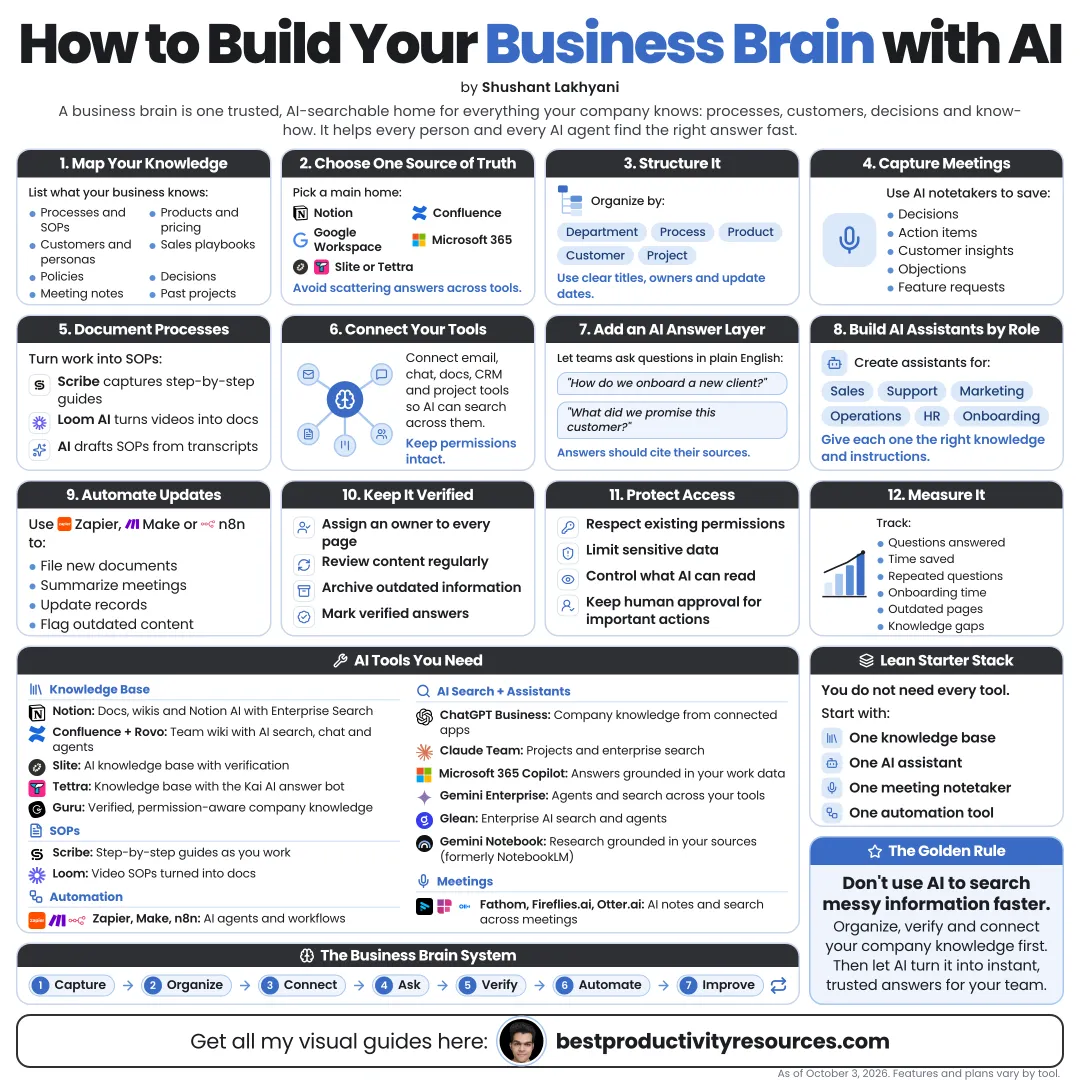
Turn scattered company knowledge into one searchable, AI-ready business brain, plus the tools you need
20 bite-sized sections
7 min read
Free, no signup
Short answer
A free guide to building a business brain with AI: capture decisions, processes, customers and meetings, organize them in one home, connect AI assistants and enterprise search, and choose the right AI tools for each layer, from ChatGPT and Claude to Glean, Notion and Gemini Notebook.
A business brain is your company’s shared, searchable memory: what you know, how you work, what you decided, and why you decided it.
Connect AI to it, and your team can:
Ask questions without interrupting colleagues
Find past decisions and the reasons behind them
Onboard new hires faster
Reuse processes that already work
Give customers consistent answers
Spot patterns in meetings and feedback
Turn knowledge into plans and docs
Most businesses have plenty of knowledge. What they lack is a way to find it and use it.
02
Learn the five layers
Capture
Pull knowledge out of heads, meetings, and inboxes.
Store
Keep it in one organized place.
Connect
Give AI secure access to the sources that matter.
Retrieve
Let anyone ask questions in plain language.
Maintain
Keep it accurate, current, and owned by someone.
03
Decide which knowledge matters most
Begin with the knowledge that hurts most when it goes missing:
How you deliver your product or service day to day
Customer questions and their answers
Pricing and policies
Sales process and common objections
Onboarding steps
Key decisions and the reasons behind them
Brand and writing guidelines
Tools and accounts, never passwords
Begin with the questions your team asks every week.
04
Choose a single knowledge home
Pick a primary home your team already works in:
Notion
Flexible docs and databases, with Notion AI built in.
Confluence
A common pick for teams already on Jira.
Google Drive
A natural fit for Google Workspace teams.
SharePoint
A natural fit for Microsoft 365 teams.
Obsidian
Local Markdown files, free for work use, and best for small teams or solo founders.
The best home is the one your people will actually keep up to date.
05
Organize it with a simple structure
Set up a few clear top-level sections:
Company: mission, strategy, and policies
Customers: profiles, feedback, and FAQs
Product or services: specs, delivery, and pricing
Sales and marketing: messaging, playbooks, and campaigns
Operations: processes and SOPs
Team: roles, onboarding, and contacts
Decisions: a running log of key calls
Archive: outdated material, clearly labeled
Give each page an owner and a last-reviewed date.
06
Document processes as SOPs
Write a standard operating procedure for every repeated task. Each SOP should cover:
Purpose
When to use it
Owner
Step-by-step instructions
Tools involved
Examples of good output
Common mistakes
Last-reviewed date
Record a screen walkthrough, then have an AI assistant draft the SOP from the transcript. Review the draft before you publish it.
07
Keep a decision log
For each important decision, record:
The decision
Date
Who decided
Options considered
Reasons
Expected outcome
When to revisit
Without a decision log, teams rerun old debates and forget why things work the way they do.
08
Capture meetings automatically
Meetings hold much of what your company knows. Use an AI note-taker such as Zoom AI Companion, Gemini in Google Meet, Microsoft Teams Copilot, Granola, Fathom, Otter, or Fireflies to capture:
Summaries
Decisions
Action items and owners
Customer questions
Objections and requests
Always tell participants when you record a meeting, and follow the laws that apply to you.
09
Capture what customers tell you
Common questions
Objections
Feature requests
Complaints
Words customers actually use
Reasons customers buy
Reasons customers leave
Each month, ask AI to group feedback into themes, then add the findings to your business brain.
10
Connect an AI assistant to your sources
Pick an assistant that can work from your company’s sources:
ChatGPT
Business and Enterprise plans can draw on company knowledge from connected apps such as Slack, Google Drive, SharePoint, and GitHub.
Claude
Projects hold your files and instructions, while connectors link apps such as Google Drive, Gmail, Notion, Slack, and Microsoft 365.
Gemini Enterprise
Google’s platform for searching company data and building agents, previously called Agentspace.
Microsoft 365 Copilot
Works across your Microsoft 365 data and respects your existing permissions.
Notion AI
Answers questions across your Notion workspace and the tools connected to it.
Choose the assistant that fits where your knowledge already lives.
11
Add enterprise search as you scale
Once knowledge spreads across many tools, AI enterprise search can help. Options include:
Glean, which connects to 100+ enterprise apps
Guru, which centers on verified knowledge
Onyx, an open-source option you can host yourself
The built-in search in Gemini Enterprise or Microsoft 365 Copilot
Insist on permission-aware search: people should only see answers drawn from documents they are allowed to open.
12
Research with Gemini Notebook
Gemini Notebook, called NotebookLM until July 2026, answers questions only from the sources you add and cites them.
Use it for:
Market and competitor research
Policy and contract summaries
Training material
Board and investor briefings
Onboarding notebooks for new hires
Business and enterprise plans add organization-level controls.
13
Automate knowledge flows
Use automation tools such as Zapier, Make, or n8n to send knowledge to its home automatically:
Meeting notes to the right project page
Support answers to the FAQ
Signed contracts to the client folder
Weekly summaries to a team channel
New decisions to the decision log
Automate the filing. Let humans approve what becomes official.
14
Build focused team assistants
Build focused assistants on top of your business brain with Projects, custom assistants, or agent builders in the tools you already use:
Onboarding assistant
Sales assistant with playbooks
Support assistant with approved replies
Brand voice assistant
Operations assistant with SOPs
Give every assistant clear instructions, approved sources, and a rule to say “I don’t know” when the answer is not there.
15
Lock down permissions and security
Choose business plans with admin controls
Respect existing document permissions
Keep passwords and secrets out of the knowledge base entirely
Restrict access to HR, legal, and financial data
Audit connector permissions on a schedule
Read each vendor’s data-use and retention terms
Major AI vendors’ business plans generally do not train on business data by default. Confirm the current terms for every tool you use.
16
Keep the knowledge accurate
AI answers are only as reliable as the documents behind them.
Give every section an owner
Review key pages every quarter
Label outdated pages clearly
Remove duplicates
Have AI flag contradictions between documents
Keep one official answer per question
An outdated answer delivered with AI confidence is worse than no answer.
17
Measure whether it works
Time it takes to onboard new hires
Repeat questions in team chat
Time spent finding information
Consistency of customer answers
Hours saved on documentation
How often the AI cannot find an answer
Unanswered questions tell you what to document next.
18
Pick the AI tools you need
Knowledge home
Notion, Confluence, Google Drive, SharePoint, or Obsidian
Zoom AI Companion, Gemini in Meet, Teams Copilot, Granola, Fathom, Otter, or Fireflies
Process capture
Screen recordings turned into AI-drafted SOPs
Automation
Zapier, Make, or n8n
You do not need them all. Start with one home, one assistant, and one capture tool.
19
Apply the business brain formula
Important knowledge
+ One organized home
+ Automatic capture
+ One connected AI assistant
+ Clear permissions
+ Owners and reviews
= A company that remembers everything it knows
20
Copy the master business brain prompt
Run this in an assistant connected to your company knowledge:
Act as our business knowledge assistant.
Answer only from our connected company sources. For each answer, name the documents you used and their last-updated date where available.
If sources disagree, show both and say which looks more recent. If the answer is not in our sources, say so plainly and suggest who might know.
Never share information the person does not have permission to see, and never guess about policies, prices, or legal terms.
The real opportunity
Do not ask: “Which AI tool should we buy?” Ask: “What knowledge do we lose, repeat, or hunt for every week?”
Capture
Store
Connect
Retrieve
Maintain
Start with your team’s most common questions, write the answers in one home, connect one AI assistant, and grow from there.
Earnings note: nothing here promises income. Any figures or examples are illustrations, not typical results; what you earn depends on your skills, effort, market and luck, and many people earn little or nothing. This is general information, not financial, legal or tax advice. See our disclaimer.
What does “How to Build Your Business Brain with AI” cover?
It has 20 sections, starting with “Understand the business brain”, “Learn the five layers”, “Decide which knowledge matters most” and “Choose a single knowledge home”, plus 16 more sections.
How long does it take to read?
About 7 minutes. Every section is a short, self-contained card, so you can jump straight to the part you need.
Is this guide free?
Yes. The full guide is free to read on this page, with no sign-up.
For research and ideas only. Results vary and nothing here is a promise of income. See our Disclaimer.
See you Monday!
Weekly newsletter
Everything new, every Monday.
One short email every Monday with everything shipped that week: new free tools and websites, new guides, new free browser tools and what's new in my free Gumroad libraries, plus how the site is growing. Free, and you can unsubscribe anytime.
You sign up on Gumroad, which stores your email to send the newsletter. See our Privacy Policy.
Cookies and your choices
Visits are counted by Cloudflare Web Analytics, which sets no cookies and stores nothing on your device. An affiliate tracking script from Impact.com also loads on our pages and can set its own cookies so partner companies can credit us for sign-ups. Essential storage is always on so pages load and work correctly. You decide whether your browsing preferences are saved on your device. Read the Privacy Policy.