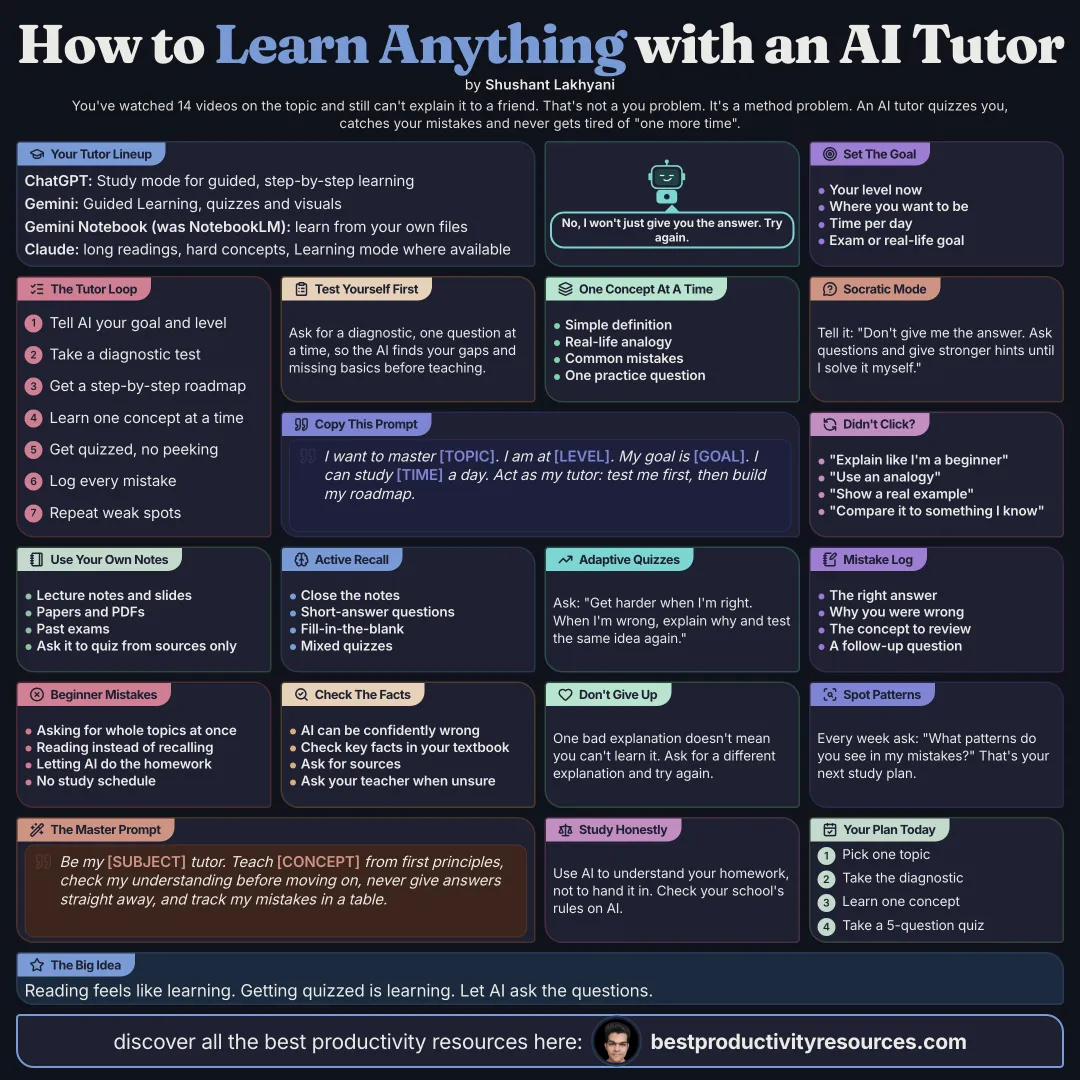
Turn AI into a tutor that explains, tests, corrects and adapts to how you learn
23 bite-sized sections
6 min read
Free, no signup
Short answer
A free, minimal guide to using AI as your personal tutor with ChatGPT, Gemini, Gemini Notebook and Claude: a 15-step tutoring workflow with diagnostic tests, Socratic questioning, active recall, adaptive quizzing, mistake logs, the Feynman technique, spaced review, ready-made study sessions and a master tutor prompt.
Best for interactive tutoring, explanations, problem solving, practice, and feedback. Turn on Study mode for guided, step-by-step learning instead of plain answers.
2 · Gemini
Best for multimodal learning, visual explanations, quizzes, and structured tutoring. Use Guided Learning or Study Notebooks to find knowledge gaps and build personalized lessons.
3 · Gemini Notebook (formerly NotebookLM)
Best for learning straight from your own materials. Upload notes, PDFs, articles, slides, websites, and other sources, then generate study guides, quizzes, flashcards, Audio Overviews, Video Overviews, and explanations grounded in them.
4 · Claude
Best for analyzing long readings in depth, explaining hard concepts, discussing ideas, and working through large documents. Where available, Learning mode puts reasoning ahead of handing over answers.
02
Define your goal
Tell the AI exactly what you want to learn. Include:
Your current level
Topic
Target skill level
Deadline
Available study time
Exam or real-world goal
Materials you already have
Prompt:
I want to master [topic]. My current level is [level]. My goal is [goal]. I can study [time] per day for [duration]. Be my personal tutor.
03
Take a diagnostic test
Do not start studying blind. Have the AI test what you already know.
Prompt:
Run a diagnostic assessment on [topic]. Ask one question at a time. Find my strengths, weaknesses, misconceptions, and missing prerequisites.
04
Build your curriculum
Turn your gaps and goals into a structured learning path. Ask the AI to split the subject into:
Fundamentals
Core concepts
Intermediate topics
Advanced topics
Practice
Projects
Revision
Prompt:
Using my diagnostic results, build a personalized learning roadmap. Cover prerequisite concepts first and raise the difficulty step by step.
05
Learn one concept at a time
Do not ask the AI to explain a whole subject in one go. For each concept, request:
Simple definition
Intuition
Real-world analogy
Detailed explanation
Example
Common mistakes
Practice question
Prompt:
Teach me [concept] from first principles. Start simple, add depth gradually, and check my understanding before you move on.
06
Use the Socratic method
Do not let the AI hand over answers right away. Make it guide your reasoning.
Prompt:
Do not give me the answer right away. Ask questions and give stronger and stronger hints until I can solve it on my own.
07
Study from your own materials
Upload:
Textbooks
Lecture notes
PDFs
Research papers
Slides
Syllabi
Assignments
Practice tests
Pick Gemini Notebook when you want learning tightly grounded in these sources. Prompt:
Teach me this material using only the sources provided. Pick out the most important concepts and quiz me on them.
08
Ask for multiple explanations
If an idea does not click, change the explanation. Try:
Explain it like I am a beginner
Explain it visually
Explain it with an analogy
Explain it with a practical example
Explain it mathematically
Explain it from first principles
Explain it by comparison with something I already know
One bad explanation does not mean you cannot understand the concept.
09
Practice active recall
Rereading explanations can fake a sense of understanding. Close your notes and pull the information from memory. Ask the AI for:
Short-answer questions
Concept questions
Flashcards
Fill-in-the-blank questions
Problem-solving exercises
Mixed quizzes
Prompt:
Test whether I can recall and apply this topic, and do not show me the answers first.
10
Use adaptive quizzing
Let your performance set the difficulty.
Prompt:
Quiz me one question at a time. Raise the difficulty when I answer correctly. When I get one wrong, diagnose why and give me another question on the same concept.
11
Keep a mistake log
Your mistakes show you what to study next. Have the AI track:
Question
Your answer
Correct answer
Why you were wrong
Underlying misconception
Concept to review
Follow-up question
Then ask on a regular basis:
Which patterns do you see across my mistakes?
12
Use the Feynman technique
Explain the topic back to the AI in your own words.
Prompt:
I will explain [topic] as if I were teaching a beginner. Point out anything wrong, incomplete, vague, or poorly understood.
Where you cannot explain something simply, dig into that gap.
13
Apply what you learn
Understanding gets stronger when you can use it in unfamiliar situations. Ask for:
Case studies
Real-world problems
Simulations
Projects
Experiments
Coding exercises
Scenario questions
Prompt:
Give me a realistic problem that forces me to apply what I learned, without telling me which concept to use.
14
Simulate an exam
Once you know the material, take the tutoring support away.
Prompt:
Write a realistic closed-book practice exam on [topic]. Give no hints or answers until I submit the whole test.
Afterward, have the AI analyze your weak areas.
15
Space out your reviews
Do not review everything equally. Revisit hard material more often and mastered concepts less often. Build review sessions around:
Recent mistakes
Weak concepts
Older material
Mixed retrieval
Cumulative quizzes
Ask the AI for a review plan based on where you struggled.
16
Run a mastery loop
Repeat:
Learn
Recall
Practice
Get feedback
Correct mistakes
Explain it yourself
Apply it
Review later
Move on when you can retrieve, explain, and apply the concept, not just recognize it.
17
Run a 30-minute AI study session
5 minutes
Recall old material from memory.
10 minutes
Learn one new concept.
10 minutes
Solve problems without looking at answers.
5 minutes
Review mistakes and sum up what you learned.
18
Run a 60-minute AI study session
10 minutes
Actively recall earlier material.
20 minutes
Learn new concepts.
20 minutes
Work through harder and harder problems.
5 minutes
Correct your mistakes.
5 minutes
Plan your next review.
19
Copy the master AI tutor prompt
Copy it, paste it, and fill in the brackets:
Be my personal tutor for [subject].
My current level is [level].
My goal is [goal].
My deadline is [date].
I can study [time] per day.
First, assess what I already know.
Then build a personalized curriculum around my weaknesses.
Teach one concept at a time with simple explanations, analogies, examples, and gradually deeper explanations.
Ask Socratic questions instead of giving me answers right away.
After each concept, test me with active-recall and application questions.
Ask one question at a time and wait for my reply.
When I make a mistake, explain why, name the underlying misconception, and give me another problem on the same skill.
Raise the difficulty as I improve.
Keep revisiting the concepts I struggle with.
Your goal is not to help me finish fast. Your goal is to make sure I can understand, remember, explain, and apply what I learn.
20
Match each AI to the job
ChatGPT
Interactive tutoring, Study mode, reasoning practice, explanations, problem solving, quizzes, and feedback.
Gemini
Guided Learning, Study Notebooks, visual learning, multimodal explanations, diagnostics, quizzes, and adaptive lessons.
Gemini Notebook
Source-grounded learning, course materials, study guides, flashcards, quizzes, Audio Overviews, Video Overviews, and research.
Claude
Long documents, in-depth explanations, discussion, writing feedback, conceptual analysis, and reasoning-focused learning.
21
Ask better questions
Don’t use AI like this
“Just give me the answer.”
Use AI like this
“Help me work out the answer myself.”
Don’t just ask
“What is this?”
Ask
“Explain it, test me, find what I misunderstand, and make me apply it.”
22
Verify important information
AI systems still make mistakes. For high-stakes or technical learning:
Check primary sources
Compare answers with textbooks or course materials
Ask for sources
Verify calculations on your own
Challenge suspicious claims
A confident answer is not the same as a correct one.
23
Follow the golden rule
Do not use AI to skip the thinking. Use AI to:
Think harder
Get faster feedback
Expose knowledge gaps
Practice more effectively
Grow able to solve problems without AI
The goal is mastery
An AI tutor is not there to make you dependent.
Learn
Recall
Practice
Feedback
Correct
Explain
Apply
Review
The goal is mastery: understand, remember, explain, and apply what you learn, until you can solve problems without AI.
What does “How to Use AI as Your Personal Tutor” cover?
It has 23 sections, starting with “Assemble your AI tutor stack”, “Define your goal”, “Take a diagnostic test” and “Build your curriculum”, plus 19 more sections.
How long does it take to read?
About 6 minutes. Every section is a short, self-contained card, so you can jump straight to the part you need.
Is this guide free?
Yes. The full guide is free to read on this page, with no sign-up.
For research and ideas only. Results vary and nothing here is a promise of income. See our Disclaimer.
See you Monday!
Weekly newsletter
Everything new, every Monday.
One short email every Monday with everything shipped that week: new free tools and websites, new guides, new free browser tools and what's new in my free Gumroad libraries, plus how the site is growing. Free, and you can unsubscribe anytime.
You sign up on Gumroad, which stores your email to send the newsletter. See our Privacy Policy.
Cookies and your choices
Visits are counted by Cloudflare Web Analytics, which sets no cookies and stores nothing on your device. An affiliate tracking script from Impact.com also loads on our pages and can set its own cookies so partner companies can credit us for sign-ups. Essential storage is always on so pages load and work correctly. You decide whether your browsing preferences are saved on your device. Read the Privacy Policy.