Turn your 2023 habits into 2026 workflows: how Claude changed and how to use it now
15 bite-sized sections
3 min read
Free, no signup
Short answer
A free guide comparing old and new Claude: a dated timeline from Claude 1 in 2023 to Opus 5.5 and Sonnet 5.5 in 2026, what changed in models, context, tools, coding, agents, memory and documents, and how to upgrade the way you use it.
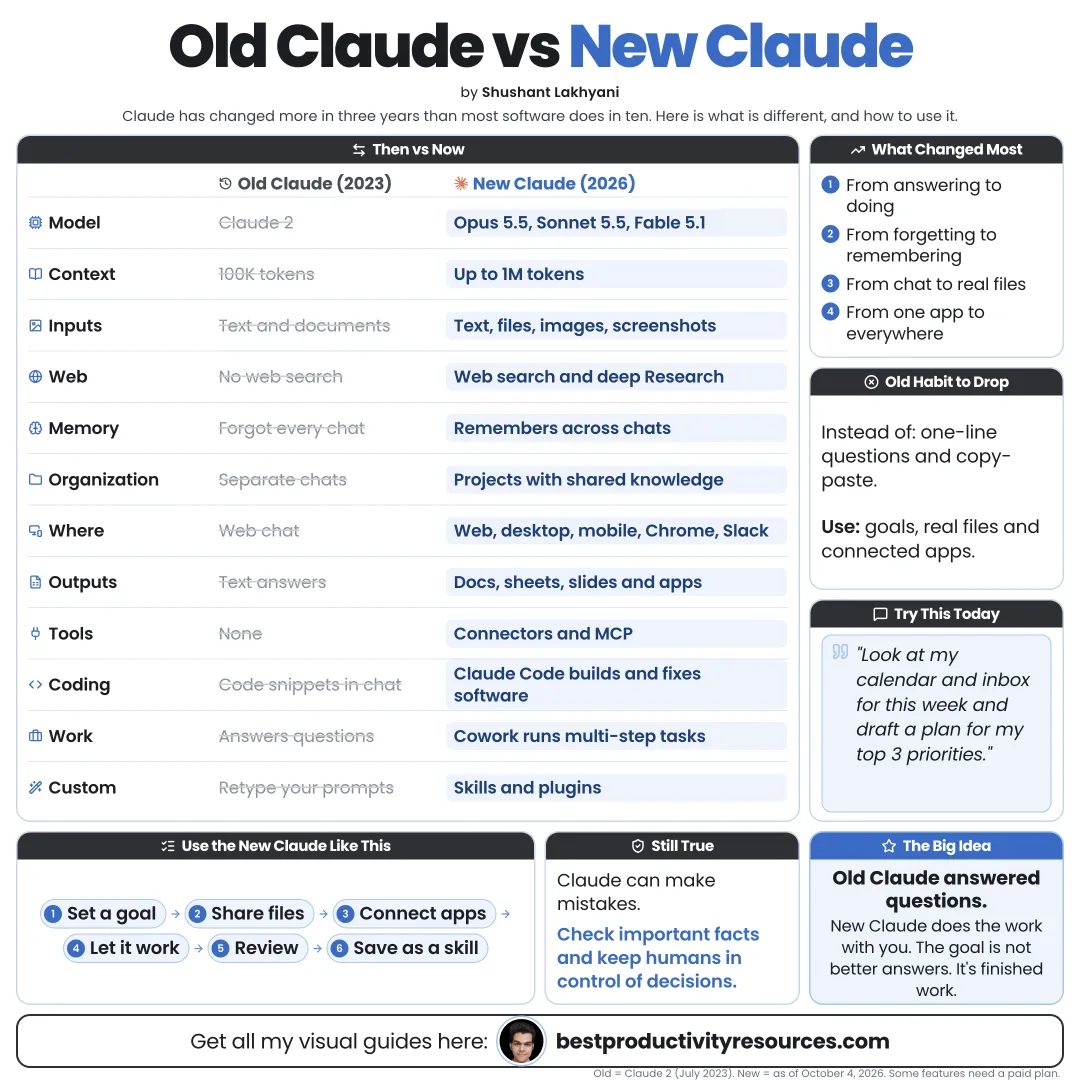
Old Claude answered questions in a chat window. New Claude works across files, apps, code, and long, multi-step tasks.
Old Claude
A conversational assistant you prompted one message at a time.
New Claude
An AI work platform that can research, create, connect to tools, write and run code, and keep pushing toward a goal.
If you still treat Claude like it is 2023, you are using only a fraction of it.
02
Trace the timeline: 2023
March 14
Claude launches for selected users.
July 11
Claude 2 arrives as the first Claude open to the general public.
November 21
Claude 2.1 widens the context window to 200,000 tokens.
03
Trace the timeline: 2024
March 4
The Claude 3 family arrives: Haiku, Sonnet, and Opus.
June 20
Claude 3.5 Sonnet and Artifacts, which show live previews of what Claude creates.
October 22
An updated Claude 3.5 Sonnet, Claude 3.5 Haiku, and computer use.
04
Trace the timeline: 2025
February
Claude 3.7 Sonnet plus the first release of Claude Code.
May 22
Claude Opus 4 and Sonnet 4 arrive, and Claude Code reaches general availability.
September 29
Claude Sonnet 4.5.
October
Claude Haiku 4.5, Skills, and Claude Code on the web arrive.
November 24
Claude Opus 4.5.
05
Trace the timeline: 2026
January
A Claude Cowork research preview brings agentic work to non-technical users.
February
Claude Opus 4.6 and Sonnet 4.6.
March
Memory opens up to every plan, Free included.
April
Claude Opus 4.7, Claude Design, and creative-tool connectors such as Adobe and Blender.
June–July
Claude Fable 5, Sonnet 5, and Opus 5 arrive.
August 27
Claude in Chrome reaches general availability.
September
Fable 5.1, Opus 5.5, Sonnet 5.5, Claude Docs and Slides in beta, and Cowork folded into Claude chat.
06
Compare the models
Then
One model at a time, chosen mostly for speed.
Now
Fable 5.1 is the most capable, Opus 5.5 is the flagship for coding and agents, Sonnet 5.5 balances speed and cost, and Haiku 4.5 covers the fastest tasks.
Opus 5.5 adds effort levels from low to max, so you decide how hard it thinks.
07
Compare what you can give it
Then
Pasted text plus a handful of files.
Now
Projects with large knowledge bases, connectors to apps such as Gmail, Google Drive, and Notion, and local files on desktop.
08
Compare what it can create
Then
Text answers.
Now
Artifacts, apps, Word, Excel, PowerPoint, and PDF files, plus Claude Docs, Claude Slides, and Claude Design prototypes.
09
Compare the coding
Then
Snippets you pasted into your editor by hand.
Now
Claude Code edits entire codebases, runs tests, opens pull requests, and works in the terminal, IDEs, desktop, and web.
10
Compare the memory
Then
Each chat began from scratch.
Now
Memory carries useful context between chats on every plan, and Projects hold context for each area of work.
11
Compare the working style
Then
You asked a question and got an answer.
Now
You set a goal, and Claude plans, uses tools, works through the steps, and returns finished work for review.
12
Compare how you reuse work
Then
Prompts saved in a notes app.
Now
Skills package workflows with instructions and scripts, and plugins bundle them for whole teams.
13
Drop these old habits
Re-explaining context in each new chat
Pasting long documents instead of using Projects
Requesting code snippets instead of using Claude Code
Saving prompts instead of building Skills
Running multi-step tasks one prompt at a time
Overlooking connectors to your own tools
14
Build these new habits
Set up your profile and review your memory
Create a Project for each major area
Connect the apps you use every day
Give goals, not just questions
Turn repeat work into Skills
Hand anything technical to Claude Code
Verify every important output
15
Remember what has not changed
Clear context still gets better answers
Claude still makes mistakes
Important facts still need checking
Your judgment still has the final word
The tools grew more powerful. The responsibility stayed with you.
The real opportunity
Do not ask: “What can I ask Claude?” Ask: “What work can I hand Claude, with the right context and tools?”
Models
Projects
Memory
Connectors
Skills
Code
Docs
Pick one old habit this week and swap it for the new way. The gains compound fast.
It has 15 sections, starting with “Grasp the big shift”, “Trace the timeline: 2023”, “Trace the timeline: 2024” and “Trace the timeline: 2025”, plus 11 more sections.
How long does it take to read?
About 3 minutes. Every section is a short, self-contained card, so you can jump straight to the part you need.
Is this guide free?
Yes. The full guide is free to read on this page, with no sign-up.
For research and ideas only. Results vary and nothing here is a promise of income. See our Disclaimer.
See you Monday!
Weekly newsletter
Everything new, every Monday.
One short email every Monday with everything shipped that week: new free tools and websites, new guides, new free browser tools and what's new in my free Gumroad libraries, plus how the site is growing. Free, and you can unsubscribe anytime.
You sign up on Gumroad, which stores your email to send the newsletter. See our Privacy Policy.
Cookies and your choices
Visits are counted by Cloudflare Web Analytics, which sets no cookies and stores nothing on your device. An affiliate tracking script from Impact.com also loads on our pages and can set its own cookies so partner companies can credit us for sign-ups. Essential storage is always on so pages load and work correctly. You decide whether your browsing preferences are saved on your device. Read the Privacy Policy.