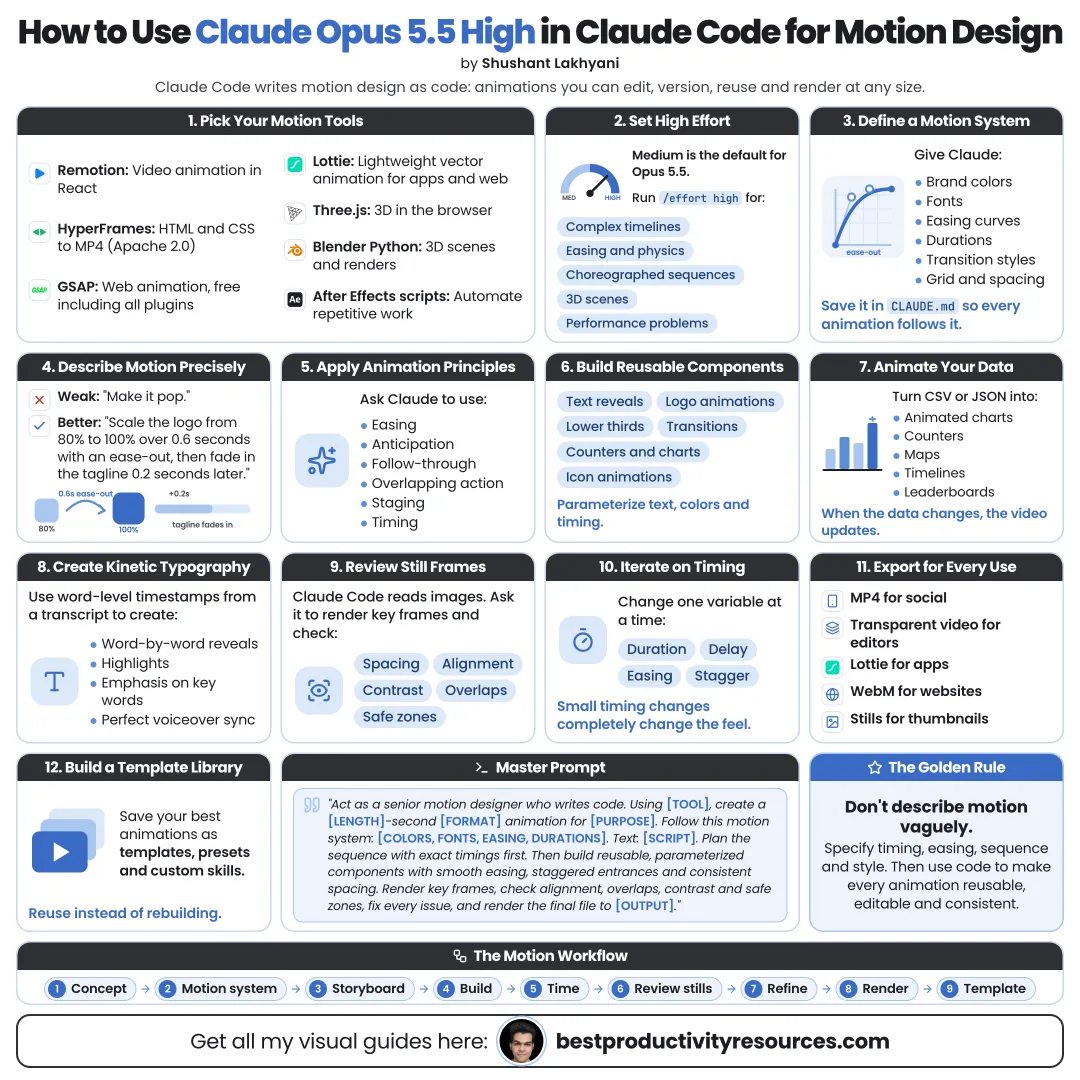
How to Use Claude Opus 5.5 High in Claude Code for Motion Design
Turn motion ideas into precise, reusable animation with code and connected design tools
24 bite-sized sections
8 min read
Free, no signup
Short answer
A free guide to motion design with Claude Opus 5.5 at high effort in Claude Code: GSAP, HyperFrames, Remotion, Lottie, Rive and Blender, a motion language, timelines, kinetic type, logo and UI motion, accessibility, performance and export.
Render motion to video through code-based frameworks
Drive supported design tools over MCP
Inspect rendered frames as image files
Package a motion style as reusable presets
Claude supplies precision and speed. You supply taste, timing, and the final call.
02
Know the motion toolkit
GSAP
A JavaScript animation library. It has been 100% free since April 2025, including the formerly paid plugins and commercial use.
HyperFrames
An open-source HTML-to-video framework from HeyGen. It supports GSAP, CSS animations, Lottie, Three.js, Anime.js, and the Web Animations API.
Remotion
Builds animated video with React. Free for individuals and for organizations of up to three people.
Lottie Creator MCP
An official server that lets an AI assistant build and edit animations in LottieFiles Creator.
Rive MCP
An official server bundled with the Rive Editor Early Access app for Mac, built for interactive animations and state machines.
Blender MCP
An official server from Blender Lab. It needs Blender 5.1 or newer.
Community-built MCP servers also exist for apps like After Effects. Vet any unofficial server carefully before you install it.
03
Run Opus 5.5 at high effort
claude --model opus --effort high
Or run /model opus and /effort high within a session. Opus 5.5 needs Claude Code v2.1.280 or later.
Motion work juggles many timing relationships at once. High effort gives Claude room to plan sequences and catch conflicts. Switch to medium for small value tweaks.
04
Choose the output first
Decide where the motion will run:
Video
An MP4 for social posts, ads, and presentations. Use HyperFrames or Remotion.
Website
Animation that runs live in the browser. Use GSAP or CSS.
App interface
Light vector animation. Use Lottie or Rive.
Interactive
Animation that responds to input. Use Rive state machines.
3D
Product shots and full scenes. Use Blender or Three.js.
Let the output pick the tool. Never pick the tool first.
05
Define your motion language
Write a short motion.md file and point to it from CLAUDE.md. Cover:
Your brand personality in three words
Standard easing curves
Standard durations
Stagger timing for list items
Entrance and exit directions
Transition styles
Color and type rules
Motion you never use
A shared motion language makes every animation feel like part of the same brand.
06
Turn motion principles into instructions
Claude responds well to named principles. Cite them by name:
Timing: how long each move lasts
Easing: slow in and slow out rather than linear motion
Anticipation: a small move ahead of a big one
Follow-through: motion that settles rather than stopping dead
Overlapping action: parts that move at slightly different times
Arcs: natural curved paths rather than straight lines
Staging: a single clear focal point at a time
Hierarchy: the key element moves before the rest
For example: “Stagger the cards by 0.08 seconds with an ease-out and a slight overshoot.”
07
Storyboard in beats
Split the animation into beats before any code exists:
What appears
When it appears
How it moves
How long it holds
How it exits
What pulls the eye next
Prompt:
Turn this idea into a beat sheet that lists the timestamp, elements, motion, easing, and duration of each beat. Wait for my approval before you write code.
08
Build with timelines
Have Claude build each sequence as one timeline, such as a GSAP timeline, with a label for every beat.
With timelines, you can easily:
Shift an entire sequence
Change one beat without breaking the rest
Reuse sequences
Render to video deterministically
Explain the timing in plain language
Use one timeline per sequence. Never scatter timers.
09
Create kinetic typography
Have Claude animate text by line, word, or character, timed to a voiceover or a music beat.
Split the text into lines, words, or characters
Use a single entrance style per video
Stress keywords with color or scale
Hold text on screen long enough to read
Line the beats up with the audio
Readable beats clever. Text that moves too fast to read has failed at its job.
10
Animate logos
Hand Claude your logo as an SVG and ask it to:
Split the logo into meaningful parts
Propose three distinct animation concepts
Build the concept you choose
Produce short and long versions
Finish on the exact static logo
Never redraw or distort an official logo. Animate the actual file.
11
Animate data
Claude can turn numbers into animated charts and counters. Request:
Count-up numbers
Bars and lines that grow in sequence
A highlight on the key data point
Labels that appear once the motion settles
A clear source line
Verify every number against its source. Motion makes wrong data look convincing.
12
Design interface motion
For product and website motion, have Claude prototype:
Page transitions
Hover and press feedback
Loading states
Menu and modal transitions
Scroll-based reveals
Success and error states
Tell it to honor the prefers-reduced-motion setting, so people who are sensitive to motion get a calmer experience.
13
Work in Lottie Creator
Once the official Lottie Creator MCP is connected, Claude can build and edit animations in a live LottieFiles Creator document from plain-language instructions.
Use it for light animations in apps and websites. Ask Claude to name layers clearly so you can tweak the result by hand.
14
Build interactive motion with Rive
The official Rive MCP runs inside the Rive Editor Early Access app for Mac, and only while the editor is open.
Claude can help you build:
Shapes and layouts
State machines
View models
Interactive buttons and icons
Choose Rive for motion that has to react to clicks, hovers, or app data.
15
Animate 3D scenes in Blender
The official MCP server from Blender Lab gives Claude access to the Blender Python API, scene information, and viewport screenshots. It needs Blender 5.1 or newer.
Set up cameras and lights
Animate product turntables
Batch-apply changes to many objects
Debug complex scenes
Automate repetitive setup work
Save your .blend file and a backup copy before any agent touches a scene.
16
Review frames, not only code
Have Claude render or snapshot key frames, such as the start, middle, and end of every beat, then check them for:
Overlapping elements
Clipped text
Weak contrast
Elements outside the safe zones
Uneven spacing
Then watch the whole animation yourself at full speed. You can only judge timing in motion.
17
Keep animation smooth
For motion in the browser, ask Claude to:
Animate transform and opacity whenever possible
Avoid animating layout properties on big elements
Limit how many elements move at once
Keep Lottie files light
Test the result on a mid-range phone
Simple motion that runs smoothly beats complex motion that stutters.
18
Design for accessibility
Respect reduced-motion settings
Never flash more than three times a second
Keep moving text easy to read
Avoid motion that hides content
Give looping website animations a way to stop
The three-flash rule comes from WCAG, the leading web accessibility guideline.
19
Package a reusable motion system
When a style works, ask Claude to package it as:
Easing and duration tokens
Entrance and exit presets you can reuse
Component templates
A motion.md style guide
A Claude Code skill for future projects
Your motion style gets faster to apply and harder to break.
20
Export the right format
Social video
H.264 MP4
Transparent overlay
A format with an alpha channel, such as ProRes 4444 or WebM with VP9
App animation
Lottie or Rive files
Website
Code that runs directly in the page
3D
Frames or video rendered in Blender
Have Claude confirm the exported file’s resolution, frame rate, duration, and, when needed, its alpha channel.
21
Follow the motion design system
Output
Pick where the motion will run.
Language
Set the easing, timing, and style.
Beats
Plan each move with timestamps.
Timeline
Build every sequence in one timeline.
Frames
Inspect key frames as images.
Motion
Watch it at full speed.
Polish
Refine the timing and easing.
System
Save presets to reuse.
22
Use the master motion prompt
Copy and paste it, then fill in the brackets:
Act as my senior motion designer and creative developer.
Create [type of animation] for [platform or output] with [GSAP / HyperFrames / Remotion / Lottie / Rive / Blender].
Follow the motion language in motion.md and the brand rules in CLAUDE.md.
First, write a beat sheet with timestamps, elements, motion, easing, and duration. Wait for my approval.
Then build each sequence as one labeled timeline.
Use transform and opacity whenever possible, respect reduced-motion settings, and never flash more than three times per second.
Render key frames and check them for overlaps, clipped text, and contrast problems.
Export [format] and confirm its resolution, frame rate, duration, and transparency where needed.
Explain any timing choices I should review.
23
Hand these jobs to Claude
Animation code
Timeline structure
Easing and timing values
Repetitive keyframing
Variations and sizes
Frame checks
Exports
Reusable presets
24
Keep these jobs yourself
Concept and taste
Brand approval
Final timing decisions
Accessibility review
Asset licensing
Watching the final result in motion
The real opportunity
Do not ask Claude to “add some animation.” Hand it a motion language, a beat sheet, and frames to check.
Output
Language
Beats
Timeline
Frames
Motion
Polish
System
The goal is not more motion. It is motion that guides attention, stays on brand, and gets reused.
What does “How to Use Claude Opus 5.5 High in Claude Code for Motion Design” cover?
It has 24 sections, starting with “See how Claude handles motion design”, “Know the motion toolkit”, “Run Opus 5.5 at high effort” and “Choose the output first”, plus 20 more sections.
How long does it take to read?
About 8 minutes. Every section is a short, self-contained card, so you can jump straight to the part you need.
Is this guide free?
Yes. The full guide is free to read on this page, with no sign-up.
For research and ideas only. Results vary and nothing here is a promise of income. See our Disclaimer.
See you Monday!
Weekly newsletter
Everything new, every Monday.
One short email every Monday with everything shipped that week: new free tools and websites, new guides, new free browser tools and what's new in my free Gumroad libraries, plus how the site is growing. Free, and you can unsubscribe anytime.
You sign up on Gumroad, which stores your email to send the newsletter. See our Privacy Policy.
Cookies and your choices
Visits are counted by Cloudflare Web Analytics, which sets no cookies and stores nothing on your device. An affiliate tracking script from Impact.com also loads on our pages and can set its own cookies so partner companies can credit us for sign-ups. Essential storage is always on so pages load and work correctly. You decide whether your browsing preferences are saved on your device. Read the Privacy Policy.