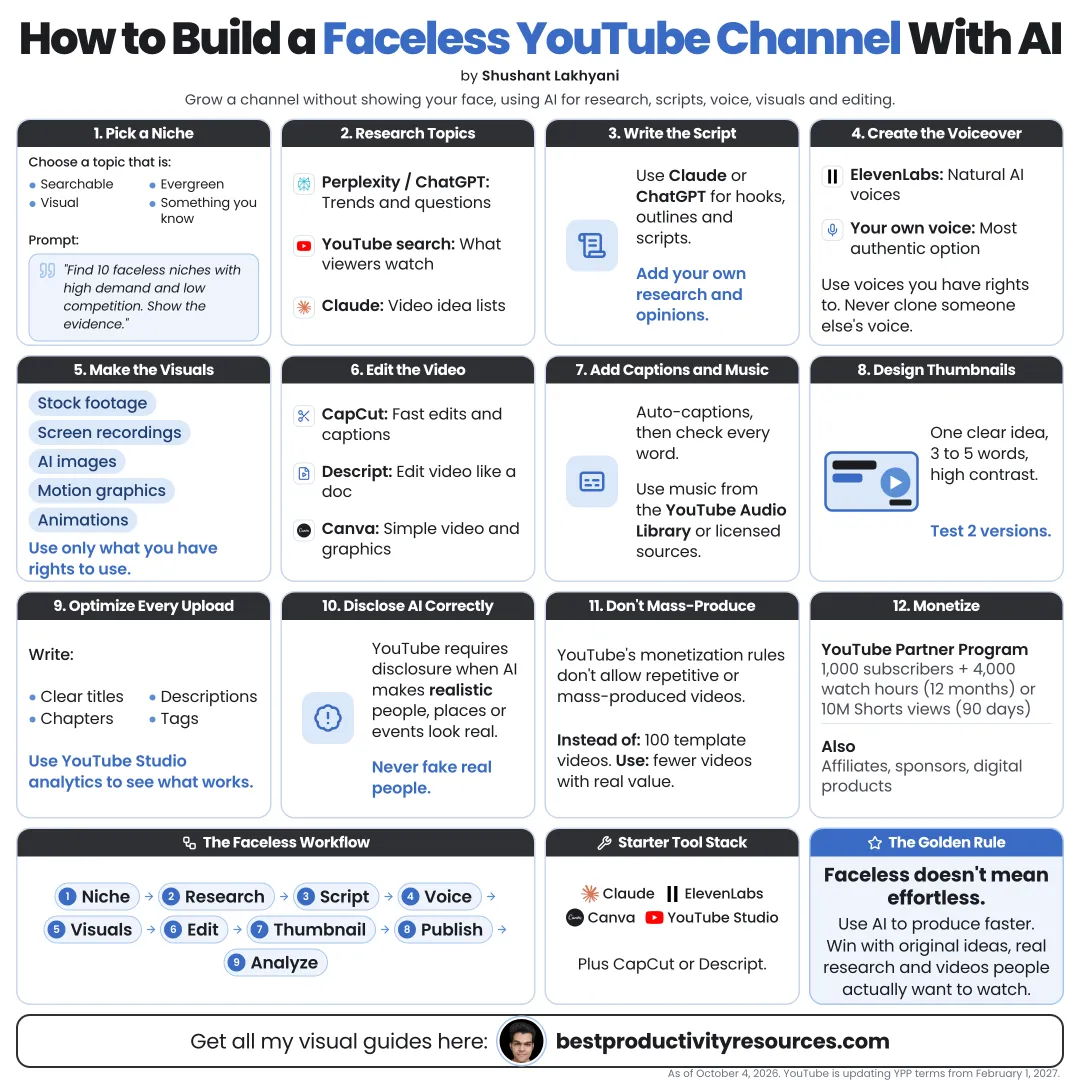
How to Build a Faceless YouTube Channel with AI Tools
Turn a niche you understand into an original, policy-safe channel, with AI doing the heavy lifting
19 bite-sized sections
5 min read
Free, no signup
Short answer
A free guide to building a faceless YouTube channel with AI tools: niche, research, scripts, voiceover, visuals, editing, thumbnails, SEO, Shorts, YouTube’s inauthentic content policy, AI disclosure rules and Partner Program requirements as of October 2026.
A faceless YouTube channel publishes videos without ever showing the creator’s face. It runs on voiceover, screen recordings, animation, stock footage, or motion graphics instead.
AI tools can speed up:
Topic research
Script drafts
Voiceover
Visuals and motion graphics
Editing and captions
Thumbnails
Titles and descriptions
Faceless is fine. Generic is the real risk.
02
Learn YouTube’s rules first
Inauthentic content
On July 15, 2025, YouTube renamed its repetitious content policy to inauthentic content. Mass-produced, repetitive videos risk losing monetization.
AI disclosure
Use the disclosure setting at upload for realistic altered or synthetic content that viewers could mistake for real people, places, or events.
Partner Program
Reach 1,000 subscribers plus either 4,000 public watch hours in 12 months or 10 million public Shorts views in 90 days.
AI-written scripts, captions, or thumbnails do not need disclosure on their own. Read YouTube’s current policies before you start.
03
Pick a niche where you add value
Explainers on a subject you know
Tutorials and software walkthroughs
History and science storytelling
Finance and business education
Book and idea summaries with original analysis
Productivity and tool reviews
Pick a niche where you bring knowledge, opinions, or access that others lack.
04
Define your channel’s originality
Write down what sets your videos apart:
Your angle or viewpoint
Your depth of research
Your format or visual style
Your expertise
Your recurring series
This protects you under the inauthentic content policy and gives viewers a reason to subscribe.
05
Research topics with AI
Use Claude, ChatGPT, or Gemini with web research, plus Gemini Notebook for source-grounded research, to:
Find the questions your audience asks
Study what already works in your niche
Spot gaps competitors miss
Gather sources for each video
Check every fact against its original source before it enters a script.
06
Write scripts that keep viewers watching
A hook in the first five seconds
A clear promise of what the viewer gets
One idea per section
Specific examples and stories
Your own views and insights
A clean ending and a call to action
Let AI draft and restructure. Bring your knowledge, voice, and judgment to the edit.
07
Record the voiceover
Your own voice
The most authentic choice. Record in a quiet room with a decent microphone.
AI voice
Text-to-speech tools such as ElevenLabs. Use only voices you are licensed to use, and never clone anyone’s voice without permission.
Clear, well-paced narration beats a perfect voice.
08
Build the visuals
Screen recordings for tutorials
Licensed stock footage and images
Code-built motion graphics, such as HyperFrames or Remotion with Claude Code
Charts and diagrams
AI-generated clips where they truly help
Use only the footage, images, and music you hold the rights to.
09
Edit efficiently
Work in an editor such as CapCut, Descript, DaVinci Resolve, or Premiere Pro, and use its AI features for:
Removing silences
Auto captions
Cleaning up audio
Reframing for vertical
Finding Shorts moments
Proofread every auto caption. Wrong captions look careless.
10
Design honest thumbnails that earn clicks
One clear subject
Three to five words at most
High contrast that reads on a phone
A consistent channel style
Nothing misleading
Make two or three versions and run them through YouTube’s thumbnail test and compare feature where available.
11
Write titles and descriptions
Clear titles that match real searches
Curiosity without clickbait
Descriptions with a summary and sources
Chapters on longer videos
Relevant tags
Ask AI for ten title options, then pick and refine the best one yourself.
12
Grow with Shorts
Cut highlights from long videos
Make standalone Shorts with a strong first line
Add captions
Link each Short to a related long video
For the Partner Program, Shorts views and long-form watch hours count separately.
13
Publish on a steady schedule
Pick a pace you can keep without losing quality, such as one long video a week plus Shorts. Consistency builds viewing habits.
A steady schedule beats a burst of rushed uploads.
14
Learn from analytics
Click-through rate: whether your titles and thumbnails work
Average view duration: whether the content holds attention
Audience retention graphs: where viewers drop off
Traffic sources: how viewers find you
Fix one thing per video.
15
Monetize beyond ads
YouTube Partner Program ads
Clearly disclosed affiliate links
Sponsorships
Digital products
Memberships
Services tied to your niche
16
Avoid the mistakes that kill faceless channels
Mass-producing near-identical videos
Reading out AI scripts with nothing added
Using unlicensed music or footage
Skipping required AI disclosure
Using misleading thumbnails and titles
Publishing unverified facts
Copying other channels’ content
17
Assemble your faceless channel stack
Research
Claude, ChatGPT, Gemini, Gemini Notebook
Script
An AI assistant, edited by you
Voice
Your own voice or a licensed AI voice
Visuals
Screen recordings, licensed stock, and code-built motion graphics
Edit
CapCut, Descript, DaVinci Resolve, or Premiere Pro
Thumbnail
A design tool plus your judgment
Publish
YouTube Studio, with disclosure settings
18
Use a master script prompt
Act as my YouTube scriptwriter for a channel about [niche] aimed at [audience].
Using only the sources and notes I provide, write a [length]-minute script about [topic].
Open with a five-second hook, promise the payoff, and keep one idea per section with specific examples.
Mark clear spaces where I will add my own opinions and experiences.
List every factual claim with its source so I can check it, and suggest visuals for each section.
Sources and notes: [paste here]
19
Keep expectations real
A faceless channel is not a source of passive income.
Growth comes from originality, consistency, quality, and audience trust. AI speeds up production, but it cannot give you something worth saying.
The golden rule
Do not use AI to make more videos. Use it to make better videos that only your channel could have made.
Niche
Originality
Research
Script
Voice
Visuals
Edit
Publish
Start with one niche, one format, and one video a week. Improve every upload and let the quality compound.
Earnings note: nothing here promises income. Any figures or examples are illustrations, not typical results; what you earn depends on your skills, effort, market and luck, and many people earn little or nothing. This is general information, not financial, legal or tax advice. See our disclaimer.
What does “How to Build a Faceless YouTube Channel with AI Tools” cover?
It has 19 sections, starting with “Understand the faceless format”, “Learn YouTube’s rules first”, “Pick a niche where you add value” and “Define your channel’s originality”, plus 15 more sections.
How long does it take to read?
About 5 minutes. Every section is a short, self-contained card, so you can jump straight to the part you need.
Is this guide free?
Yes. The full guide is free to read on this page, with no sign-up.
For research and ideas only. Results vary and nothing here is a promise of income. See our Disclaimer.
See you Monday!
Weekly newsletter
Everything new, every Monday.
One short email every Monday with everything shipped that week: new free tools and websites, new guides, new free browser tools and what's new in my free Gumroad libraries, plus how the site is growing. Free, and you can unsubscribe anytime.
You sign up on Gumroad, which stores your email to send the newsletter. See our Privacy Policy.
Cookies and your choices
Visits are counted by Cloudflare Web Analytics, which sets no cookies and stores nothing on your device. An affiliate tracking script from Impact.com also loads on our pages and can set its own cookies so partner companies can credit us for sign-ups. Essential storage is always on so pages load and work correctly. You decide whether your browsing preferences are saved on your device. Read the Privacy Policy.