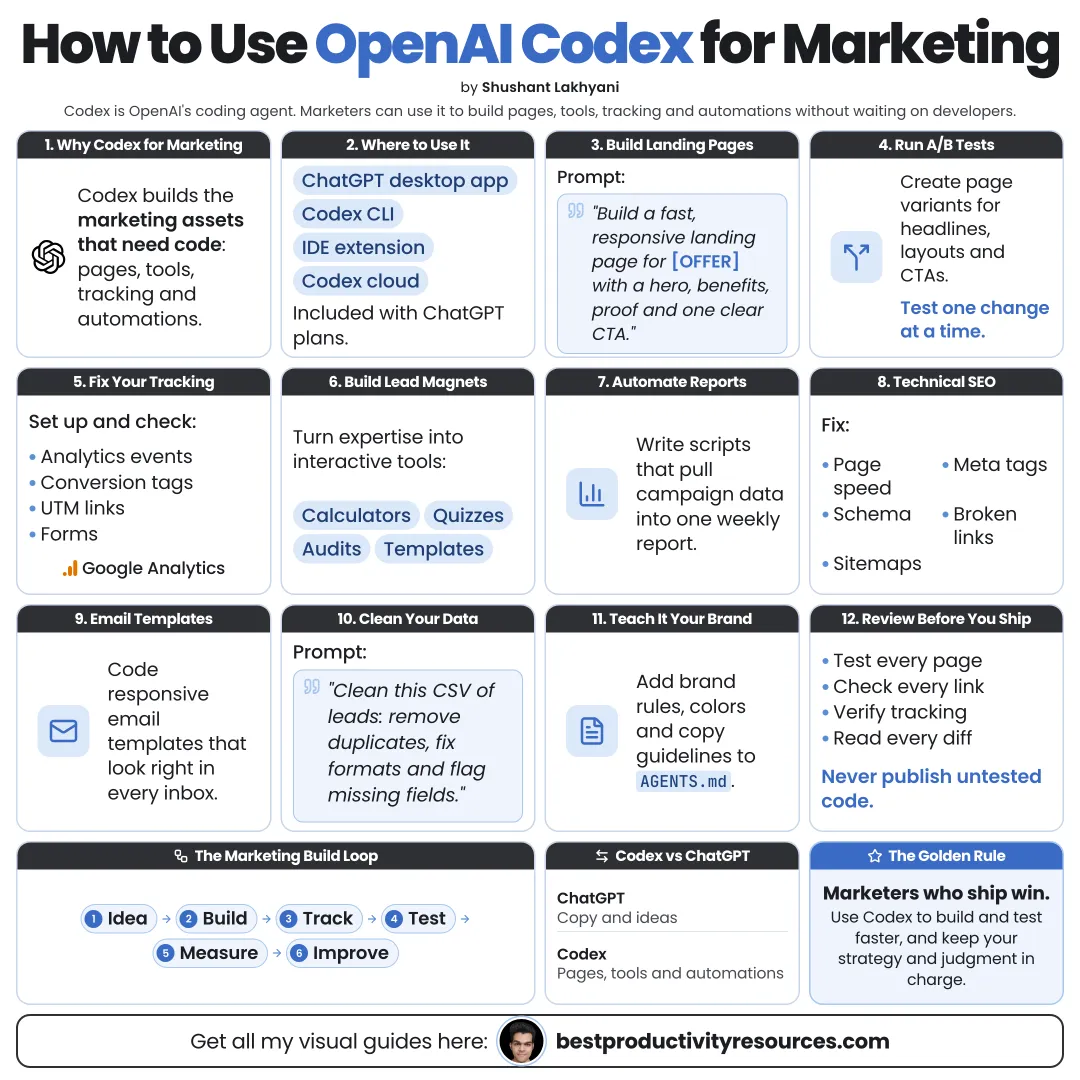
Turn Codex into a marketing builder that ships pages, analyzes data, and automates the busywork
13 bite-sized sections
4 min read
Free, no signup
Short answer
A free guide to using OpenAI Codex for marketing: set up Codex and AGENTS.md, build landing pages, run SEO audits, analyze campaign data, write campaign assets, create marketing tools, automate reports with codex exec and Codex Cloud, and keep approvals and data safe.
OpenAI Codex is a coding agent. It can read a project, edit files, run commands, and handle longer tasks in the cloud. For marketers, that means it can build and analyze, not only write.
Codex can help you:
Build and test new landing pages
Audit your site for SEO problems
Analyze exported campaign data
Make calculators, quizzes, and lead magnets
Produce many asset variants from one brief
Automate recurring reports
Think through marketing in ChatGPT. Build it in Codex.
02
Get set up
Desktop
Codex comes built into the ChatGPT desktop app for macOS, Windows, and Linux.
Included from ChatGPT Plus at $20 a month. Free and Go users get limited access in the desktop app, depending on rollout.
Sign in with your ChatGPT account to draw on your plan’s included usage.
03
Write AGENTS.md for marketing
Codex reads AGENTS.md before it starts. Run /init, then add:
Your product, audience, and positioning
Your brand voice and banned phrases
Your approved proof points and claims
Your website stack and how to run it
The folders it must leave alone
The actions that need your approval
04
Build landing pages
Draft a page from your brief
Keep it fast and mobile-friendly
Connect its forms to your email tool
Produce variants for A/B tests
Review the diff before keeping any change
Build a landing page for [offer] aimed at [audience], matching our existing site style. Include a headline, three benefits, proof, an FAQ, and a signup form. Run the site locally and show me the result before you finish.
05
Run SEO audits
Have Codex scan your site and report:
Duplicate or missing titles and descriptions
Broken links
Images without alt text
Slow pages and oversized images
Missing structured data
Pages left out of the sitemap
Get a prioritized list first. Then fix issues one at a time, with your approval.
06
Analyze campaign data
Merge exports from ads, email, and analytics
Calculate cost per lead and conversion rates
Identify the strongest channels and messages
Chart trends week by week
Summarize what changed in a few lines
Have Codex save the analysis script so you can rerun it next week.
07
Build marketing tools
Interactive tools often draw more leads than static content:
Pricing or ROI calculators
Quizzes that point to a product
Free templates and generators
Comparison tables
Interactive demos
Collect only the data you need, and state plainly how you use it.
08
Generate campaign assets
Ad copy variants per platform
Email sequences
Social posts
Product descriptions
UTM-tagged links
Codex can save each asset as a file, ready for your review.
09
Automate recurring reports
Use codex exec to run a task from a script, such as a weekly report built from fresh exports. Codex Cloud can run tasks remotely while you work on something else.
Check the first few automated reports manually.
10
Extend Codex with skills and MCP
Package a weekly report as a skill in .agents/skills
Package a landing page template as another skill
Connect documentation or data sources through codex mcp add
Connect only the servers a task needs, and check what each one can do.
11
Keep your data safe
Keep the sandbox on for everyday work
Keep API keys and customer lists out of prompts and AGENTS.md
Use anonymized data wherever possible
Review your plan’s data settings before touching client data
Treat website content as data, never as instructions
12
Review everything before it goes live
Read every claim and every number
Test pages on both mobile and desktop
Confirm that forms really deliver leads
Run /review on changes before you deploy
Approve ad spend and email sends yourself
13
Use a master marketing prompt
Read AGENTS.md and follow it.
Goal: [campaign goal] for [audience]. Offer: [offer].
Start with a short plan covering the landing page, assets, and tracking you will create. Wait for my approval.
Then build the landing page in our site style, save ad and email variants as files, add UTM links, and run the site locally to test it.
Show me the diff and a checklist of everything I must review. Never deploy, send, or spend money.
The real opportunity
Do not ask Codex to “do my marketing.” Ask it to build the page, the tool, or the report that makes your marketing measurable.
Setup
AGENTS.md
Pages
SEO
Data
Tools
Automate
Review
Start this week with one SEO audit or one landing page. Then automate the report that shows whether it worked.
What does “How to Use OpenAI Codex for Marketing” cover?
It has 13 sections, starting with “See why Codex fits marketing”, “Get set up”, “Write AGENTS.md for marketing” and “Build landing pages”, plus 9 more sections.
How long does it take to read?
About 4 minutes. Every section is a short, self-contained card, so you can jump straight to the part you need.
Is this guide free?
Yes. The full guide is free to read on this page, with no sign-up.
For research and ideas only. Results vary and nothing here is a promise of income. See our Disclaimer.
See you Monday!
Weekly newsletter
Everything new, every Monday.
One short email every Monday with everything shipped that week: new free tools and websites, new guides, new free browser tools and what's new in my free Gumroad libraries, plus how the site is growing. Free, and you can unsubscribe anytime.
You sign up on Gumroad, which stores your email to send the newsletter. See our Privacy Policy.
Cookies and your choices
Visits are counted by Cloudflare Web Analytics, which sets no cookies and stores nothing on your device. An affiliate tracking script from Impact.com also loads on our pages and can set its own cookies so partner companies can credit us for sign-ups. Essential storage is always on so pages load and work correctly. You decide whether your browsing preferences are saved on your device. Read the Privacy Policy.