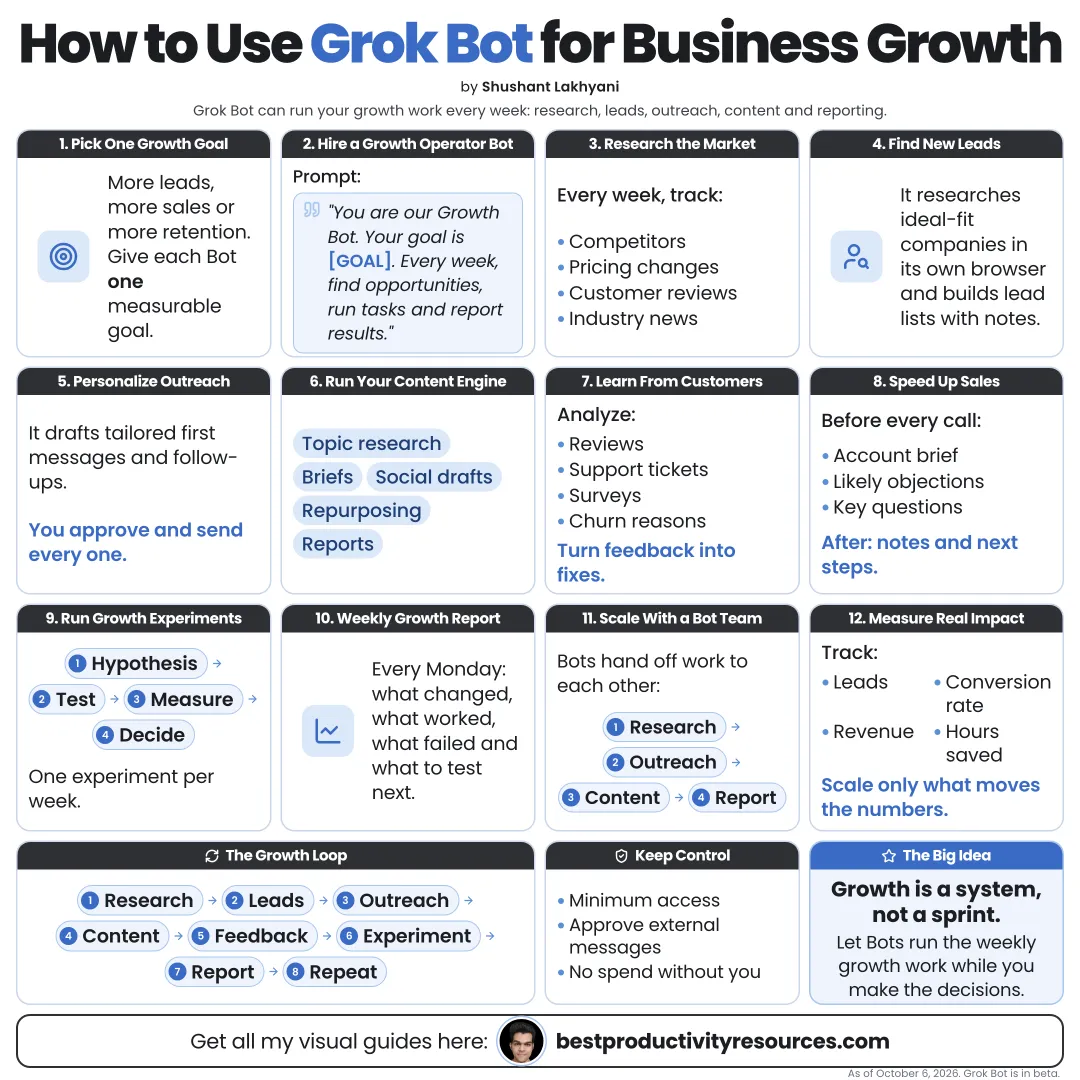
Turn Grok Bot into a growth team that researches, prepares, and follows up, so you can focus on customers
15 bite-sized sections
4 min read
Free, no signup
Short answer
A free guide to using xAI’s Grok Bot for business growth: market and competitor research, lead research, personalized outreach drafts, CRM hygiene, content, partnerships, customer feedback, reporting, and approvals that protect your brand.
Growth stalls when research, follow-ups, and admin eat into time with customers. Grok Bot, xAI’s app for AI teammates, can take on that prep work. Each bot runs on its own cloud computer, signs in to your tools, and can work on a schedule.
It can help you:
Find and research new leads
Draft personalized outreach messages
Keep your CRM accurate and current
Track competitors and their moves
Turn customer feedback into clear insights
Prepare a weekly growth report
Bots do the growth prep. People win the customers.
02
Run the growth loop
Research
Learn the market and your customers.
Target
Pick the best accounts and channels.
Reach
Send personalized outreach and content.
Convert
Follow up fast and well prepared.
Retain
Listen, then improve.
Measure
Report and adjust every week.
03
Define your ideal customer
Industry and company size
Buyer’s role
The problem they face
Signs they need you now
Deal-breakers to avoid
Your best current customers, as examples
Keep all of this in one document that every growth bot works from.
04
Research the market
Have a Researcher bot:
Map every competitor and its pricing
Summarize public reviews of each competitor
Track fresh launches and announcements
Find the communities where customers gather
Capture the exact words customers use
Require a source link for every important claim.
05
Build a lead list
Find companies that fit your ideal customer
Note recent signals, such as hiring, funding, or launches
Identify the right role from public sources
Remove current customers and active deals
Score each lead and give the reasons
Respect every site’s terms and all privacy laws. Use only public business information.
06
Draft personalized outreach
For each top lead, have a Writer bot draft:
A short opener tied to a real signal
One clear reason to talk
One simple next step
A follow-up to send a week later
Treat every outreach message as a draft until you have read and approved it.
07
Keep the CRM clean
Log every call and email
Update deal stages promptly
Add next steps with dates
Flag deals that have stalled
Remove duplicate records
A clean CRM sharpens every growth decision.
08
Prepare for every sales call
Before each call, a bot can put together a one-page brief:
Company summary
Recent news
Likely problems
Questions to ask
Relevant case studies
09
Support content and social
Turn customer questions into ideas for posts
Draft posts in your own brand voice
Cut long content into short posts
Compile content performance every week
Review and publish every post yourself.
10
Find partnerships
Businesses serving the same customers
Newsletters and podcasts in your niche
Events and communities
Integration partners
Have the bot research the fit and draft an introduction for you to approve.
11
Listen to customers
Collect feedback from reviews, support, and surveys
Group the feedback into themes
Count how often each theme comes up
Draft review replies for your approval
Suggest improvements to the product or service
12
Report growth every week
Set up a Monday routine that compiles:
New leads and where they came from
Outreach sent and replies received
Changes in the pipeline
Wins and losses, with reasons
Content performance
One recommendation for the week ahead
13
Build a growth bot team
Researcher
Researches the market, competitors, and leads
Writer
Drafts outreach, content, and replies
Operator
Updates the CRM and compiles reports
Several bots can share one group chat and hand work to each other. Start with one bot, and add more once it works.
14
Protect your brand
Never let bots send outreach on their own
Never mass-message from personal social accounts
Follow the email and privacy laws in your markets
Type passwords and codes in yourself
Keep Auto-review on Ask first for sending and publishing
One careless automated message can burn more trust than a month of growth earns.
15
Use the master growth prompt
Act as the growth assistant for [business], which sells [offer] to [ideal customer].
Each weekday, find five new companies that fit our ideal customer, each with a recent public signal and a source link. Score each one with reasons, skip current customers, and draft a short personalized first message for each.
Add everything to [tracker] and message me a summary.
Never send messages, post, or change deal values without my approval.
Keep the golden rule
Do not use Grok Bot to send more messages. Use it to send better ones, to the right people, with you approving every one.
Customer
Research
Leads
Outreach
CRM
Content
Report
Start with one weekly growth report this week. Let its findings choose your next bot.
Earnings note: nothing here promises income. Any figures or examples are illustrations, not typical results; what you earn depends on your skills, effort, market and luck, and many people earn little or nothing. This is general information, not financial, legal or tax advice. See our disclaimer.
What does “How to Use Grok Bot for Business Growth” cover?
It has 15 sections, starting with “See why Grok Bot helps growth”, “Run the growth loop”, “Define your ideal customer” and “Research the market”, plus 11 more sections.
How long does it take to read?
About 4 minutes. Every section is a short, self-contained card, so you can jump straight to the part you need.
Is this guide free?
Yes. The full guide is free to read on this page, with no sign-up.
For research and ideas only. Results vary and nothing here is a promise of income. See our Disclaimer.
See you Monday!
Weekly newsletter
Everything new, every Monday.
One short email every Monday with everything shipped that week: new free tools and websites, new guides, new free browser tools and what's new in my free Gumroad libraries, plus how the site is growing. Free, and you can unsubscribe anytime.
You sign up on Gumroad, which stores your email to send the newsletter. See our Privacy Policy.
Cookies and your choices
Visits are counted by Cloudflare Web Analytics, which sets no cookies and stores nothing on your device. An affiliate tracking script from Impact.com also loads on our pages and can set its own cookies so partner companies can credit us for sign-ups. Essential storage is always on so pages load and work correctly. You decide whether your browsing preferences are saved on your device. Read the Privacy Policy.