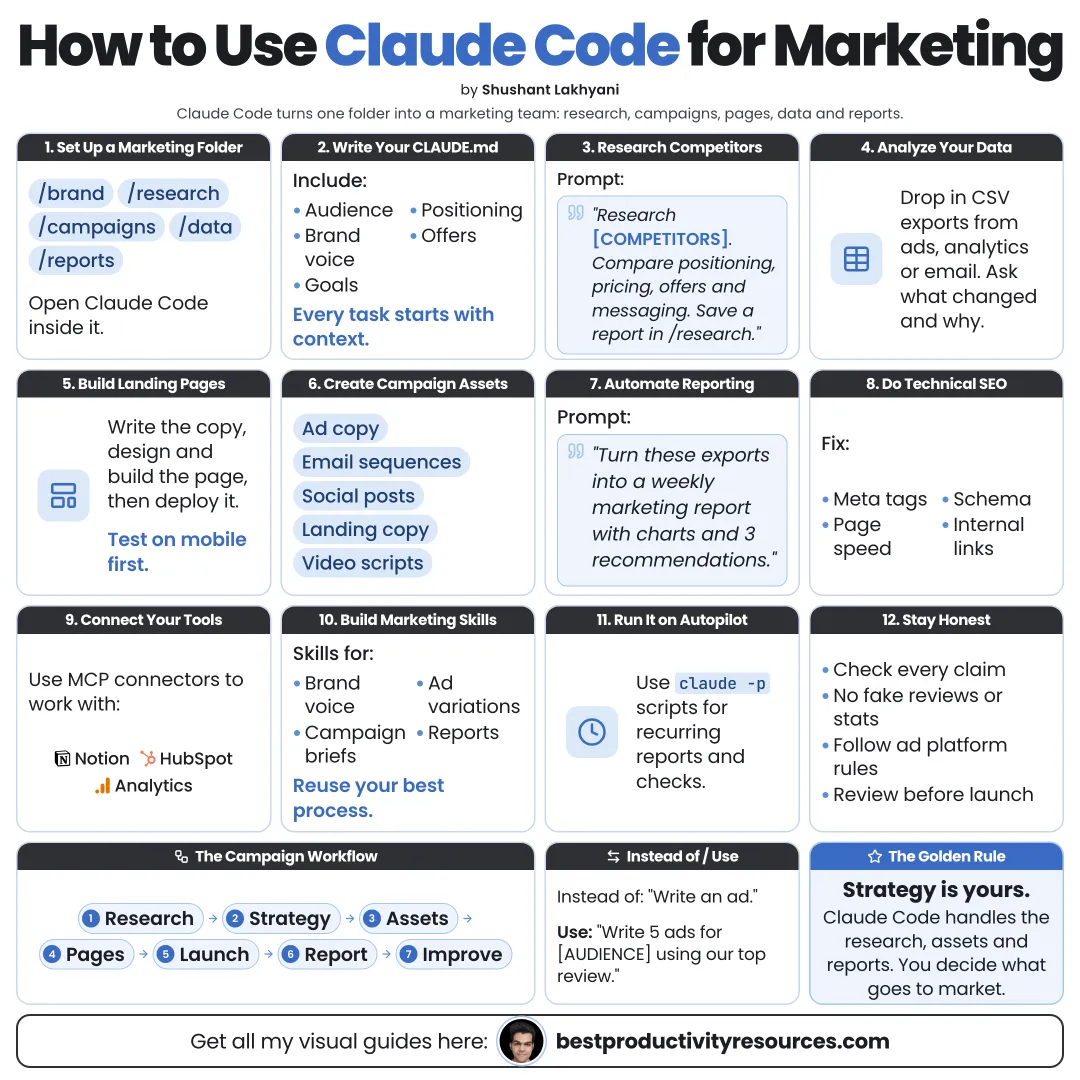
Turn Claude Code into a marketing workspace that researches, builds pages, analyzes data, and runs campaigns with you
14 bite-sized sections
4 min read
Free, no signup
Short answer
A free guide to using Claude Code for marketing: set up a marketing folder and CLAUDE.md, research customers and competitors, build landing pages, write campaigns and emails, analyze data, do SEO, connect tools with plugins and MCP, automate with routines, and keep approvals in place.
Claude Code is Anthropic’s agentic tool that works directly with files, data, and code. Marketing runs on files and data: briefs, copy, pages, spreadsheets, and reports.
Unlike an ordinary chat, it can:
Work across your entire marketing folder
Build and revise landing pages
Analyze CSV exports and chart the results
Research competitors and cite sources
Write full campaigns, not one-off posts
Plug into tools through plugins and MCP
Run scheduled jobs with routines
Claude Code is more than a writer. It is a marketer that can also build and analyze.
02
Set up your marketing workspace
Install Claude Code with curl -fsSL https://claude.ai/install.sh | bash, or open the Code tab in the Claude desktop app. Every paid Claude plan includes it.
Folder structure
brand: positioning, voice, and audience
research: customers and competitors
campaigns: a folder for each campaign
pages: landing pages
data: exports and reports
03
Write a marketing CLAUDE.md
Product and offer
Ideal customer and their pain points
Positioning and core messages
Brand voice and phrases to avoid
Proof points you may use
Legal and compliance rules
Actions that require approval
Claude Code must never invent a claim, a testimonial, or a number.
04
Research customers and competitors
Summarize interviews and customer reviews
Map how competitors position and price
Capture the exact words customers use
Spot gaps in the market
Save every finding with its source
Research our top five competitors. For each one, summarize positioning, pricing, key claims, and weaknesses drawn from public reviews, with links. Save it to research/competitors.md.
05
Build landing pages
Claude Code can build a full page in code, including:
Headline, offer, and proof
A mobile-friendly layout
Fast load times
Forms wired to your tools
Variants for testing
The frontend-design plugin helps you get more distinctive layouts. Preview every page on a phone before launch.
06
Write full campaigns
From a single brief, request:
Campaign concept and core message
Landing page copy
Email sequence
Social posts tailored to each platform
Ad copy variants
Launch checklist
Save every asset in the campaign folder so you can review it.
07
Write email sequences
Welcome sequence
Nurture sequence
Launch sequence
Win-back sequence
Subject line options
Obey the email laws in your markets and email only people who opted in.
08
Analyze marketing data
Export CSVs from your tools and have Claude Code:
Clean and merge the data
Work out conversion rates and costs
Chart the trends
Compare channels and campaigns
Explain what changed and what may have caused it
Double-check the math behind important decisions. Ask Claude Code to show its working.
09
Improve SEO
Audit titles, descriptions, and headings on every page
Track down broken links
Add structured data
Speed up slow pages
Plan content around questions people actually search
Write for people first. Search engines reward pages that truly help.
10
Connect your marketing tools
Plugins in the official Claude Code marketplace include:
Windsor.ai for marketing and ad data from many sources
PostHog and Amplitude for product analytics
Install them with /plugin. Check what each plugin can access before you connect any account.
11
Automate with routines
A performance report every week
A competitor news check every day
An SEO audit every month
A refresh of the content calendar
Routines run on a schedule in the cloud. Leave anything public or paid as a human step.
12
Package workflows as skills
Campaign from a brief
On-brand landing page
Weekly marketing report
Competitor snapshot
Brand voice check
13
Keep approvals in place
Review every public claim
Approve all ad spend yourself
Approve every email before it goes out
Confirm legal and platform rules
Never hand Claude Code payment credentials
14
Use the master marketing prompt
Read CLAUDE.md first.
Campaign goal: [goal]. Audience: [audience]. Offer: [offer]. Budget: [budget]. Deadline: [date].
Research the audience and competitors, citing sources. Propose a campaign concept and core message, then wait for my approval.
Next, create the landing page, a five-email sequence, social posts, and ad variants in campaigns/[name].
Use approved proof points only. Never publish, send, or spend money.
The real opportunity
Do not ask Claude Code for “marketing ideas.” Hand it your customer, your offer, and your data, and build the campaign together.
Brand
Research
Pages
Campaigns
Email
Data
SEO
Approve
Start with one campaign folder and one landing page. Measure the results, then turn the process into a skill.
What does “How to Use Claude Code for Marketing” cover?
It has 14 sections, starting with “See why Claude Code fits marketing”, “Set up your marketing workspace”, “Write a marketing CLAUDE.md” and “Research customers and competitors”, plus 10 more sections.
How long does it take to read?
About 4 minutes. Every section is a short, self-contained card, so you can jump straight to the part you need.
Is this guide free?
Yes. The full guide is free to read on this page, with no sign-up.
For research and ideas only. Results vary and nothing here is a promise of income. See our Disclaimer.
See you Monday!
Weekly newsletter
Everything new, every Monday.
One short email every Monday with everything shipped that week: new free tools and websites, new guides, new free browser tools and what's new in my free Gumroad libraries, plus how the site is growing. Free, and you can unsubscribe anytime.
You sign up on Gumroad, which stores your email to send the newsletter. See our Privacy Policy.
Cookies and your choices
Visits are counted by Cloudflare Web Analytics, which sets no cookies and stores nothing on your device. An affiliate tracking script from Impact.com also loads on our pages and can set its own cookies so partner companies can credit us for sign-ups. Essential storage is always on so pages load and work correctly. You decide whether your browsing preferences are saved on your device. Read the Privacy Policy.