Skip to content
Day 69: new resources are added every day. See what's new

Free guide

20 Best Claude Plugins

Turn Claude Code into a stronger builder, reviewer, and teammate with plugins from Anthropic’s official marketplace

  • 13 bite-sized sections
  • 4 min read
  • Free, no signup

Short answer

A free guide to the 20 best Claude Code plugins in October 2026, all from Anthropic’s official marketplace: Frontend Design, Code Review, Feature Dev, Security Guidance, Skill Creator, Context7, Playwright, GitHub, Linear, Notion, Figma, Canva, HyperFrames, Stripe, and more, with install commands and safety tips.

Updated

Built with love by Shushant Lakhyani. Building bestproductivityresources.com

Inside this guide

Short cards you can read in order or jump straight to. Tap the link icon on any card to share just that part.

01

Understand Claude plugins

A plugin is a package that adds new abilities to Claude Code. A single plugin can bundle:

  • Skills
  • Slash commands
  • Subagents
  • Hooks that run at set points
  • MCP servers that connect external tools

As of October 2026, Anthropic’s official marketplace, claude-plugins-official, listed more than 300 plugins. Every plugin in this guide comes from it.

Install a plugin for a job you do often. Remove it once you stop.

02

Install a plugin

In Claude Code, run /plugin to browse the marketplace, or install one directly:

/plugin install frontend-design@claude-plugins-official

Run /plugin again to view, disable, or uninstall your plugins. A plugin that connects to a service needs your account with that service.

03

Build better software

1 · Frontend Design

  • Builds distinctive, production-grade interfaces that steer clear of the generic AI look.
  • Install: /plugin install frontend-design@claude-plugins-official

2 · Feature Dev

  • A complete feature workflow, with agents that explore the codebase, design the architecture, and review quality.
  • Install: /plugin install feature-dev@claude-plugins-official

3 · Code Simplifier

  • Polishes recently changed code for clarity and consistency without changing its behavior.
  • Install: /plugin install code-simplifier@claude-plugins-official
04

Review your code and secure it

4 · Code Review

  • Reviews pull requests with several specialized agents, using confidence scoring to filter out false positives.
  • Install: /plugin install code-review@claude-plugins-official

5 · PR Review Toolkit

  • Review agents that check comments, tests, error handling, type design, and code quality.
  • Install: /plugin install pr-review-toolkit@claude-plugins-official

6 · Security Guidance

  • Flags risky patterns while Claude edits, and checks diffs for security problems.
  • Install: /plugin install security-guidance@claude-plugins-official
05

Customize Claude Code

7 · Skill Creator

  • Builds new skills, improves existing ones, and measures how well they perform.
  • Install: /plugin install skill-creator@claude-plugins-official

8 · CLAUDE.md Management

  • Audits CLAUDE.md files, records what each session teaches, and keeps project memory up to date.
  • Install: /plugin install claude-md-management@claude-plugins-official

9 · Hookify

  • Turns simple rules into hooks that block unwanted behavior.
  • Install: /plugin install hookify@claude-plugins-official

10 · Commit Commands

  • Commands to commit, push, and open pull requests.
  • Install: /plugin install commit-commands@claude-plugins-official
06

Work with docs and the browser

11 · Context7

  • Pulls current library documentation, so Claude stops leaning on outdated APIs.
  • Install: /plugin install context7@claude-plugins-official

12 · Playwright

  • Microsoft’s browser automation for testing pages, capturing screenshots, and filling in forms.
  • Install: /plugin install playwright@claude-plugins-official

13 · Chrome DevTools MCP

  • Drives and inspects a live Chrome browser, including performance traces, network requests, and console messages.
  • Install: /plugin install chrome-devtools-mcp@claude-plugins-official
07

Connect your work tools

14 · GitHub

  • GitHub’s official server for issues, pull requests, code review, and searching repositories.
  • Install: /plugin install github@claude-plugins-official

15 · Linear

  • Create and update issues and projects in any Linear workspace.
  • Install: /plugin install linear@claude-plugins-official

16 · Notion

  • Search, create, and edit Notion pages and databases.
  • Install: /plugin install notion@claude-plugins-official
08

Create design and media

17 · Figma

  • Reads design files, components, and tokens, and helps you turn designs into code.
  • Install: /plugin install figma@claude-plugins-official

18 · Canva

  • Creates, edits, resizes, and brand-checks your Canva designs.
  • Install: /plugin install canva@claude-plugins-official

19 · HyperFrames

  • HeyGen’s HTML-to-video framework for building compositions, animations, captions, and voiceovers.
  • Install: /plugin install hyperframes@claude-plugins-official
09

Build payments

20 · Stripe

  • Stripe’s development plugin for building and testing payment integrations.
  • Install: /plugin install stripe@claude-plugins-official

Use test keys while you build. Never paste live secret keys into a chat.

10

Explore honorable mentions

  • Vercel and Cloudflare for deploying
  • Supabase and Firebase for your databases
  • Sentry and PostHog for error tracking and analytics
  • Slack and Atlassian for team chat and Jira
  • TypeScript LSP and Pyright LSP for smarter code intelligence
11

Pick a starter set for your role

Web developer
Frontend Design, Context7, Playwright, Code Review
Team lead
PR Review Toolkit, GitHub, Linear, Security Guidance
Designer
Figma, Canva, Frontend Design
Creator
HyperFrames, Canva, Notion
Power user
Skill Creator, CLAUDE.md Management, Hookify
12

Stay safe with plugins

  • Install only trusted plugins from sources you know
  • Read what a plugin contains before you install it
  • Check what each connected service can reach
  • Remove plugins you have stopped using
  • Keep secrets out of your prompts and plugin settings

Anthropic notes that it cannot verify third-party plugins work as intended or will stay unchanged. Review them as you would any software you install.

13

Avoid plugin overload

  • Every plugin adds instructions and tools Claude has to weigh
  • Overlapping plugins can blur which tool Claude should use
  • Install for a real workflow, test it, then keep it or remove it

Five plugins you use every day beat thirty you forgot you installed.

The golden rule

Do not collect plugins. Install the one that removes the task you repeat most this week.

  • Build
  • Review
  • Secure
  • Customize
  • Docs
  • Connect
  • Design

Start today with Frontend Design or Code Review. Add the next plugin only when you know exactly what it will do for you.

Share this guide

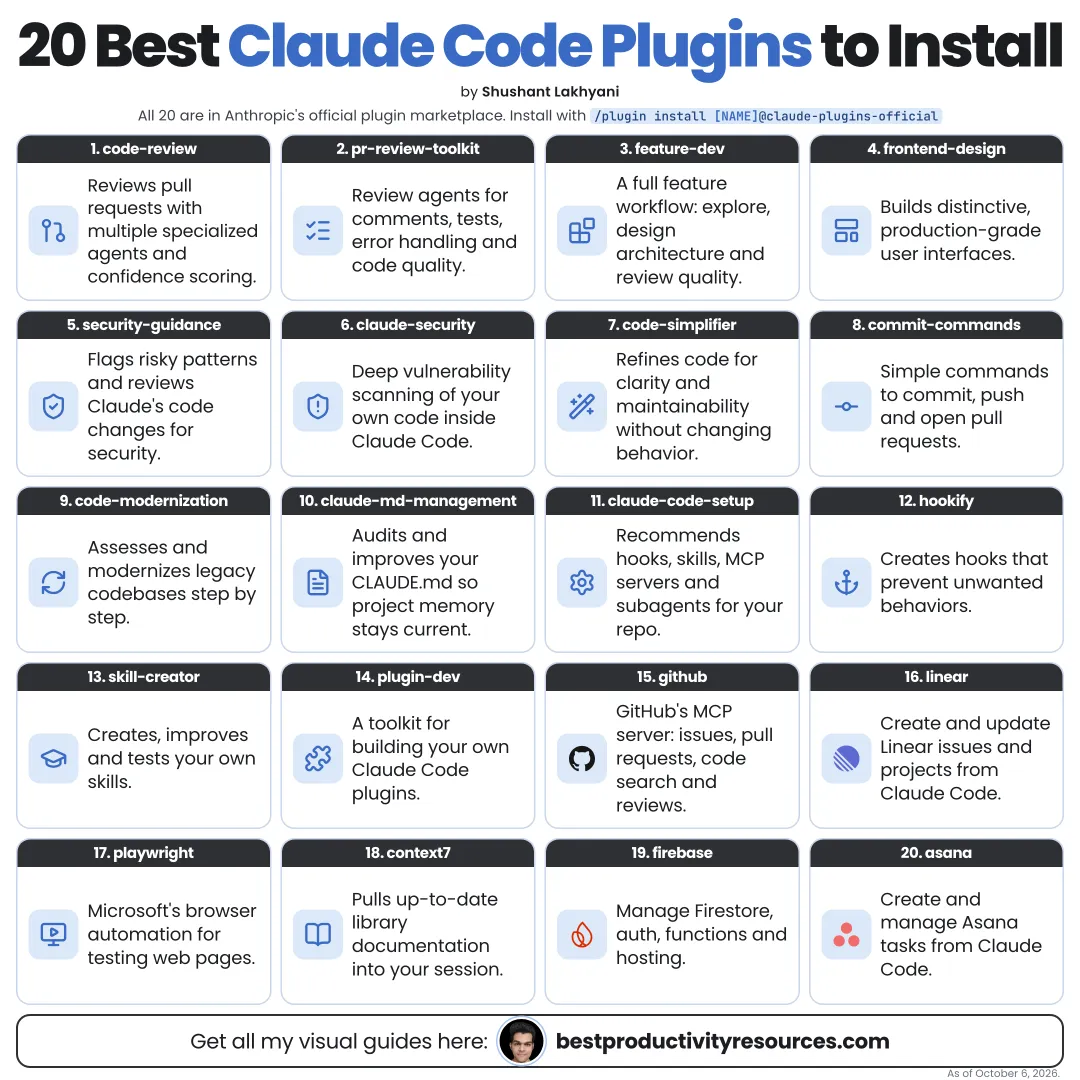
The whole guide on one page

The same guide as one infographic. Save it, pin it or share it.

Frequently asked questions

The quick answers, if you just need the gist.

What does “20 Best Claude Plugins” cover?
It has 13 sections, starting with “Understand Claude plugins”, “Install a plugin”, “Build better software” and “Review your code and secure it”, plus 9 more sections.
How long does it take to read?
About 4 minutes. Every section is a short, self-contained card, so you can jump straight to the part you need.
Is this guide free?
Yes. The full guide is free to read on this page, with no sign-up.
When was this guide last updated?
It was last updated in October 2026.

Keep reading

More free guides you might like. Still no signup.

Free Notion database

1,100+ ways people are making money online

Real online businesses, creators and projects, broken down by how they make money: apps, online stores, AI tools and more. Free on Gumroad.

Get the free database

Free Notion database

399+ ways to make money online

Hundreds of online income methods in one place, so you can compare options and pick one to try. Free on Gumroad.

Get the free list

For research and ideas only. Results vary and nothing here is a promise of income. See our Disclaimer.

Weekly newsletter

Everything new, every Monday.

One short email every Monday with everything shipped that week: new free tools and websites, new guides, new free browser tools and what's new in my free Gumroad libraries, plus how the site is growing. Free, and you can unsubscribe anytime.

Join the newsletter

You sign up on Gumroad, which stores your email to send the newsletter. See our Privacy Policy.