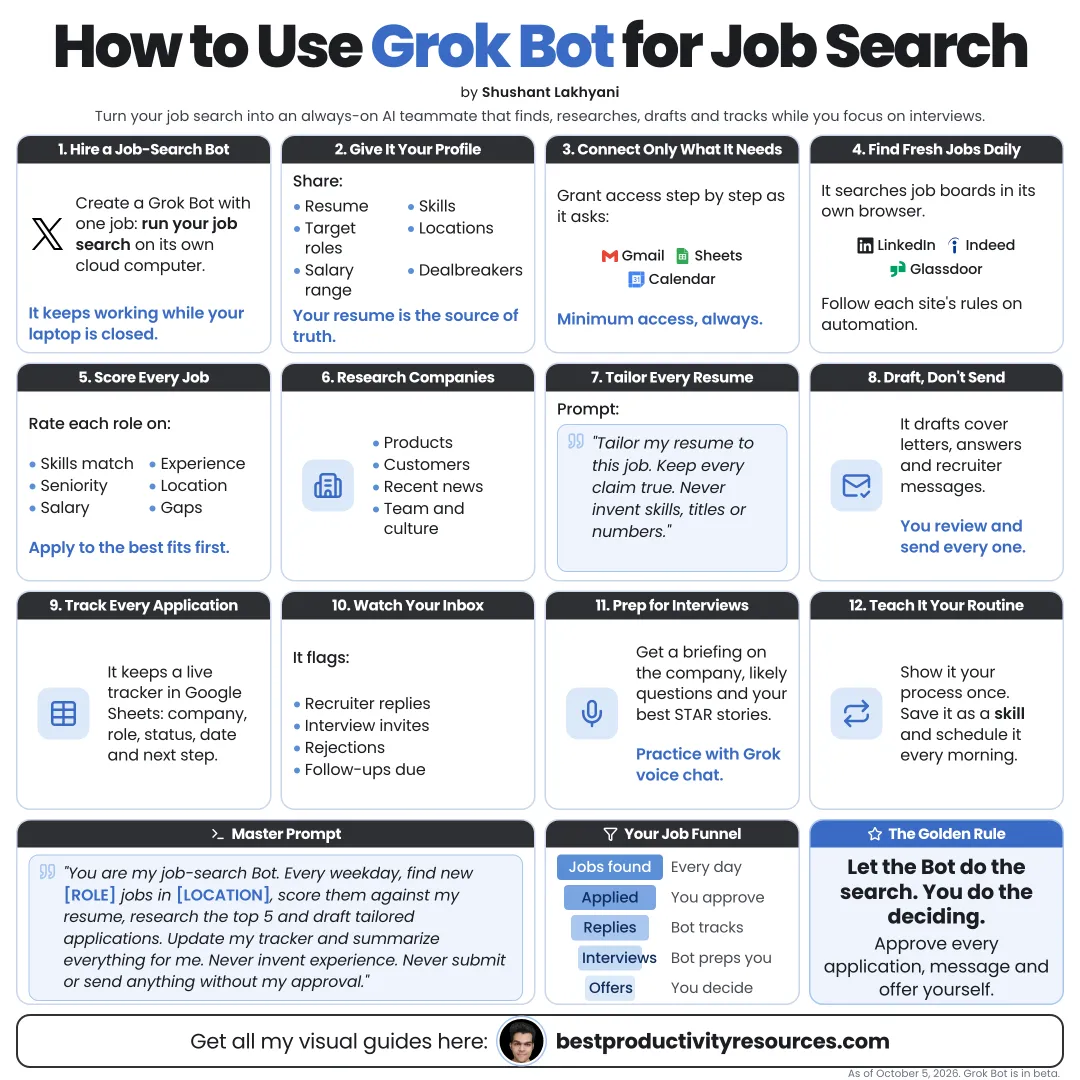
Turn Grok Bot into a job search team that finds, researches, and prepares, while you decide and apply
17 bite-sized sections
5 min read
Free, no signup
Short answer
A free guide to using xAI’s Grok Bot for job search in 2026: build a career profile, create focused bots, scan listings daily, rank fit, research companies, tailor resumes and cover letters, track applications, prepare for interviews, and stay within platform rules.
Grok Bot is xAI’s app for AI teammates, in beta since August 11, 2026. Each bot runs on a cloud computer with a browser, so it can handle multi-step work while your laptop is closed.
Unlike a standard chatbot, it can:
Check job sites on a set schedule
Compare listings with your profile
Look into companies and hiring managers
Draft resumes and cover letters for each role
Update your application tracker
Prepare interview briefs
Learn repeatable steps you demonstrate
Let Grok Bot search and prepare. Keep the applying and deciding for yourself.
02
Learn the rules first
Many job sites restrict bots and automated activity. LinkedIn’s User Agreement prohibits bots or other unauthorized automated methods on its service
Read each site’s terms before a bot signs in
Mass automated applications can get accounts restricted and frustrate recruiters
Every application should be one you read and approved
Safer pattern: the bot researches public listings and prepares drafts. You submit.
03
Build your career profile
Write one document for the bots to work from:
Target roles and seniority
Industries and company types
Locations and remote preferences
Salary range
Must-haves and deal-breakers
Your strongest achievements, with numbers
Your current resume
Visa or availability details, where relevant
A precise profile yields precise matches.
04
Set up a small job search team
Scout
Finds new listings that fit your profile.
Analyst
Scores fit and researches every company.
Writer
Drafts tailored resumes, cover letters, and outreach messages.
Coach
Builds interview briefs and practice questions.
Start with the Scout on its own. Add the others once it works well.
05
Give each bot a clear job description
Example
Name: Scout
Job: Daily job search
Description: Find new public listings for [roles] in [locations] posted in the last 24 hours. Check them against my profile. Never apply or contact anyone.
06
Scan new listings on a schedule
Make the search a routine:
Check your chosen job boards and company career pages every weekday evening
Skip roles already seen
Drop listings that hit your deal-breakers
Log the results in a tracker
Send you a brief shortlist
Review the first few runs closely before you trust the routine.
07
Rank roles by fit
Have the Analyst score each role on:
Skills match
Experience match
Salary range, where listed
Location and remote fit
Company stage and stability
Growth opportunity
Ask it to explain every score and list the gaps, not just return a number.
08
Research each company
What the company does and how it earns money
Recent news and funding
Products and customers
Team and hiring manager, from public sources
Culture signals in public reviews
Questions worth raising in an interview
Ask for a source link on every important claim, and verify the ones you plan to mention.
09
Tailor your resume
For each shortlisted role, have the Writer:
Map your achievements to the job’s requirements
Use the job’s key terms only where they are true for you
Order bullets by relevance
Keep it within one or two pages
Highlight every change for your review
Never let a bot invent skills, titles, dates, or results you lack.
10
Draft your cover letters and messages
A short cover letter for every priority role
A note to a referral contact
A message to a recruiter
A follow-up after you apply
A thank-you note after each interview
Every message comes to you as a draft. You edit, approve, and send it.
11
Keep an application tracker
Have a bot keep a spreadsheet or Notion database updated with:
Company and role
Link to the listing
Date found and date applied
Fit score
Contact person
Status
Next step and follow-up date
12
Prepare for interviews
Have the Coach build a brief for every interview:
Company and role summary
Likely interview questions
Your best story for each question
Questions to ask the interviewer
Salary research from public sources
Rehearse your answers out loud, by voice or with a friend.
13
Teach it your repeatable steps
Do a task once while the bot watches, such as saving a listing to your tracker. It can store the path as a skill and repeat it.
Good job search skills: saving listings, updating your tracker, and preparing research briefs. Keep submitting applications as your own step.
14
Protect your accounts and your data
Type passwords and two-factor codes yourself, never into the chat
Grant bots access only to what each task needs
Keep approvals on for anything that sends or submits on your behalf
Keep your ID numbers and bank details away from bots
Remember that every one of your bots shares one cloud computer
Sign out of any site you no longer need
15
Try these prompts
“Find product manager roles in Berlin, or remote in Europe, posted in the last 24 hours. Do not apply.”
“Score these five roles against my profile and explain each gap.”
“Research this company and write a one-page brief with sources.”
“Tailor my resume for this role. Highlight each change. Add nothing untrue.”
“Draft a 150-word cover letter for this role, in my voice.”
“Add today’s shortlist to my tracker.”
“Prepare an interview brief for my Thursday call with [company].”
“Every Friday, sum up my job search week and suggest next steps.”
16
Split the work between Grok Bot and you
Grok Bot handles
Searching, filtering, ranking, researching, drafting, tracking, and interview prep.
You handle
Your profile, final decisions, every application, every message, interviews, and negotiations.
17
Use a master job search prompt
Act as my job search team.
My profile: [paste profile]. Target roles: [roles]. Locations: [locations]. Salary range: [range]. Deal-breakers: [list].
Every weekday evening, find new matching public listings, drop duplicates and deal-breakers, score each role for fit with reasons, and add the top five to my tracker.
For each top role, draft a tailored resume and cover letter for my review, using only facts from my profile.
Never apply, submit forms, or message anyone. Ask me before taking any action outside my accounts.
The golden rule
Do not use Grok Bot to apply to more jobs. Use it to apply to the right ones, better prepared.
Profile
Scout
Rank
Research
Tailor
Track
Prepare
Start this week with one Scout bot and one evening routine. Ten strong applications beat a hundred automated ones.
What does “How to Use Grok Bot for Job Search” cover?
It has 17 sections, starting with “See why Grok Bot helps with job search”, “Learn the rules first”, “Build your career profile” and “Set up a small job search team”, plus 13 more sections.
How long does it take to read?
About 5 minutes. Every section is a short, self-contained card, so you can jump straight to the part you need.
Is this guide free?
Yes. The full guide is free to read on this page, with no sign-up.
For research and ideas only. Results vary and nothing here is a promise of income. See our Disclaimer.
See you Monday!
Weekly newsletter
Everything new, every Monday.
One short email every Monday with everything shipped that week: new free tools and websites, new guides, new free browser tools and what's new in my free Gumroad libraries, plus how the site is growing. Free, and you can unsubscribe anytime.
You sign up on Gumroad, which stores your email to send the newsletter. See our Privacy Policy.
Cookies and your choices
Visits are counted by Cloudflare Web Analytics, which sets no cookies and stores nothing on your device. An affiliate tracking script from Impact.com also loads on our pages and can set its own cookies so partner companies can credit us for sign-ups. Essential storage is always on so pages load and work correctly. You decide whether your browsing preferences are saved on your device. Read the Privacy Policy.