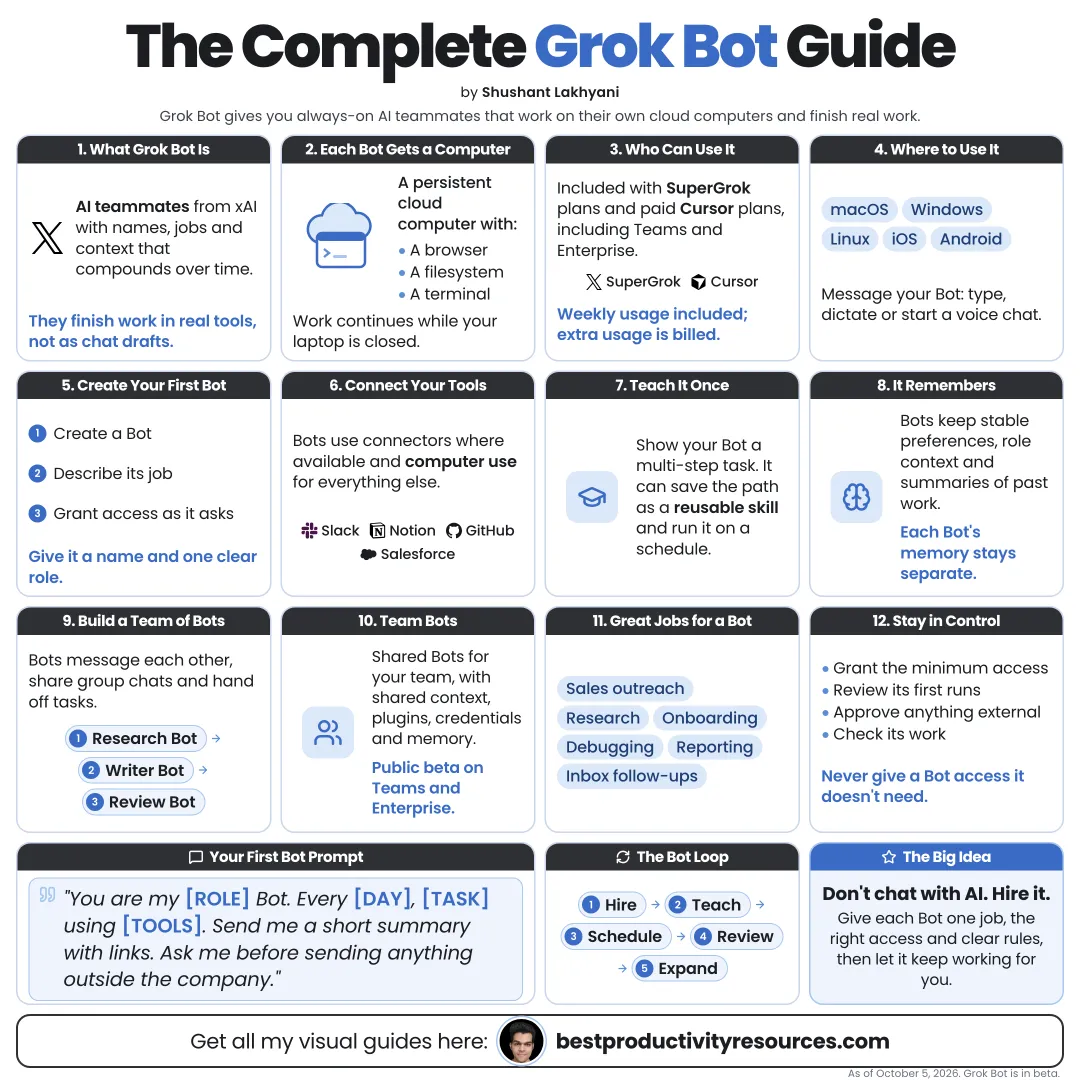
Turn Grok Bot into a small team of AI teammates that finish real work while you approve what matters
15 bite-sized sections
5 min read
Free, no signup
Short answer
A free Grok Bot guide for October 2026: what xAI’s Grok Bot is, who can use it, how to create bots, give access, teach skills, run routines and group chats, set approvals and Auto-review, and keep your accounts safe.
Grok Bot is xAI’s app for AI teammates, in beta since August 11, 2026. Every bot has a name, a job, and memory, and works on a cloud computer with a browser, files, and a terminal.
Unlike a standard chatbot, it can:
Sign in to tools you already use
Work across multiple apps and websites
Operate the screen like a person when no connector exists
Keep working while your laptop is closed
Learn workflows you demonstrate
Coordinate with other bots
Request your approval before consequential actions
Grok talks with you. Grok Bot works for you.
02
Check who can use it
Grok plans
Premium, Super, and Ultra on The X Subscription, plus existing SuperGrok, SuperGrok Plus, and SuperGrok Heavy subscribers
Cursor plans
Cursor Pro, Pro+, and Ultra, along with Cursor Teams
Enterprise
Offered through a waitlist and team plans
Grok Bot has its own weekly-resetting usage allowance, separate from regular Grok or Cursor use.
03
Know where it runs
Desktop
macOS, Windows, and Linux
Mobile
iPhone, iPad, and Android
Cloud
Your bots’ computer lives in the cloud, so tasks keep going when your device is off
04
Create your first bot
Give it a name and a narrow job description.
Example
Name: Researcher
Job: Competitive research
Description: Research AI products from public sources. Keep a direct source link for every important claim.
One bot with one clear job beats one bot that does everything.
05
Hand it a real task
A strong task spans tools and has a clear finish line:
What to find or do
Which tools to use
What to leave out
What the output should look like
Where to save it
When to check with you
Pull this week’s pipeline review list from our CRM. Skip anyone already in an active sequence. Research the top five accounts and draft a personalized email to each. Do not send anything. Put the drafts in one doc for my review.
06
Grant access only when a task needs it
Connect a tool only when a task needs it
Use connectors wherever they exist
Let the bot drive the screen only for tools without connectors
Type passwords and two-factor codes yourself, never into the chat
Sign out of services you stop using
Every bot on your account shares one cloud computer, its files, and its browser sessions. Separate bots do not create separate security boundaries.
07
Approve before anything leaves
Grok Bot sends drafts and voice memos for approval and checks with you before consequential decisions. Always review:
Emails and messages
Posts and publishing
Deletions
Purchases
Changes to production systems
Anything shared beyond your team
Never approve an action if you cannot tell its target or effect.
08
Set Auto-review rules
Auto-review is a separate layer that checks risky actions such as shell commands, plugin calls, and computer use. Add your own rules in Settings → General → Auto-review.
Ask first
Only for actions that send, spend, delete, or publish
Allow automatically
Only for narrow, known, low-risk actions
Keep each rule narrow and tied to one known action. Broad rules strip away the protection.
09
Teach skills by demonstration
Run a browser workflow once while the bot watches. It can store the repeatable path as a skill.
Strong first skills:
Processing invoices from email
Updating the CRM after calls
Filing bug reports from a set template
Preparing the weekly report
Working through a new hire onboarding checklist
10
Put routines on a schedule
Turn a skill into a scheduled routine:
Every morning: summarize the new leads
Every Monday: prepare the pipeline review
Every Friday: draft the team’s weekly update
Every month: reconcile the invoices
Review the first few runs closely before you rely on a routine.
11
Assemble a small bot team
Several bots can share a group chat and context, and hand work to one another.
Researcher
Finds and checks information
Writer
Drafts emails, docs, and posts
Operator
Updates tools and records
Coder
Reproduces bugs and drafts fixes
Add a bot only when a real job calls for one. More bots burn through your weekly allowance faster.
12
Start with proven use cases
Researching outbound sales and drafting emails
Updating the CRM and pipeline
Preparing demo environments
Reproducing bugs and filing tickets
Processing email and invoices
Onboarding new hires
13
Keep your data safe
Bots act as you and can reach only what you can reach
Give every task the least access it needs
Keep sensitive files outside the shared workspace
Pause or delete routines you stop using
Uninstall plugins you do not need
Clear old files off the bot computer
14
Try these prompts
“Research these five companies and write a one-page brief on each, with sources.”
“Read today’s invoices in my inbox and list them by due date. Do not pay any of them.”
“Reproduce this bug from the report and file a ticket with steps and screenshots.”
“Draft this week’s team update using our project board.”
“Watch me do this task once, then save it as a reusable skill.”
“Every Monday at 9:00, prepare the pipeline review and send me a message.”
“Tell me which access you need before you begin.”
“Show me every action you plan to take before you take it.”
15
Split the work between bots and you
Bots handle
Research, drafting, data entry, routine updates, issue reproduction, and work preparation.
You handle
Access, approvals, sensitive decisions, sending, spending, and final quality checks.
The real opportunity
Do not ask: “What can Grok Bot do?” Ask: “Which repeatable task can one bot finish this week, with my approval at the end?”
Bot
Job
Task
Access
Approve
Skill
Routine
Start with one bot and one routine. Grow the team only after the first bot earns your trust.
For research and ideas only. Results vary and nothing here is a promise of income. See our Disclaimer.
See you Monday!
Weekly newsletter
Everything new, every Monday.
One short email every Monday with everything shipped that week: new free tools and websites, new guides, new free browser tools and what's new in my free Gumroad libraries, plus how the site is growing. Free, and you can unsubscribe anytime.
You sign up on Gumroad, which stores your email to send the newsletter. See our Privacy Policy.
Cookies and your choices
Visits are counted by Cloudflare Web Analytics, which sets no cookies and stores nothing on your device. An affiliate tracking script from Impact.com also loads on our pages and can set its own cookies so partner companies can credit us for sign-ups. Essential storage is always on so pages load and work correctly. You decide whether your browsing preferences are saved on your device. Read the Privacy Policy.