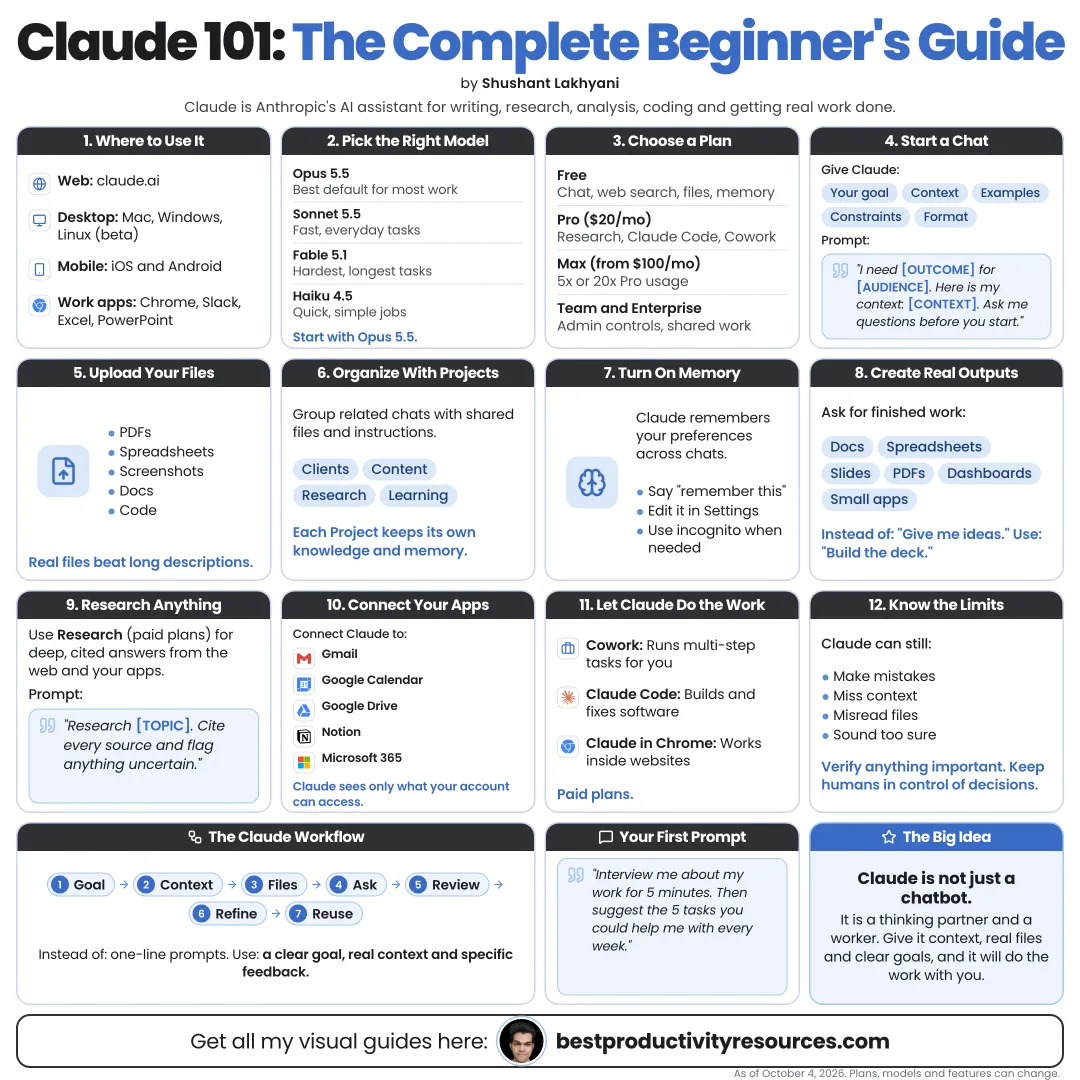
Turn Claude from a chatbot you try into an assistant you use every day
20 bite-sized sections
6 min read
Free, no signup
Short answer
A free beginner’s guide to Claude as of October 2026: what Claude is, plans, models, effort, Projects, memory, connectors, files, Research, Skills, Docs, Claude Code and Claude in Chrome, plus prompting basics, privacy and limits.
Use it on the web at claude.ai, in the desktop apps for macOS and Windows, or in the iOS and Android apps.
02
Choose a plan
Free
$0. Chat, memory, Projects (up to five), Skills, and many connectors, with tighter usage limits.
Pro
$20/month, or $17/month when billed annually. Adds more usage, Claude Code, and extra features.
Max
Starts at $100/month for far higher usage.
Team
Starts at $20 per seat per month billed annually, with admin controls and sharing.
Enterprise
Adds advanced security, controls, and scale.
Start on Free. Upgrade once you hit limits on work that matters.
03
Know the models
Claude Fable 5.1
The most capable public model from Anthropic, released September 1, 2026.
Claude Opus 5.5
The flagship for coding, agents, and complex work, released on September 22, 2026.
Claude Sonnet 5.5
Quicker and cheaper to run, released on September 28, 2026.
Claude Haiku 4.5
The fastest and lowest-cost option.
Choose a model from the menu below the message box. Keep the default for most work and step up for harder problems.
04
Set up your profile
In settings, tell Claude about yourself so every answer begins with context:
Your role and industry
What you rely on Claude for
Your preferred tone
Your formatting preferences
Things Claude should always or never do
Short and specific beats long and vague.
05
Write better prompts
Every strong prompt covers:
Goal
The result you want.
Context
Background Claude has no way to guess.
Input
The files, notes, or data to work from.
Format
The length, structure, and style of the answer.
Constraints
What to avoid and what to include.
Example:
I run a small bakery. Write three Instagram captions for our new sourdough. Keep the tone friendly and each caption under 40 words, use one emoji at most, and close each with a call to visit this weekend.
06
Iterate instead of restarting
“Make it shorter.”
“Use plainer words.”
“Give me three options.”
“Explain your reasoning.”
“What did you assume here?”
“What is missing?”
Treat the first answer as a draft. Quality comes from the conversation that follows.
07
Use memory
Memory has been available on every plan since March 2026. Claude can bring helpful context, like your projects and preferences, into future chats.
Check and edit what Claude remembers in settings. Delete anything you would rather not have stored.
08
Organize work in Projects
A Project is a workspace with its own files and instructions. Create one for a client, a course, a book, or an area of your business.
Upload the key documents
Write clear project instructions
Keep related chats in one place
Reuse context without uploading again
On paid plans, retrieval can expand project knowledge by up to 10x. Team and Enterprise plans can share Projects across members.
09
Work with files
Upload documents, PDFs, spreadsheets, images, and code, then ask Claude to:
Summarize long documents
Compare files
Extract tables and data
Analyze spreadsheets
Read charts and screenshots
Produce Word, Excel, PowerPoint, and PDF files
Switch on code execution and file creation in settings so Claude can build and edit files.
10
Connect your apps
Connectors let Claude draw on information from your tools, such as:
Connect only the tools you need, and check what each connector can reach.
11
Run Research on deep questions
Research lets Claude search many sources and return a cited report.
Reach for it on market research, competitor analysis, technical comparisons, and any question that depends on current information.
Open the cited sources yourself for any claim that matters.
12
Use Skills for recurring work
Skills are folders of instructions and scripts that teach Claude one specific workflow. Every plan includes them.
Anthropic ships Skills for Word, Excel, PowerPoint, and PDF tasks. Upload your own as a ZIP file under Customize, then Skills.
13
Make documents, slides, and designs
In September 2026, Anthropic launched Claude Docs and Claude Slides in beta and brought Claude Design into chat. All three are now out of beta, and every plan, Free included, can use them.
Docs: living documents you edit together with Claude, exportable to Word or Google Docs
Slides: presentations you can export to PowerPoint or PDF
Design: prototypes, mockups, and one-pagers built from a prompt
They are rolling out to Pro and Max first, and other plans will follow.
14
Hand Claude longer tasks
Claude can now judge when a request needs several steps and keep working with tools, connectors, and files. In the desktop app, it can also work with local files you allow.
Give it a clear goal, the inputs it needs, and a definition of done.
15
Code with Claude Code
Claude Code is the agentic coding tool from Anthropic for the terminal, IDEs, the desktop app, and the web. Every paid plan includes it.
curl -fsSL https://claude.ai/install.sh | bash
Then run claude inside a project folder to begin.
16
Browse the web with Claude in Chrome
Claude in Chrome, available on paid plans, lets Claude read web pages in your browser and act on them.
Review its actions on important sites, and never let it handle passwords or payments unless you are directly involved.
17
Protect your privacy
Review your data and privacy settings
Keep passwords and ID numbers out of chats
Audit what each connector can access
Edit or delete any memory you do not want
Move company data to Team or Enterprise plans
18
Know the limits
Claude can still:
Make factual mistakes
Misread ambiguous requests
Miss recent events when search is off
Write code that contains bugs
Sound confident while wrong
Verify the result whenever it matters.
19
Plan your first week with Claude
Day 1
Fill in your profile and try five everyday tasks.
Day 2
Upload a long document and question Claude about it.
Day 3
Start a Project for one area of your work.
Day 4
Connect one app you open every day.
Day 5
Run your first Research question.
Day 6
Make a document or a slide deck.
Day 7
Turn your strongest workflow into a Skill.
20
Try ten starter prompts
Prompt 1
“Summarize this document as five bullet points and three action items.”
Prompt 2
“Rewrite this email so it is clearer and friendlier.”
Prompt 3
“Explain [topic] as if I am new to it, then quiz me.”
Prompt 4
“Compare these two options in a table with pros, cons, and your recommendation.”
Prompt 5
“Turn these notes into a plan that fits on one page.”
Prompt 6
“What should I ask before I decide this?”
Prompt 7
“Point out the weaknesses in this argument.”
Prompt 8
“Analyze this spreadsheet and name the three biggest trends.”
Prompt 9
“Write a first draft, then list what you were unsure about.”
Prompt 10
“Keep asking me questions until you have enough context to help.”
The golden rule
Do not treat Claude like a search box. Give it context, a goal, and a way to check its work.
Context
Goal
Files
Projects
Skills
Review
The goal is not to ask Claude more questions. It is to hand it better problems and judge the answers yourself.
For research and ideas only. Results vary and nothing here is a promise of income. See our Disclaimer.
See you Monday!
Weekly newsletter
Everything new, every Monday.
One short email every Monday with everything shipped that week: new free tools and websites, new guides, new free browser tools and what's new in my free Gumroad libraries, plus how the site is growing. Free, and you can unsubscribe anytime.
You sign up on Gumroad, which stores your email to send the newsletter. See our Privacy Policy.
Cookies and your choices
Visits are counted by Cloudflare Web Analytics, which sets no cookies and stores nothing on your device. An affiliate tracking script from Impact.com also loads on our pages and can set its own cookies so partner companies can credit us for sign-ups. Essential storage is always on so pages load and work correctly. You decide whether your browsing preferences are saved on your device. Read the Privacy Policy.