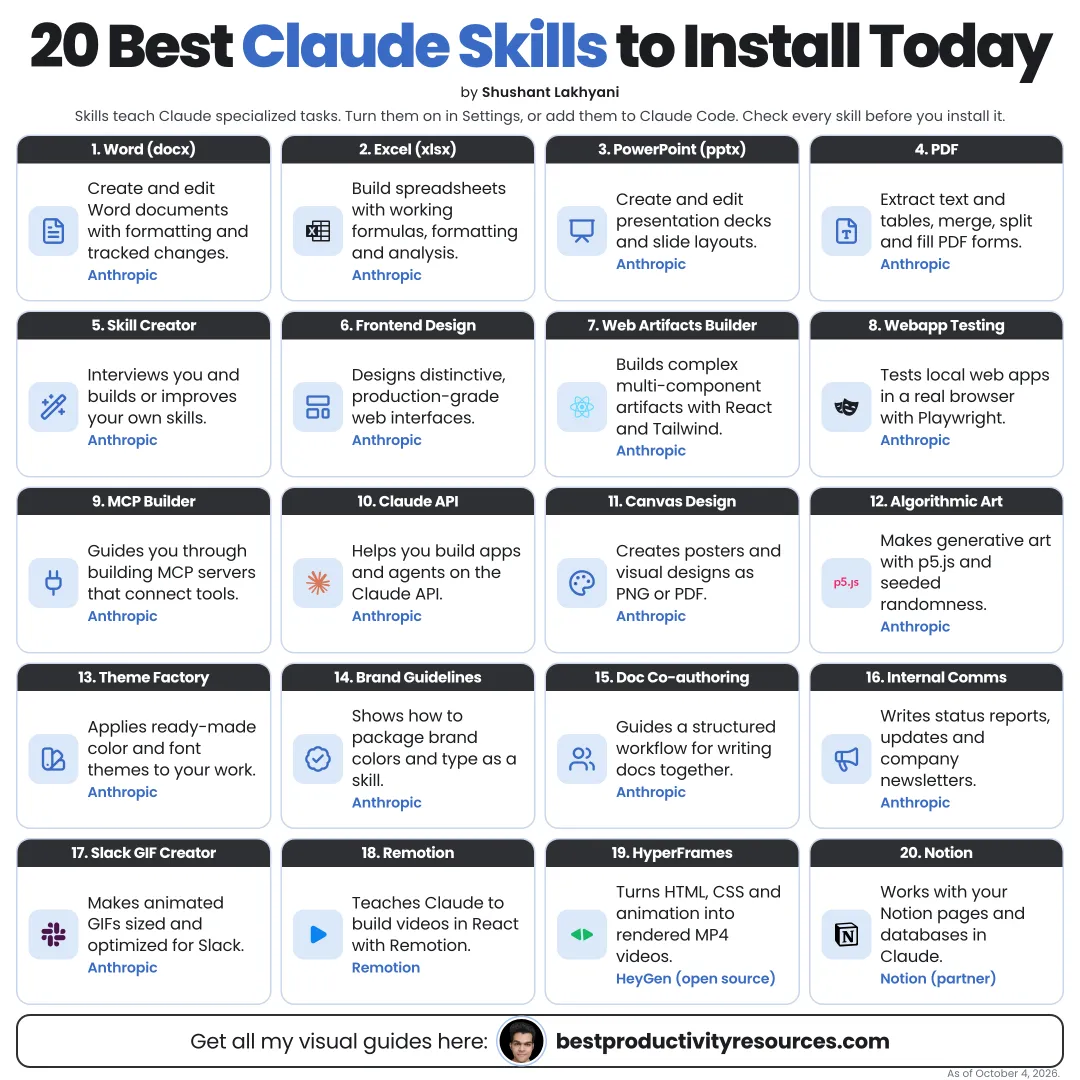
Turn Claude into a document maker, designer, developer, and video producer with skills that already exist
11 bite-sized sections
4 min read
Free, no signup
Short answer
A free list of the 20 best Claude skills as of October 2026: Anthropic’s official skills for Word, Excel, PowerPoint, PDF, design, frontend, testing and MCP, plus Superpowers, Remotion and HyperFrames, with what each does and how to install them.
Every skill here is real and published by Anthropic or by the tool’s own team. Most of Anthropic’s skills live in its public anthropics/skills repository.
Claude Code
Run /plugin marketplace add anthropics/skills, then install the skill sets you need.
claude.ai
Anthropic’s built-in document skills work automatically once code execution and file creation are turned on. Upload any other skill as a ZIP under Customize, then Skills.
Install the few skills you will actually use, not every skill you can find.
02
Handle documents and files
01 · docx
Create and edit Word documents, formatting and tracked changes included.
02 · xlsx
Build and analyze Excel spreadsheets with formulas, formatting, and charts.
03 · pptx
Create and edit PowerPoint presentations from scratch.
04 · pdf
Read, fill, merge, split, and create PDFs.
These four are source-available, not open source, and they power Claude’s own file creation.
03
Write and communicate
05 · doc-coauthoring
A structured workflow for co-writing docs, proposals, technical specs, and decision records.
06 · internal-comms
Draft status reports, updates, newsletters, and other internal communications in one consistent format.
07 · brand-guidelines
Apply a set brand’s colors and typography to outputs. Use it as the template for your own brand skill.
04
Design and create
08 · frontend-design
Build distinctive, production-quality web interfaces that do not look generic.
09 · canvas-design
Produce visual art and posters as PNG or PDF files.
10 · theme-factory
Apply preset or custom themes to slides, documents, and artifacts.
11 · algorithmic-art
Make generative art with code, such as p5.js sketches.
Create complex, multi-component claude.ai artifacts using React, Tailwind CSS, and shadcn/ui.
14 · webapp-testing
Test local web apps by controlling a browser through Playwright.
15 · mcp-builder
Create high-quality MCP servers that link Claude to external tools and APIs.
16 · claude-api
Build apps on the Claude API and Anthropic SDKs.
06
Use skills that build skills
17 · skill-creator
Anthropic’s skill for creating, testing, and refining new skills. Start here to build your own.
07
Add skills from tool makers and the community
18 · Superpowers
A popular open-source skills library by Jesse Vincent (obra) that gives Claude Code a disciplined process: brainstorming, plan writing, test-driven development, systematic debugging, and subagent-driven execution with code review. It joined Anthropic’s official Claude plugins marketplace in January 2026.
Official Remotion skills that teach Claude to write correct Remotion code, so you can make videos with React through prompts. Remotion is free for individuals and organizations of up to three people. Larger companies need a company license.
npx skills add remotion-dev/skills
20 · HyperFrames skills
Official skills from HeyGen’s open-source HyperFrames framework. Claude writes the HTML, CSS, and JavaScript, and HyperFrames renders it as video. Licensed under Apache 2.0. Requires Node.js 22 or later and FFmpeg.
claude plugin marketplace add heygen-com/hyperframes
claude plugin install hyperframes@hyperframes
It has 11 sections, starting with “Read this list the right way”, “Handle documents and files”, “Write and communicate” and “Design and create”, plus 7 more sections.
How long does it take to read?
About 4 minutes. Every section is a short, self-contained card, so you can jump straight to the part you need.
Is this guide free?
Yes. The full guide is free to read on this page, with no sign-up.
For research and ideas only. Results vary and nothing here is a promise of income. See our Disclaimer.
See you Monday!
Weekly newsletter
Everything new, every Monday.
One short email every Monday with everything shipped that week: new free tools and websites, new guides, new free browser tools and what's new in my free Gumroad libraries, plus how the site is growing. Free, and you can unsubscribe anytime.
You sign up on Gumroad, which stores your email to send the newsletter. See our Privacy Policy.
Cookies and your choices
Visits are counted by Cloudflare Web Analytics, which sets no cookies and stores nothing on your device. An affiliate tracking script from Impact.com also loads on our pages and can set its own cookies so partner companies can credit us for sign-ups. Essential storage is always on so pages load and work correctly. You decide whether your browsing preferences are saved on your device. Read the Privacy Policy.