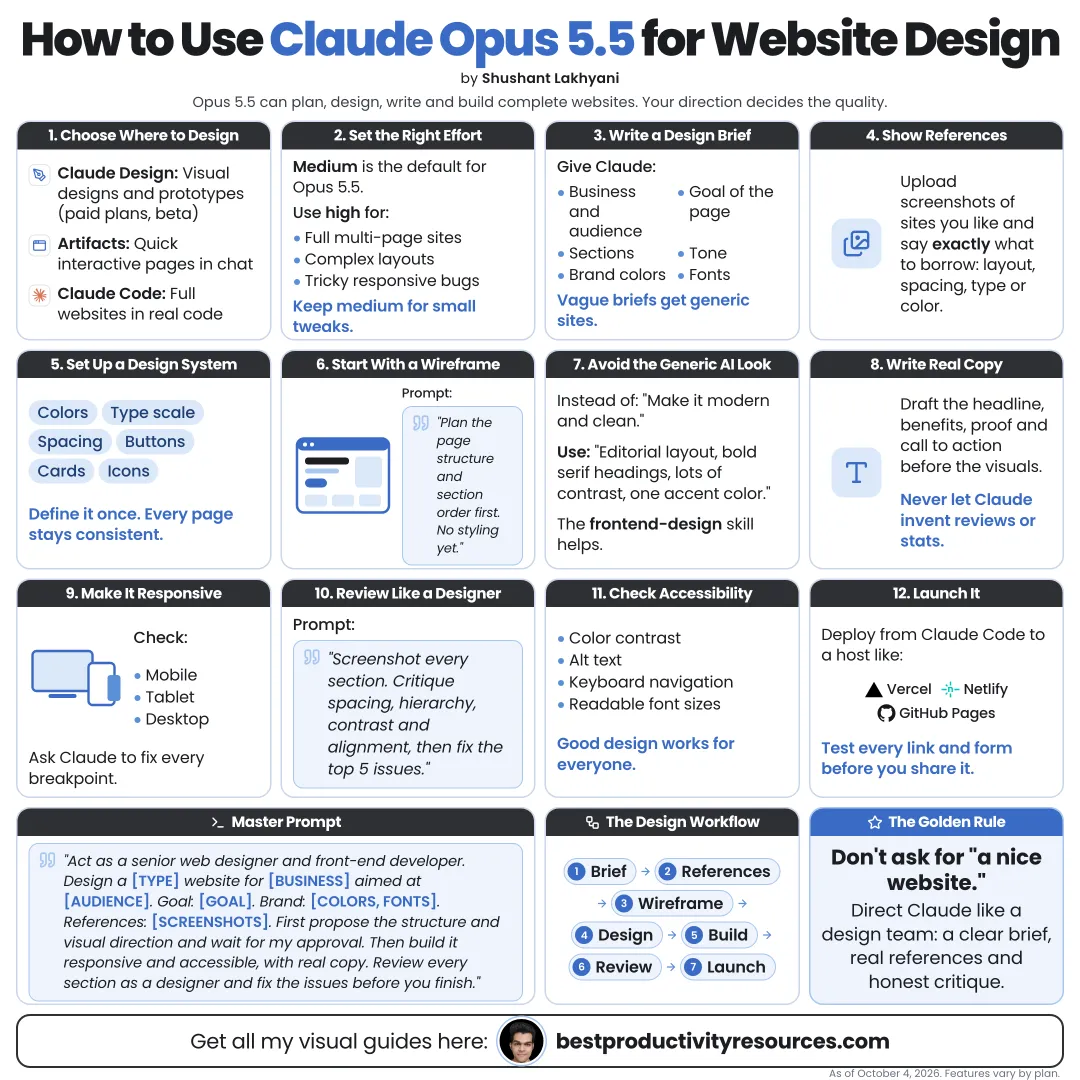
Turn a brief into a distinctive, accessible, fast website with Claude Design and Claude Code
18 bite-sized sections
4 min read
Free, no signup
Short answer
A free guide to designing websites with Claude Opus 5.5: briefs, inspiration, Claude Design prototypes, artifacts, handoff to Claude Code, the frontend-design skill, design systems, copy, responsive layout, accessibility, performance, SEO and launch.
Claude Opus 5.5, released September 22, 2026, is Anthropic’s flagship model for coding and complex work. On website design, Claude can:
Turn a brief into structure and copy
Build interactive prototypes
Write production-ready front-end code
Set up a consistent design system
Review layouts from screenshots
Raise accessibility and performance
Revise from your feedback in minutes
Claude designs quickly. Your taste and your brief decide whether the result is good.
02
Assemble the Claude website toolkit
Claude Design
Prompt-to-prototype design, launched April 17, 2026, and added to Claude chat in September 2026.
Artifacts
Interactive web pages and apps you build and preview inside Claude.
Claude Code
Builds and edits the real site inside your project folder.
frontend-design skill
Anthropic’s skill for distinctive, production-grade interfaces.
03
Write a design brief
Who the site serves
What visitors should do next
Which pages you need
Brand colors, fonts, and logo
Tone and personality
Sites you admire, and why
Content you already have
Must-have features
Accessibility and performance targets
A site without a brief turns into a template. A brief makes it yours.
04
Plan the structure before the visuals
Prompt:
From this brief, propose a sitemap, the order of sections on each page, the main call to action, and the job of each section. Do not design anything yet.
Settle structure before visuals. Most redesigns fail on structure, not on color.
05
Write the copy early
Have Claude draft headlines, section copy, and calls to action from your brief. Then rework them in your own voice.
One clear message in each section
Benefits ahead of features
Only specific, verifiable claims
Short sentences under scannable headings
Real copy leads to better design than placeholder text.
06
Prototype in Claude Design
Describe the page and let Claude build a prototype. Then refine it with precise feedback:
“Make the hero headline the obvious focus.”
“Add more space between sections.”
“Use our brand blue for buttons and links only.”
“Show me a version with more white space.”
Ask for two or three directions before you commit to one.
07
Define the design system
Ask Claude to write the rules that every page follows:
Color tokens with exact hex values
Type scale and font weights
Spacing scale
Border radius and shadows
Button and link styles
Form styles
Icon style
Consistency is what makes a site look designed instead of assembled.
08
Hand the design to Claude Code
Claude Design can package a design into a handoff bundle for Claude Code, which turns it into working code.
For complex builds in Claude Code, run Opus 5.5 at high effort:
claude --model opus --effort high
Store the design system and project rules in CLAUDE.md so every session sticks to them.
09
Add the frontend-design skill
Anthropic’s frontend-design skill steers Claude toward distinctive interfaces and away from a generic look. Install Anthropic’s skills in Claude Code with:
/plugin marketplace add anthropics/skills
10
Design for mobile first
Lay out the phone view first
Keep tap targets generous
Prevent horizontal scrolling
Readable text size on small screens
Test tablet and desktop afterward
Ask Claude to screenshot every breakpoint and review the images for issues.
11
Build accessibility in from the start
Contrast of at least 4.5:1 for normal text (WCAG AA)
Proper headings in a logical order
Alt text on meaningful images
Visible focus states for keyboard navigation
Labels on every form field
Support for reduced-motion settings
An accessible site is a better site for every visitor.
12
Make the site fast
Images compressed and sized correctly
Modern image formats
Only the fonts you actually use
No unnecessary JavaScript
Lazy-loading for images below the fold
Lighthouse for measuring results
13
Cover the SEO basics
A unique title and description on every page
One clear H1 on every page
Descriptive URLs
A sitemap
Fast loading on phones
Helpful, original content
14
Review the result with fresh eyes
Have Claude critique the finished design:
Review this page as a senior web designer would. List the ten biggest problems with hierarchy, spacing, consistency, accessibility, and conversion, ranked by impact.
Then choose which changes are worth making.
15
Launch with care
Test each link and form
Check on real phones
Proofread every line of copy
Confirm analytics and privacy notices, if you use them
Set up redirects from old URLs
Back up the previous site
16
Hand Claude these jobs
Structure proposals
Copy drafts
Prototypes and variations
Code
Design system rules
Accessibility and performance checks
17
Keep these jobs yourself
The brief
Taste and final direction
Brand approval
Accuracy of claims
Testing with real people
Launch decisions
18
Use the master website design prompt
Act as my senior web designer and front-end developer.
Using this brief: [brief], propose a sitemap and section plan first, then wait for my approval.
Next, create two distinct design directions, each with a design system: colors, type scale, spacing, and components.
Build the approved direction mobile first, accessible to WCAG AA, and quick to load.
Screenshot every breakpoint, review the images for problems, and fix them.
Finally, list anything that needs my decision.
Seize the real opportunity
Do not ask Claude to “make a nice website.” Give it a brief, a structure, a design system, and screenshots to review.
Brief
Structure
Copy
Prototype
System
Build
Check
Launch
The goal is not a site that looks AI-made. It is a site that clearly serves its visitors and looks like your brand.
What does “How to Use Claude Opus 5.5 for Website Design” cover?
It has 18 sections, starting with “See how Claude designs websites”, “Assemble the Claude website toolkit”, “Write a design brief” and “Plan the structure before the visuals”, plus 14 more sections.
How long does it take to read?
About 4 minutes. Every section is a short, self-contained card, so you can jump straight to the part you need.
Is this guide free?
Yes. The full guide is free to read on this page, with no sign-up.
For research and ideas only. Results vary and nothing here is a promise of income. See our Disclaimer.
See you Monday!
Weekly newsletter
Everything new, every Monday.
One short email every Monday with everything shipped that week: new free tools and websites, new guides, new free browser tools and what's new in my free Gumroad libraries, plus how the site is growing. Free, and you can unsubscribe anytime.
You sign up on Gumroad, which stores your email to send the newsletter. See our Privacy Policy.
Cookies and your choices
Visits are counted by Cloudflare Web Analytics, which sets no cookies and stores nothing on your device. An affiliate tracking script from Impact.com also loads on our pages and can set its own cookies so partner companies can credit us for sign-ups. Essential storage is always on so pages load and work correctly. You decide whether your browsing preferences are saved on your device. Read the Privacy Policy.