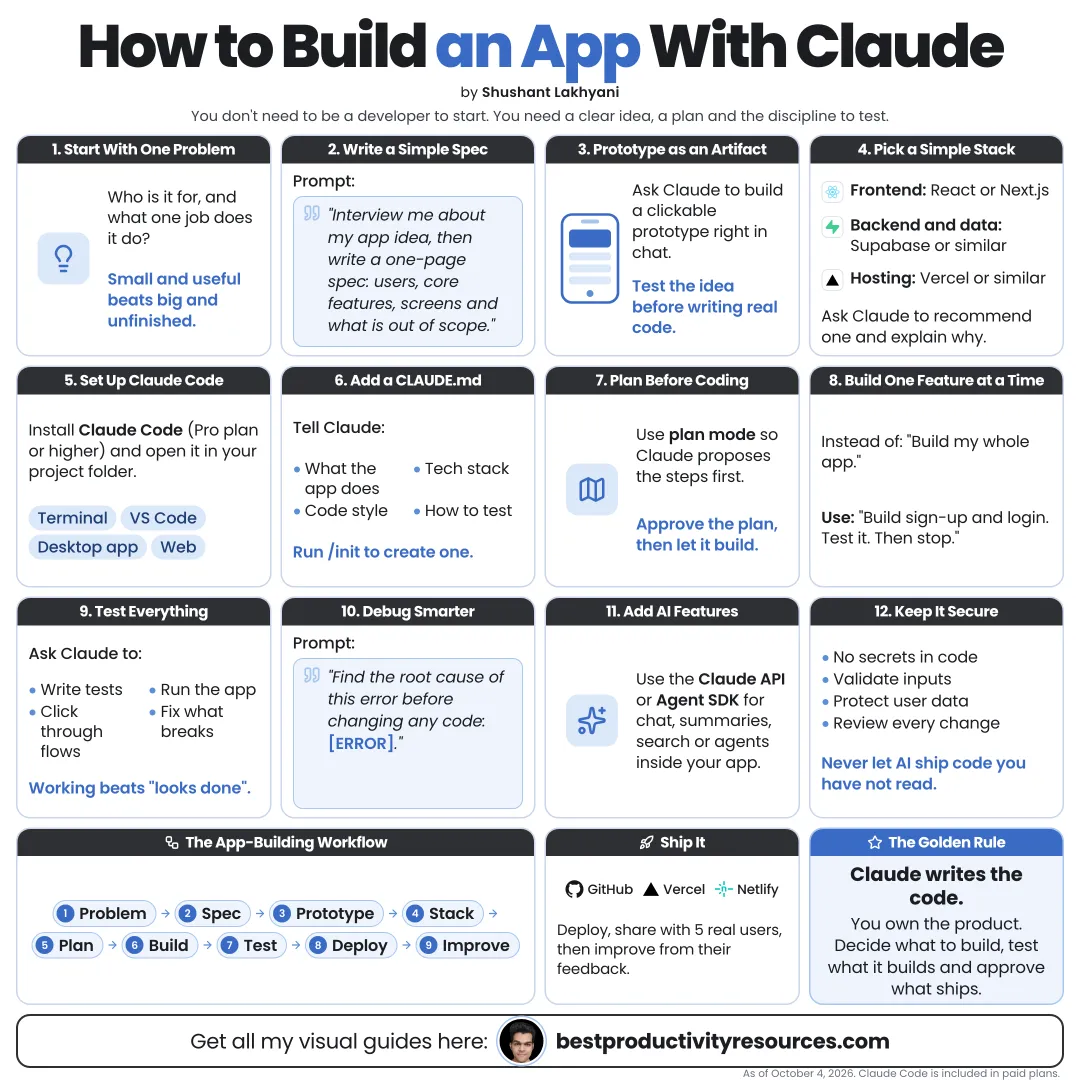
Turn an idea into a working, tested app, step by step, even if you are new to coding
17 bite-sized sections
5 min read
Free, no signup
Short answer
A free guide to building an app with Claude: define the problem, write a spec, prototype with artifacts and Claude Design, build with Claude Code and Opus 5.5, add data and sign-in, test, secure, deploy and improve.
Build small interactive apps right in a Claude chat and preview them instantly. Best for tools, calculators, and prototypes.
Claude Design
Turn a prompt into interactive prototypes and mockups, then pass them to Claude Code.
Claude Code
Build a real app in a project folder on your computer or in the cloud. Comes with every paid plan.
Prototype in chat. Build the real thing in Claude Code.
02
Start with the problem
Who will use the app?
Which problem does it solve?
How do people handle it today?
What is the single most important action?
How will you know the app works?
An app that solves one problem well beats one that solves ten problems badly.
03
Write a simple spec
Ask Claude to help you draft a one-page spec covering:
Users and their goals
Core features in version one
Features to save for later
Screens and what each one shows
Data the app stores
Sign-in needs
What stays out of scope
Interview me about this app idea, one question at a time. Then write a one-page spec with a tight version one scope.
04
Prototype the experience
Use artifacts or Claude Design to click through the main flow before you build anything.
Test the main screens
Confirm the key action takes only a few steps
Show it to two or three real users
Update the spec based on their feedback
Changes cost the least before any real code exists.
05
Choose a simple stack
Ask Claude to recommend a stack that fits your skill level and app type, and to explain its choice.
Web app
A popular framework with solid documentation
Mobile app
A cross-platform framework, if you need both iOS and Android
Data
A hosted database with built-in sign-in, if users need accounts
Hosting
A platform that deploys straight from your Git repository
Pick popular, well-documented tools. Claude knows them better, and help is easier to find.
06
Set up Claude Code
curl -fsSL https://claude.ai/install.sh | bash
Make a project folder, run claude inside it, and switch to Opus 5.5 for complex work:
/model opus
/effort high
Rather skip the terminal? The Claude desktop app has Claude Code in its Code tab.
07
Create CLAUDE.md
Run /init to generate a CLAUDE.md file, then add:
What the app does
Which tech stack it uses
How to run, test, and build it
Which code style rules apply
What Claude must ask about first
Claude reads this file at the start of every session.
08
Build in small steps
Ship one feature at a time:
Ask Claude for a plan first
Approve the plan
Let Claude build that feature
Run the app and test it yourself
Commit to Git once it works
Move on to the next feature
Small, tested steps always beat one giant prompt.
09
Turn on Git from day one
Have Claude set up Git and commit after every working step. If something breaks, you can always roll back to the last good version.
10
Add data and accounts carefully
Store only the data you truly need
Use a proven sign-in service rather than building your own
Keep secrets in environment variables, never in the code
Set database access rules so each user sees only their own data
Back up any important data
11
Test properly
Have Claude write automated tests for the core features
Run the tests after every single change
Click through the whole app yourself
Test it on a phone
Enter wrong inputs on purpose
Have a friend use it with no help
12
Report bugs clearly
When something breaks, tell Claude:
What you did
What you expected to happen
What actually happened
The exact error message
A screenshot, if the bug is visual
Have Claude find the root cause before it changes any code.
13
Review security before launch
Claude Code ships with a built-in security check. Run it before every deploy:
/security-review
It scans the changes on your branch for risks such as injection, sign-in and access flaws, and data exposure. It compares your branch with the main branch of your remote repository, so push the project to GitHub (or another Git host) first.
Then have Claude fix what it found:
Fix these security issues one by one, starting with the most severe. Explain each fix, and wait for my approval before moving to the next.
If your app handles payments, health, or sensitive personal data, get a human expert to review it as well.
14
Deploy
Pick a hosting platform
Set environment variables on the platform, not in code
Connect your domain
Test the live version
Set up error monitoring
Have Claude guide you through each step on the platform you chose.
15
Improve with real users
Gather feedback
Note where people get stuck
Fix the biggest problem first
Add features only when users need them
16
Run the app-building loop
Problem
Define one clear problem.
Spec
Scope version one.
Prototype
Click through it before you build.
Build
Ship one feature at a time.
Test
Run automated checks and test by hand.
Secure
Review security before launch.
Ship
Deploy and monitor.
Improve
Learn from real users.
17
Use the master app prompt
Act as my senior developer and teacher.
I want to build [app] for [users] to solve [problem].
First, interview me and write a one-page spec with a small version one. Wait for my approval.
Then suggest a simple, well-documented stack and explain your choice.
Build one feature at a time: plan it, build it, write tests, run them, and explain what you did in plain language.
Commit after every working step. Never put secrets in code, and ask me before you delete anything or deploy.
Seize the real opportunity
Do not ask Claude to “build me an app.” Hand it a problem, a spec, and one feature at a time.
Problem
Spec
Prototype
Build
Test
Secure
Ship
Improve
The goal is not the biggest app. It is a small app real people use, built in steps you understand.
What does “How to Build an App with Claude” cover?
It has 17 sections, starting with “Pick one of three ways to build”, “Start with the problem”, “Write a simple spec” and “Prototype the experience”, plus 13 more sections.
How long does it take to read?
About 5 minutes. Every section is a short, self-contained card, so you can jump straight to the part you need.
Is this guide free?
Yes. The full guide is free to read on this page, with no sign-up.
For research and ideas only. Results vary and nothing here is a promise of income. See our Disclaimer.
See you Monday!
Weekly newsletter
Everything new, every Monday.
One short email every Monday with everything shipped that week: new free tools and websites, new guides, new free browser tools and what's new in my free Gumroad libraries, plus how the site is growing. Free, and you can unsubscribe anytime.
You sign up on Gumroad, which stores your email to send the newsletter. See our Privacy Policy.
Cookies and your choices
Visits are counted by Cloudflare Web Analytics, which sets no cookies and stores nothing on your device. An affiliate tracking script from Impact.com also loads on our pages and can set its own cookies so partner companies can credit us for sign-ups. Essential storage is always on so pages load and work correctly. You decide whether your browsing preferences are saved on your device. Read the Privacy Policy.