Turn your past writing into a voice Claude can match, without sounding like AI
15 bite-sized sections
4 min read
Free, no signup
Short answer
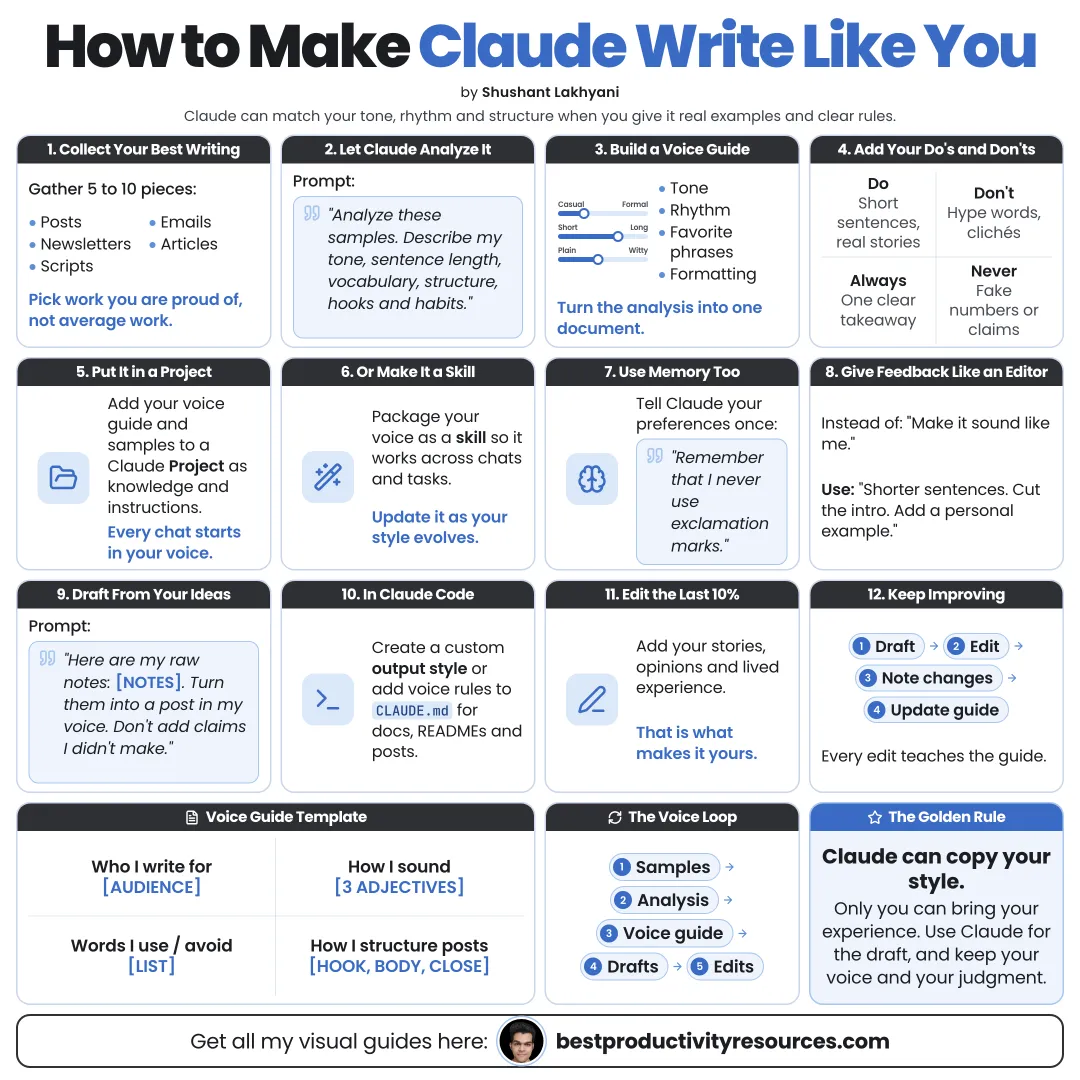
A free guide to making Claude write like you: collect samples, build a voice guide, use custom styles, profile preferences, Projects, memory and Skills, ban AI-sounding phrases, edit drafts and keep your writing authentic.
Left to itself, Claude writes in a polished, generic style. To match your voice, it needs:
Real samples of your writing
A precise description of your style
Rules on what you never do
Context on your audience
Feedback on every draft
Claude can imitate a voice. It cannot make up yours.
02
Collect your best writing
Pull together 5 to 15 pieces that sound most like you:
Emails
Social posts
Newsletters
Articles
Messages to clients
Scripts or talks
Choose pieces you are proud of, in the formats you want Claude to produce.
03
Have Claude analyze your voice
Prompt:
Analyze these writing samples. Describe my voice in specific, observable terms: sentence length, vocabulary, tone, structure, punctuation, how I open and close, the phrases I repeat, and the things I never do. Quote an example for each point.
Concrete observations work better than labels like “friendly” or “professional.”
04
Write a voice guide
Condense the analysis into a short guide:
Your tone in three words
Your usual sentence and paragraph length
Words and phrases you rely on
Words and phrases you never use
How you open and close
Your formatting habits
Two or three short sample passages
Rules with examples work better than rules on their own.
05
Create a custom style
Claude’s custom styles store a voice you can switch on in any chat.
Open the + menu in a chat
Choose Use style, then Create & edit styles
Select Create custom style
Add writing examples or paste in your samples
Review the style description and edit it
Claude may boil your samples down to a generic description. Edit it so your real phrasing and rules survive.
06
Set your profile preferences
Add standing preferences in settings so they apply in every chat:
Your role and audience
Your spelling preference, such as American or British
Your formatting rules
Phrases to avoid
07
Keep your writing in a Project
Set up a Writing Project that holds:
Your voice guide
Your best samples
Notes on your audience
Templates for common formats
Project instructions like “Follow the voice guide exactly” keep every chat inside that Project on voice.
08
Package your voice as a skill
For formats you repeat, like a weekly newsletter, build a skill that bundles your voice guide, examples, and template. Anthropic’s skill-creator can help you set it up.
09
Ban AI-sounding writing
List everything you never want to see, for example:
Hype words you would never use
Filler openers like “Great question”
Overused transitions
Too many em dashes or emoji
Generic conclusions
Bullet lists where you would write prose
Telling Claude what to avoid matters as much as telling it what to do.
10
Feed Claude your raw thoughts
Strong drafts start from your ideas, not from a topic.
Dictate or jot down rough notes
Include your own opinions and stories
Add details only you know
Ask Claude to shape them in your voice
Your own experiences are what make the writing sound like you.
11
Edit with precise feedback
“Use shorter sentences, like my samples.”
“I would never say this phrase. Cut it.”
“Too formal. Match the email in sample 3.”
“Keep my opening line word for word.”
Add corrections you repeat to your voice guide, so you only make each one once.
12
Read it out loud
If a sentence sounds awkward spoken, it will read awkwardly too. Fix it before you publish.
13
Stay authentic
Never let Claude make up experiences or results
Verify every fact and number
Disclose AI help where your audience or employer expects it
Keep your opinions yours
Claude can match your style. Only you can supply the truth.
14
Run the voice-matching loop
Collect
Gather your strongest writing.
Analyze
Pin down your voice precisely.
Codify
Turn it into a voice guide.
Save
Store it as a custom style, profile, Project, or skill.
Draft
Begin with your raw thoughts.
Edit
Give specific, line-level feedback.
Update
Add each correction to the guide.
15
Copy the master voice prompt
Write this in my voice, following my voice guide and samples exactly.
Use my raw notes below as the content. Do not add any facts, stories, or opinions I did not give you.
Match my sentence length, vocabulary, and structure. Avoid every phrase on my banned list.
After the draft, flag any sentences you are not sure sound like me.
Notes: [your notes]
The golden rule
Do not ask Claude to write for you. Teach it how you write, then hand it what only you can say.
Collect
Analyze
Codify
Save
Draft
Edit
Update
The goal is not to sound like polished AI writing. It is to sound like you, while spending less time on the first draft.
What does “How to Make Claude Write Like You” cover?
It has 15 sections, starting with “See why Claude does not sound like you yet”, “Collect your best writing”, “Have Claude analyze your voice” and “Write a voice guide”, plus 11 more sections.
How long does it take to read?
About 4 minutes. Every section is a short, self-contained card, so you can jump straight to the part you need.
Is this guide free?
Yes. The full guide is free to read on this page, with no sign-up.
For research and ideas only. Results vary and nothing here is a promise of income. See our Disclaimer.
See you Monday!
Weekly newsletter
Everything new, every Monday.
One short email every Monday with everything shipped that week: new free tools and websites, new guides, new free browser tools and what's new in my free Gumroad libraries, plus how the site is growing. Free, and you can unsubscribe anytime.
You sign up on Gumroad, which stores your email to send the newsletter. See our Privacy Policy.
Cookies and your choices
Visits are counted by Cloudflare Web Analytics, which sets no cookies and stores nothing on your device. An affiliate tracking script from Impact.com also loads on our pages and can set its own cookies so partner companies can credit us for sign-ups. Essential storage is always on so pages load and work correctly. You decide whether your browsing preferences are saved on your device. Read the Privacy Policy.