Turn AI from a shortcut that misleads you into a tool that makes you better
16 bite-sized sections
4 min read
Free, no signup
Short answer
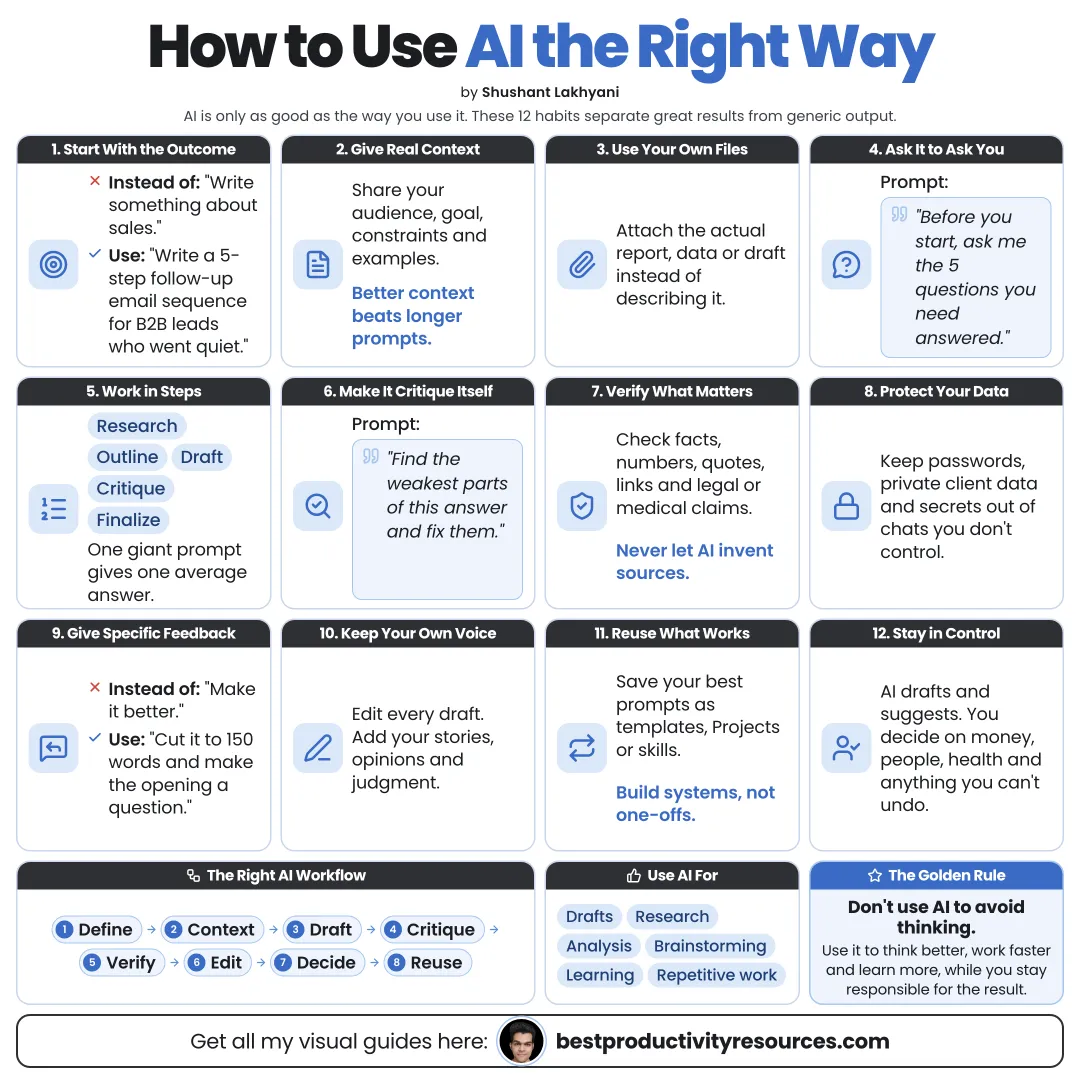
A free guide to using AI the right way: give context, ask for drafts not decisions, verify facts, protect private data, keep your own thinking, avoid common mistakes, and build habits that make AI genuinely useful at work and in learning.
AI assistants like ChatGPT, Claude, and Gemini can write, analyze, summarize, code, and research in seconds.
Used well, AI can help you:
Think more clearly
Move faster on routine tasks
Learn new subjects
Explore more options
Catch mistakes
Produce stronger first drafts
Used badly, it spreads errors, erodes your skills, and leaks private information.
AI multiplies whatever you bring to it. Bring clear thinking.
02
Start with your goal
Before you type, decide:
What outcome you need
Who it is for
What good looks like
How you plan to use the answer
A clear goal turns a generic answer into a useful one you can act on.
03
Give it context
AI cannot guess what is in your head. Include:
Background and situation
Audience
Constraints
Examples you like
Relevant files or data
What you have tried already
Most bad AI answers come from bad questions.
04
Ask for drafts, never decisions
Let AI generate options, drafts, and analysis. Leave decisions to people.
“Give me three approaches and their trade-offs.”
“Write a draft, and I will edit it.”
“What am I missing?”
“Make the case against my plan.”
05
Verify what matters
AI can state wrong information with total confidence. Check:
Facts and figures
Quotes and citations
Dates and recent events
Legal, medical, or financial claims
Code before it runs anywhere that matters
Calculations
Confidence is not correctness.
06
Ask for sources
Ask AI to cite its sources, then open them. Favor:
Primary sources
Official documentation
Recent publications
Reputable outlets
An unopened citation is not a check.
07
Protect private information
Never paste in:
Passwords and API keys
Government ID numbers
Bank and card details
Other people’s personal data without their permission
Confidential company information on a personal account
Check each tool’s data settings, and use a business plan for company work.
08
Keep doing your own thinking
Hand AI all your thinking and your skills fade. Protect them:
Try it yourself first, then compare with AI
Outline it yourself before you ask for a draft
Ask AI to question you, not only to answer
Restate the result in your own words
Skip AI on some tasks on purpose
Use AI to think harder, not to skip thinking.
09
Learn with AI, not just finish with it
“Explain this simply, then quiz me on it.”
“Do not tell me the answer. Give me hints.”
“What do people most often misunderstand here?”
“Give me one practice problem.”
Learning with AI means you do more of the work yourself and get faster feedback.
10
Fit the tool to the task
Quick answers
A chat assistant
Current information
An assistant with web search or a research mode
Your documents
Projects or source-grounded tools like Gemini Notebook
Coding
Coding agents like Claude Code or Codex
Repeated workflows
Skills, templates, or automations
11
Iterate in conversation
Say what is wrong
Request specific changes
Ask for alternatives
Ask which assumptions it made
Open a new chat when the topic changes
Long, unfocused chats lose quality. A fresh context often helps.
12
Be open about your AI use
Follow your school’s or employer’s AI rules
Disclose AI use wherever it is expected
Never pass off AI output as personal experience
Label realistic AI-generated images and videos
Respect copyright and the work of others
13
Keep humans responsible
Leave people in charge of:
Final decisions
Anything that touches others’ health, money, or safety
Hiring and judgments about people
Legal and financial commitments
Anything published under your name
You answer for whatever you do with AI’s output.
14
Avoid common mistakes
Asking vague questions
Taking the first answer
Trusting citations you have not checked
Pasting in sensitive data
Letting AI make the important decisions
Using AI for everything, even what you should learn
Ignoring tool limits and knowledge cutoffs
15
Follow the right way to use AI
Goal
Know what you want.
Context
Supply the background.
Draft
Let AI generate options.
Question
Push back on the answer.
Verify
Check what matters.
Decide
Keep the judgment human.
Learn
Improve without becoming dependent.
16
Copy the master prompt
I want to [goal] for [audience].
Context: [background, constraints, examples].
Before you answer, ask me any questions you need.
Then give me a draft or options, explain your assumptions, list what I should verify, and flag anything you are unsure about.
The golden rule
Do not let AI replace your judgment. Let it inform your judgment.
Goal
Context
Draft
Question
Verify
Decide
Learn
The goal is not to use AI more. It is to use it so well that your work and your thinking both improve.
It has 16 sections, starting with “Know what using AI right means”, “Start with your goal”, “Give it context” and “Ask for drafts, never decisions”, plus 12 more sections.
How long does it take to read?
About 4 minutes. Every section is a short, self-contained card, so you can jump straight to the part you need.
Is this guide free?
Yes. The full guide is free to read on this page, with no sign-up.
For research and ideas only. Results vary and nothing here is a promise of income. See our Disclaimer.
See you Monday!
Weekly newsletter
Everything new, every Monday.
One short email every Monday with everything shipped that week: new free tools and websites, new guides, new free browser tools and what's new in my free Gumroad libraries, plus how the site is growing. Free, and you can unsubscribe anytime.
You sign up on Gumroad, which stores your email to send the newsletter. See our Privacy Policy.
Cookies and your choices
Visits are counted by Cloudflare Web Analytics, which sets no cookies and stores nothing on your device. An affiliate tracking script from Impact.com also loads on our pages and can set its own cookies so partner companies can credit us for sign-ups. Essential storage is always on so pages load and work correctly. You decide whether your browsing preferences are saved on your device. Read the Privacy Policy.