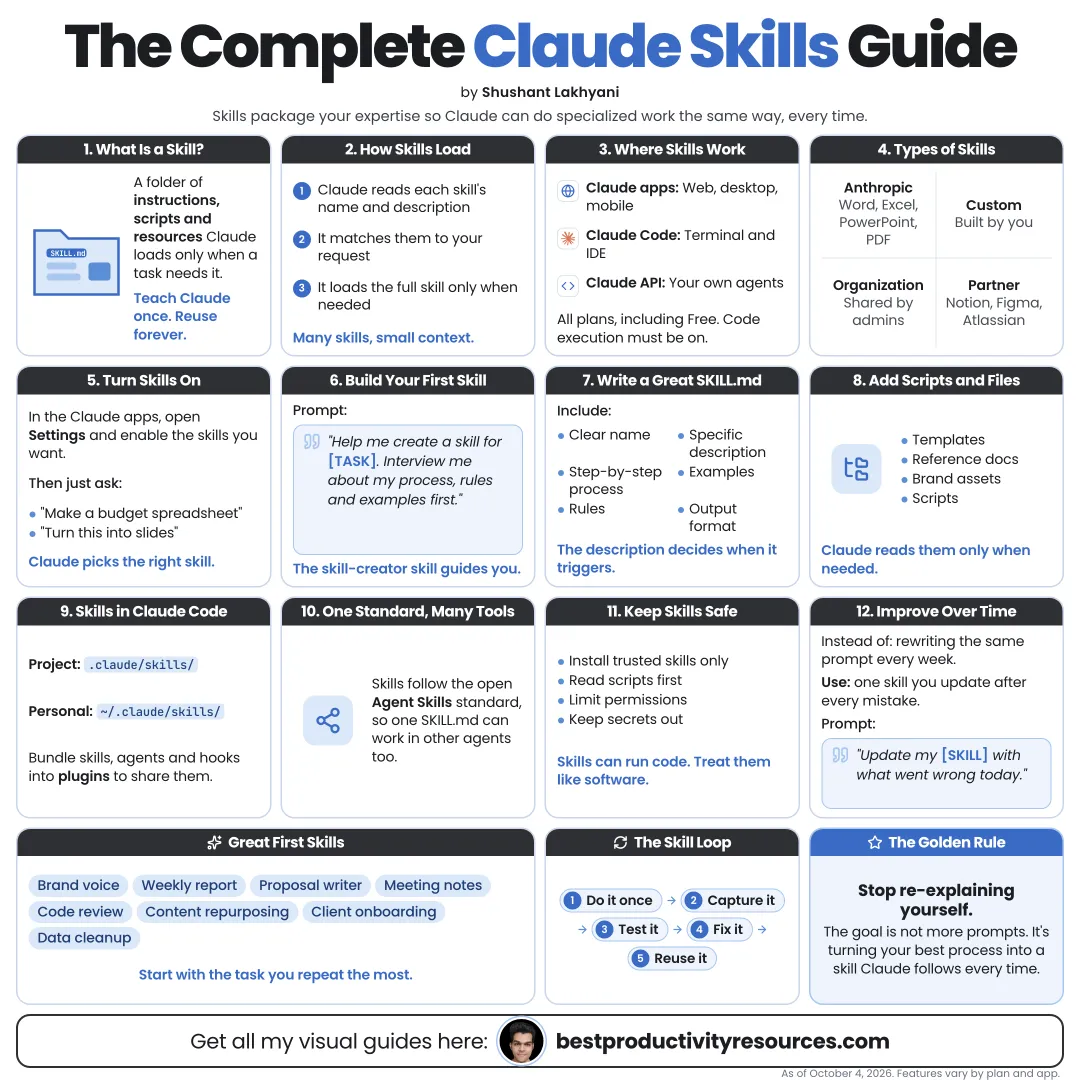
Turn your best workflows into reusable skills Claude can run on demand
19 bite-sized sections
5 min read
Free, no signup
Short answer
A free, complete guide to Claude Skills: what they are, which plans have them, how they load, SKILL.md structure, creating skills with skill-creator, uploading to claude.ai, Claude Code skill folders, invocation controls, plugins, sharing and safety.
A skill is a folder that teaches Claude one specific task. It holds a SKILL.md file with instructions, plus optional scripts, templates, and reference files.
A skill can do what a saved prompt cannot:
Load on its own when relevant
Include scripts for Claude to run
Bundle templates and examples
Hold long reference material back until needed
Be shared across a team
Run in claude.ai, Claude Code, and the API
Think of a skill as an expert procedure: write it once, reuse it many times.
02
Know where skills work
claude.ai and the apps
Available on the Free, Pro, Max, Team, and Enterprise plans.
Claude Code
Supports personal, project, plugin, and enterprise skill folders.
Claude API
Through the Skills API.
Skills first shipped in October 2025.
03
Learn how skills load
Skills stay light through progressive disclosure:
Claude always sees every skill’s name and description
The full instructions load only when the skill runs
Supporting files load only when something references them
So you can install many skills without filling Claude’s context.
The description decides when a skill runs. Write it with care.
04
Turn on skills in claude.ai
Free, Pro, Max
Go to Settings, then Capabilities, and turn on Code execution and file creation.
Team, Enterprise
An admin turns on Cloud code execution and file creation and Skills under Organization settings, then Plugins & skills.
Anthropic’s built-in skills for Word, Excel, PowerPoint, and PDF then kick in on their own when relevant.
Every skill needs a SKILL.md file that opens with a name and a description, followed by the instructions.
---
name: weekly-report
description: Build our weekly client report from the metrics spreadsheet. Use when asked for a weekly report or a client update.
---
1. Read the latest metrics file.
2. Summarize the five biggest changes.
3. Follow the template in template.md.
4. Flag every metric that dropped more than 10%.
07
Write a strong description
The description tells Claude when to use the skill. Cover:
What the skill does
When to use it
Words people would naturally use
What it must not be used for
Make it too vague and the skill never fires. Make it too broad and it fires when it should not.
08
Write clear instructions
Number the steps
State the goal before the steps
State the inputs and outputs
Add one or two examples
Name the common mistakes to avoid
Explain how to check the result
Keep SKILL.md tight. Put long reference material in separate files and link to them.
09
Add supporting files
Templates
Documents or formats Claude fills in
Examples
Strong outputs for Claude to imitate
References
Policies, style guides, or data to consult
Scripts
Code for steps that must run exactly
Use scripts for anything that needs precision. Use instructions for anything that needs judgment.
10
Create a skill with skill-creator
Anthropic’s skill-creator skill helps you build new skills: it asks questions, drafts the files, and tests the result.
Prompt:
Use the skill-creator skill to turn this workflow into a skill. Ask me whatever you need to know, draft SKILL.md and any supporting files, then test the skill on one example.
11
Upload a skill to claude.ai
Zip the skill folder into one ZIP file
Open Customize, then Skills
Select +, then + Create skill
Choose Upload a skill and pick the ZIP
On Team and Enterprise plans, admins can provision skills for the whole organization.
12
Use skills in Claude Code
Personal
~/.claude/skills/<name>/SKILL.md, for all your projects
Project
.claude/skills/<name>/SKILL.md, for a single repository
Plugin
Inside an installed plugin, run as /plugin-name:skill-name
Run a skill yourself with /skill-name, or let Claude pick it up when the description matches.
13
Control who can invoke a skill
Default
You and Claude can both run it.
disable-model-invocation: true
Only you can run it. Best for actions such as deploys.
user-invocable: false
Only Claude uses it, as quiet background knowledge.
Add allowed-tools to pre-approve specific tools while the skill runs.
14
Install skills from others
In Claude Code, add Anthropic’s example skills by running:
/plugin marketplace add anthropics/skills
Many tool makers publish official skills too, such as Remotion and HyperFrames for video.
Read every third-party skill before you install it. Skills can run code.
15
Test and improve
Run the skill on three real examples
Confirm it fires when expected
Confirm it stays quiet when it should
Compare the output with your best manual work
Fix the instructions, not only the output
If a skill fires too often, make its description more specific.
16
Share skills with your team
Commit project skills to the repository
Bundle related skills into one plugin
Provision organization-wide skills on Team or Enterprise
Version each skill and log its changes
Assign one owner to each skill
17
Keep skills safe
Never store passwords or API keys in a skill
Review every script before you run it
Install skills only from trusted sources
Restrict tools with allowed-tools where possible
Require a human to approve risky actions
A skill is exactly as powerful as the instructions and code inside it.
18
Run the skill-building loop
Choose
Pick a valuable workflow you repeat.
Describe
Write a precise description.
Instruct
Write clear, numbered steps.
Equip
Attach templates, examples, and scripts.
Test
Try it on real examples.
Refine
Tighten triggers and instructions.
Share
Hand it to your team.
19
Use the master skill prompt
Help me turn [workflow] into a Claude skill.
First, interview me about the goal, the inputs, the steps, the quality bar, and common mistakes.
Then draft SKILL.md with a precise name and a description that states exactly when to use it.
Move long reference material into separate files, and use scripts only for steps that must run exactly.
Last, test the skill on one example and list anything that needs my decision.
Follow the core principle
Do not ask: “Which prompt should I save?” Ask: “What do I repeat that an expert procedure could do the same way every time?”
Choose
Describe
Instruct
Equip
Test
Refine
Share
Build one skill for one repeated task, prove it saves time, then move on to the next.
It has 19 sections, starting with “Understand what Claude Skills are”, “Know where skills work”, “Learn how skills load” and “Turn on skills in claude.ai”, plus 15 more sections.
How long does it take to read?
About 5 minutes. Every section is a short, self-contained card, so you can jump straight to the part you need.
Is this guide free?
Yes. The full guide is free to read on this page, with no sign-up.
For research and ideas only. Results vary and nothing here is a promise of income. See our Disclaimer.
See you Monday!
Weekly newsletter
Everything new, every Monday.
One short email every Monday with everything shipped that week: new free tools and websites, new guides, new free browser tools and what's new in my free Gumroad libraries, plus how the site is growing. Free, and you can unsubscribe anytime.
You sign up on Gumroad, which stores your email to send the newsletter. See our Privacy Policy.
Cookies and your choices
Visits are counted by Cloudflare Web Analytics, which sets no cookies and stores nothing on your device. An affiliate tracking script from Impact.com also loads on our pages and can set its own cookies so partner companies can credit us for sign-ups. Essential storage is always on so pages load and work correctly. You decide whether your browsing preferences are saved on your device. Read the Privacy Policy.