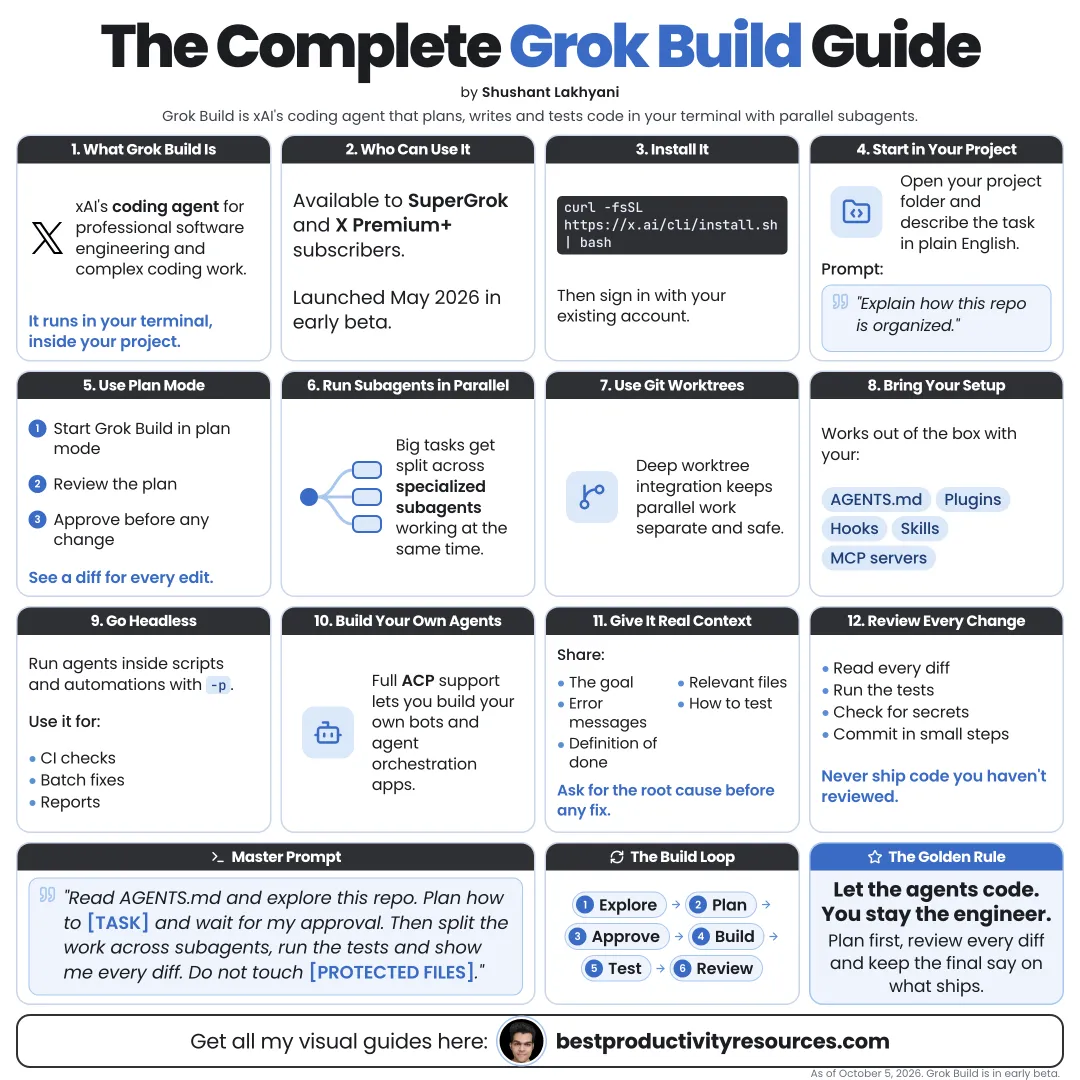
Turn Grok Build into a careful coding agent in your terminal: plan first, build in steps, and protect your code
15 bite-sized sections
4 min read
Free, no signup
Short answer
A free Grok Build guide for October 2026: what SpaceXAI’s open-source terminal coding agent is, install, sign-in, models, Plan, Auto, and Always-approve modes, AGENTS.md, skills, MCP, subagents, headless mode, ACP, and the privacy lessons from July 2026.
Grok Build is SpaceXAI’s terminal coding agent. It entered early beta in May 2026, and it has been open source under the Apache 2.0 license since July 14, 2026.
Unlike a coding chatbot, it can:
Understand your codebase
Edit files
Run shell commands
Search the web
Plan before building
Hand work to parallel subagents
Run headless in scripts and CI
Work inside editors via the Agent Client Protocol
As a coding agent, it changes your files. Treat it like a new teammate with access to your repository.
02
Check who can use it
Grok Build opened to SuperGrok and X Premium+ subscribers on May 25, 2026. It also works with an xAI API key. See x.ai/cli for current plans.
The docs name Grok 4.7 as the latest model. Change models with /model, or add custom ones in the config file.
Confirm the install with grok --version. The first launch opens your browser so you can sign in. You can also set an API key:
export XAI_API_KEY="your-key"
Keep API keys out of your repository, always.
04
Know the three modes
Plan
Grok Build drafts a plan and edits only the plan file. Enter it with /plan plus a description.
Auto
A classifier auto-approves safe tools. Enter it with /auto.
Always-approve
No permission prompts at all. Enter it with /always-approve.
Cycle through the modes with Shift+Tab.
Use Plan for anything that matters. Save Always-approve for a disposable sandbox.
05
Plan every feature first
In Plan mode you can approve the plan, comment on single steps, or rewrite it before anything runs. Make sure the plan:
Solves the real problem
Touches only the right files
Includes tests
Adds no unneeded dependencies
Explains anything risky
Review it with /view-plan, then let the build start.
06
Give it project context
Grok Build reads AGENTS.md files by default. Put one at your project root covering:
What the project does
The tech stack
How to install, run, test, and build
Code style rules
Folders it must leave alone
Commands that need your approval first
07
Build in small steps
Request one feature or fix at a time
Run the tests after every change
Try the result yourself
Commit to Git once it works
Open a fresh session with /new when you switch tasks
Small steps that are tested and committed keep every mistake easy to undo.
08
Use subagents and workflows
Grok Build can split larger tasks across parallel subagents, and Git worktree support keeps each one’s changes separate.
/workflow
Runs a saved workflow
/create-workflow
Creates a new workflow
/deep-research
Runs a research workflow on one question
Read every subagent’s changes before you merge.
09
Extend it with skills, plugins, and MCP
Skills: invokable ones show up as slash commands
Plugins and marketplaces: packaged features
Hooks: your own checks at set moments
MCP servers: connections to other tools and data
Install extensions only from trusted sources. Each one sees everything the agent sees.
10
Automate with headless mode
Add the -p flag to run Grok Build in scripts and automations, with streaming JSON output when you need it.
Generate release notes
Triage new issues
Fix lint errors
Write tests for changed files
In automations, grant the minimum access it needs and review each change before it reaches production.
11
Run it inside your editor
With the Agent Client Protocol, Grok Build can run inside ACP-compatible editors and agent apps, so you are not tied to the terminal.
12
Take lessons from the July 2026 privacy incident
On July 12, 2026, a security researcher showed that Grok Build version 0.2.93 uploaded whole Git repositories, history and secrets included, to cloud storage controlled by xAI. SpaceXAI switched off the upload server-side around July 13 and open-sourced Grok Build a day later.
With any coding agent, protect yourself:
Keep secrets in environment variables, never in code or Git history
Rotate every key that was ever committed
Give agent work its own test key
Check your data and training settings
Stick to your company’s approved tools for client code
13
Keep these commands handy
/new or /clear
Start a fresh session
/sessions
Manage sessions
/model <name>
Switch models
/memory
Browse memories
/settings
Open settings
/imagine <prompt>
Generate images
/feedback
Send issues and ideas to the team
/quit
Exit
14
Use a master Grok Build prompt
Act as a senior engineer on this project. Read AGENTS.md before anything else.
Task: [feature or bug].
Begin in plan mode: list the files you will change, your approach, the tests you will add, and any risks. Wait for my approval.
Then build one step at a time. Run the tests after every step and show me the results.
Ask before you add dependencies, touch [protected folders], or run destructive commands. Never print or commit secrets.
15
Avoid these mistakes
Running Always-approve on your main machine
Pointing it at repositories that hold secrets
Merging code you have not read or tested
Installing plugins or MCP servers you do not trust
Skipping Git commits between steps
Pasting API keys into the chat
The golden rule
Do not ask Grok Build to “build everything.” Ask it to plan one change, approve that plan, and test each step.
Install
Plan
AGENTS.md
Build
Test
Commit
Secure
Start with one small bug in a test project. Move on to real work once you understand how it behaves.
For research and ideas only. Results vary and nothing here is a promise of income. See our Disclaimer.
See you Monday!
Weekly newsletter
Everything new, every Monday.
One short email every Monday with everything shipped that week: new free tools and websites, new guides, new free browser tools and what's new in my free Gumroad libraries, plus how the site is growing. Free, and you can unsubscribe anytime.
You sign up on Gumroad, which stores your email to send the newsletter. See our Privacy Policy.
Cookies and your choices
Visits are counted by Cloudflare Web Analytics, which sets no cookies and stores nothing on your device. An affiliate tracking script from Impact.com also loads on our pages and can set its own cookies so partner companies can credit us for sign-ups. Essential storage is always on so pages load and work correctly. You decide whether your browsing preferences are saved on your device. Read the Privacy Policy.