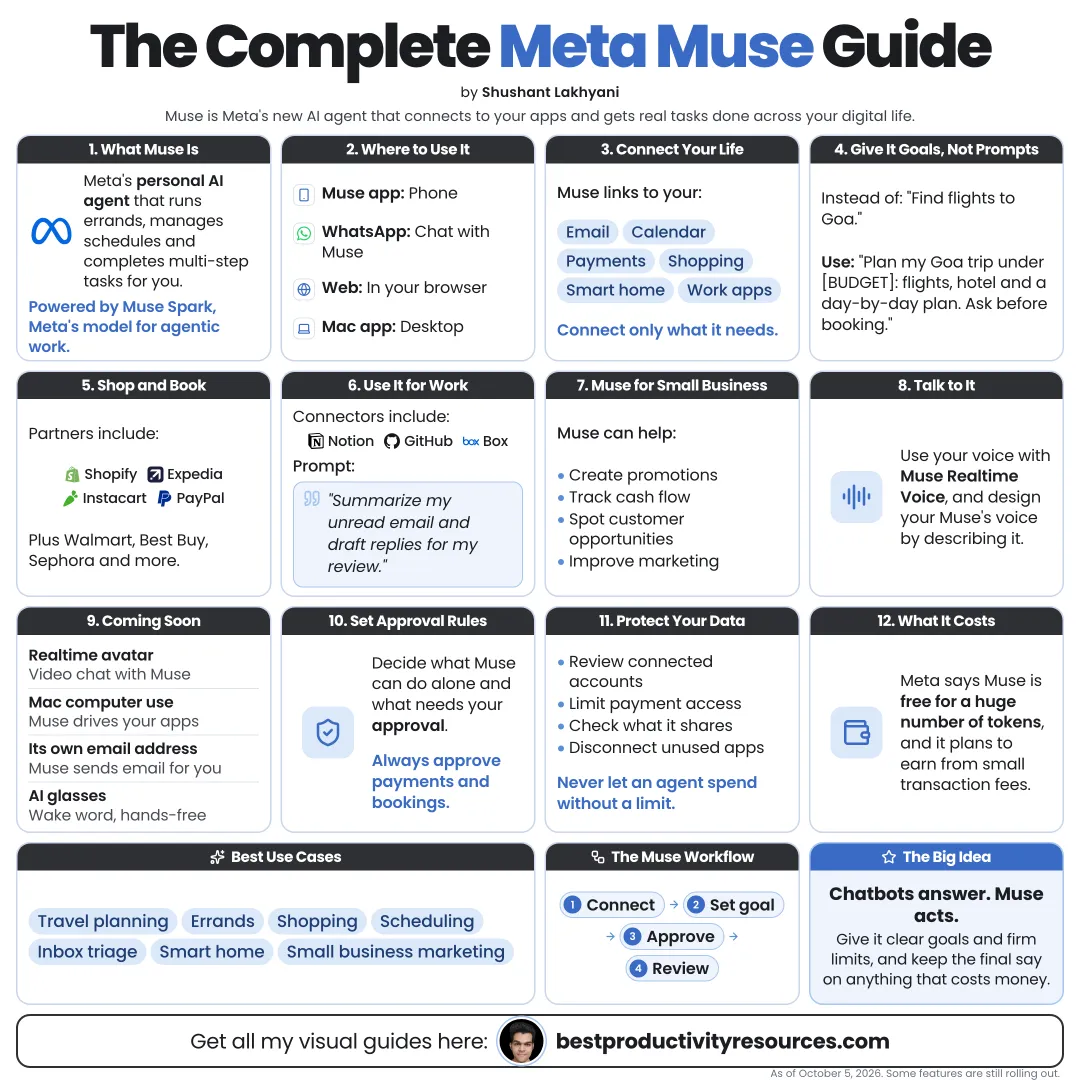
Turn Meta’s Muse agent into a careful helper for everyday errands, planning, and small business work
16 bite-sized sections
5 min read
Free, no signup
Short answer
A free Meta Muse guide for October 2026: what Muse is, plans and weekly limits, Secure VM and Sentinel approvals, connectors, setup, everyday and small business tasks, prompts, privacy settings, and what not to hand over.
Muse is Meta’s personal AI agent. Meta launched it in the US on September 8, 2026, on iOS, Android, and the web. It runs on Muse Spark, Meta’s model built for agentic work.
Unlike a typical chatbot, it can:
Link to your email and calendar
Work inside its own cloud browser
Complete multi-step tasks across sites and apps
Draft and send messages once you approve
Shop and book with connected partners
Plan longer-term goals alongside you
Muse takes actions, not just questions. That is why it needs firm limits.
02
Compare plans and limits
Free
A free usage limit that refreshes weekly
Power
$20 a month, roughly 500 million tokens a week
Maximum
$100 a month, roughly 3 billion tokens a week
Long, multi-step tasks burn far more tokens than chat. Plans and availability can change, so check the current details in the app.
03
See how Muse keeps actions in check
Secure VM
A dedicated cloud computer with its own browser, which holds your agent and its connected sign-ins. Meta says every user gets a separate virtual machine.
Sentinel
A separate agent, isolated from your Muse, that clears connector actions and network access before they run and checks with you on sensitive ones.
Live view
You can watch the browser while Muse is working.
Approvals protect you only if you read them before tapping yes.
04
Set up your agent
Pick its name, avatar, and communication style
Tell it who you are and where you want help
Set preferences for budget limits, brands, times, and tone
Connect only the accounts a task requires
Check your privacy settings before the first task
Begin with one low-risk task, like planning a week of meals, before you trust it with anything that involves money.
05
Connect tools with care
Muse connects to email and calendar, plus partners that include:
Payments: Stripe, Shop Pay, and PayPal
Shopping: Shopify stores, Best Buy, Gap, Sephora, Walmart, and Wayfair
Canva, Figma, Klaviyo, HighLevel, Lovable, Granola, and Zoom
Use it to answer common customer questions, draft posts in your brand voice, summarize sales, and shape campaign ideas. Approve anything public or financial yourself.
10
Watch what comes next
Meta announced these at Meta Connect on September 23, 2026:
Real-time video chats with a Muse avatar
Muse operating apps on a Mac
A dedicated email address for forwarded threads
Muse on Meta’s smart glasses, with a wake word
Meta announced some of these for the coming months. Check what is live in your app.
11
Write tasks Muse can actually finish
A strong task spells out:
The goal
The budget or limits
Your preferences
The accounts it may use
What it must ask about first
What done looks like
Find three hotels in Lisbon for October 20 to 23, under $180 a night, close to public transport, with free cancellation. Do not book. Show me the options with links and the total cost.
12
Protect your privacy
Turn off training on your chats if you prefer: Meta uses them by default
Never paste passwords or one-time codes into chat
Limit health, legal, and financial details to what a task needs
Review connected accounts once a month
Delete conversations you do not need
13
Know where it falls short
Some sites block AI agents, so a task may not finish on every site.
Prices and availability can shift between search and checkout
Agents can misread web pages and forms
Long tasks drain your weekly limit fast
Muse can make mistakes, so double-check important results
14
Try these prompts
“Summarize my unread email and draft replies to the three most urgent messages.”
“Plan this week’s dinners under $80 and fill an Instacart basket. Do not check out.”
“Find a slot next week for a 30-minute call with Sam and draft the invite.”
“Compare these three laptops on price, battery life, and weight.”
“Build a weekly plan to get ready for my driving test in six weeks.”
“List my subscriptions from email receipts with their renewal dates.”
“Write three Instagram captions for this product in my brand voice.”
“Summarize last week’s sales and suggest one thing to test.”
“Find refundable flights to Chicago for these dates. Hold nothing.”
“Tell me what you need from me to finish this task.”
15
Split the work between you and Muse
Muse handles
Searching, comparing, drafting, scheduling, form filling, tracking, and reminders.
You handle
Approving payments, sending important messages, sharing sensitive data, and making final decisions.
16
Use the master Muse prompt
You are my personal assistant for [area of life or business].
My goal: [goal]. My limits: [budget, time, brands, places].
You may use: [connected accounts]. You may not use: [accounts or data].
Work step by step. Show me options before you act.
Always ask before you buy, book, send, post, delete, or share personal data.
When you are done, summarize what you did, what it cost, and what still needs my decision.
Follow the golden rule
Do not hand Muse your whole life. Give it one clear task and firm limits, and keep the final yes for yourself.
Goal
Limits
Connect
Approve
Verify
Privacy
Start with a single errand this week. Add more only once you trust how it works.
It has 16 sections, starting with “Get to know Meta Muse”, “Compare plans and limits”, “See how Muse keeps actions in check” and “Set up your agent”, plus 12 more sections.
How long does it take to read?
About 5 minutes. Every section is a short, self-contained card, so you can jump straight to the part you need.
Is this guide free?
Yes. The full guide is free to read on this page, with no sign-up.
For research and ideas only. Results vary and nothing here is a promise of income. See our Disclaimer.
See you Monday!
Weekly newsletter
Everything new, every Monday.
One short email every Monday with everything shipped that week: new free tools and websites, new guides, new free browser tools and what's new in my free Gumroad libraries, plus how the site is growing. Free, and you can unsubscribe anytime.
You sign up on Gumroad, which stores your email to send the newsletter. See our Privacy Policy.
Cookies and your choices
Visits are counted by Cloudflare Web Analytics, which sets no cookies and stores nothing on your device. An affiliate tracking script from Impact.com also loads on our pages and can set its own cookies so partner companies can credit us for sign-ups. Essential storage is always on so pages load and work correctly. You decide whether your browsing preferences are saved on your device. Read the Privacy Policy.