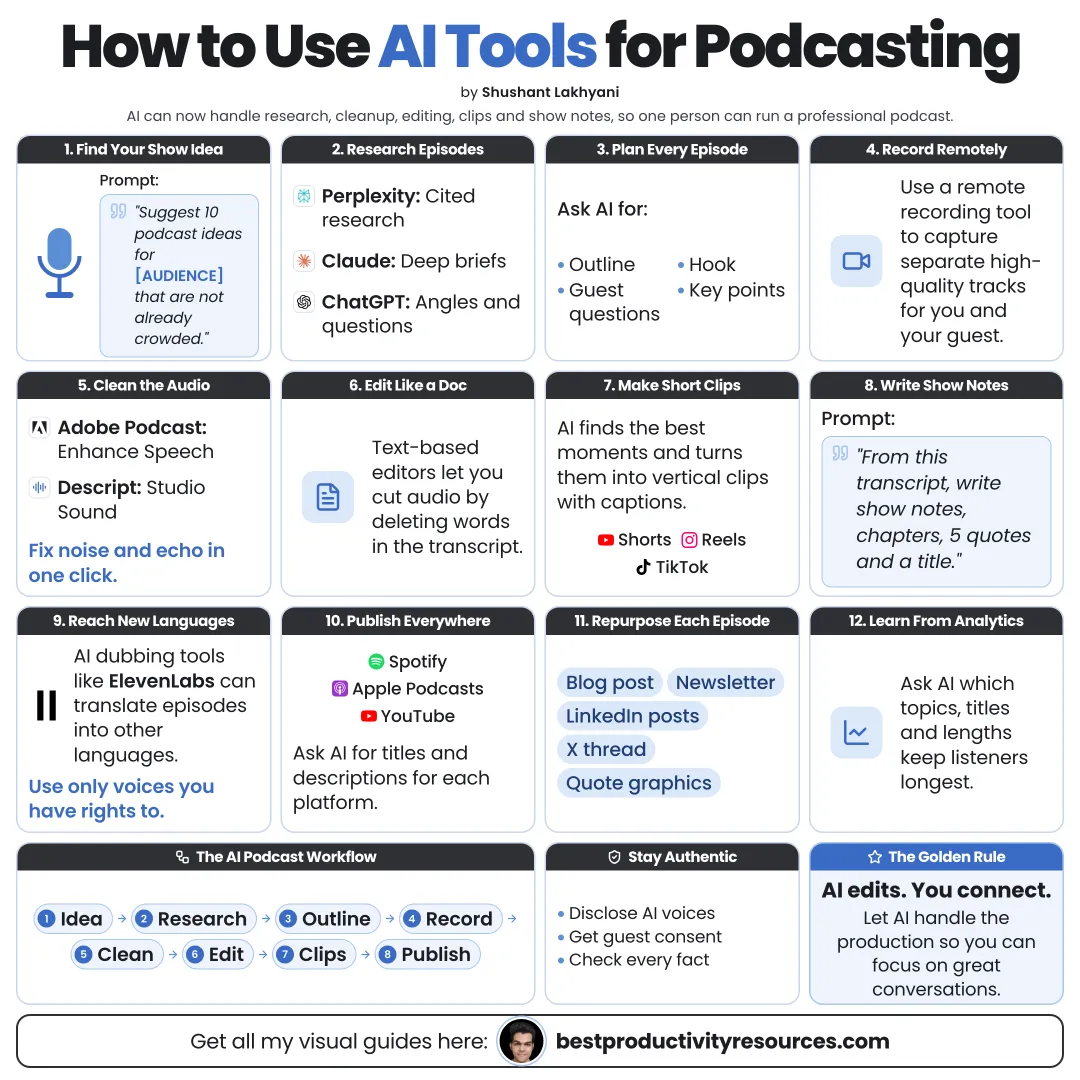
Turn one recording into a polished episode, clips, show notes, and growth, with AI doing the heavy lifting
16 bite-sized sections
4 min read
Free, no signup
Short answer
A free guide to using AI tools for podcasting in 2026: plan episodes, research guests, write outlines, record with Riverside, clean audio with Adobe Podcast, edit with Descript, create clips, write show notes, translate, grow your show, and use AI voices responsibly.
Give me 20 episode ideas for a podcast about [topic] for [audience]. For each one, include the listener’s question, a working title, and why it matters right now.
04
Research guests and topics
Summarize the guest’s public work and past interviews
Find questions they rarely get asked
Gather facts and sources on the topic
Build a one-page brief
Gemini Notebook works well for research grounded in sources you upload. Verify every fact before you say it on air.
05
Write the outline
A hook for the opening 30 seconds
Three to five core segments
Open questions, never yes-or-no ones
Follow-up prompts for each segment
A clear ending and a call to action
Outline the episode, but do not script it word for word. Natural conversation sounds better.
06
Record with quality
Use a decent microphone in a quiet room with soft surfaces
Record every speaker on a separate track
Use a platform such as Riverside for remote interviews with local tracks
Run a short sound check first
Record a backup every time
AI can clean audio. It cannot fully rescue a bad recording.
07
Clean up the audio
Adobe Podcast Enhance Speech for quick, free cleanup in the browser
Descript Studio Sound for cleanup right inside your editor
Noise and echo removal
Loudness leveled to podcast standards
Do not over-process. Heavy enhancement makes voices sound artificial.
08
Edit with the transcript
Tools such as Descript and Riverside let you edit audio and video by editing the text:
Remove filler words
Trim long pauses
Cut off-topic tangents
Reorder segments
Fix small slips
Listen to the full final edit. Automatic cuts can strip out meaning.
09
Create clips for social
Pick the strongest moments that stand alone
Add captions to every clip
Reframe each clip for vertical video
Open with a strong first line
Point back to the full episode
Clip tools such as Opus Clip, Riverside, and Descript can suggest moments. You choose the final clips.
10
Draft show notes and chapters
Ask AI to draft these from the transcript:
A clear episode title
A short description
Key takeaways for listeners
Chapters with timestamps
Links and resources mentioned on air
A short guest bio
Check every timestamp and link before you publish.
11
Repurpose every episode
A blog post
A newsletter
LinkedIn and X posts
Quote graphics
A short video summary
One episode should fuel a full week of content.
12
Translate to reach new audiences
AI dubbing and voice tools such as ElevenLabs can translate episodes into other languages while keeping a similar voice.
Get consent from every voice you clone or dub
Have a fluent speaker review each translation
Tell listeners whenever audio is AI-generated
13
Use AI voices responsibly
Never clone any voice without explicit permission
Disclose any AI-generated voices and hosts
Never use AI to imitate real people
Check every platform’s rules on synthetic content
Keep your own voice at the heart of the show
14
Grow your show
Write titles that match what people search for
Publish full episodes on YouTube as well as on audio platforms
Post clips on a steady schedule
Invite guests who bring their own audiences
Invite listeners to send reviews and questions
Review your analytics every month
15
Build a simple AI podcast stack
Plan and research
Claude, ChatGPT, or Gemini, plus Gemini Notebook for sources
Record
Riverside or a similar platform
Clean
Adobe Podcast or Descript Studio Sound
Edit
Descript or Riverside
Clips
Opus Clip, Riverside, or Descript
Voice and dubbing
ElevenLabs, always with consent
Host
A podcast host that distributes to Apple Podcasts, Spotify, and YouTube
16
Use the master podcast prompt
Act as my podcast producer for a show about [topic] for [audience].
From this transcript, write: five title options, a 100-word description, the key takeaways, chapters with timestamps, the five best clip moments with start and end times and why each one works, and a newsletter summary.
Use only what the transcript contains. Never invent quotes or facts.
Transcript: [paste here]
Keep the golden rule
Do not use AI to replace the conversation. Use it to prepare better, edit faster, and take every episode further.
Plan
Research
Record
Clean
Edit
Clips
Notes
Grow
Start by handing AI the show notes and clips for your next episode. Add more steps once that saves you time.
What does “How to Use AI Tools for Podcasting” cover?
It has 16 sections, starting with “See what AI can do for a podcast”, “Follow the AI podcast workflow”, “Plan your episodes” and “Research guests and topics”, plus 12 more sections.
How long does it take to read?
About 4 minutes. Every section is a short, self-contained card, so you can jump straight to the part you need.
Is this guide free?
Yes. The full guide is free to read on this page, with no sign-up.
For research and ideas only. Results vary and nothing here is a promise of income. See our Disclaimer.
See you Monday!
Weekly newsletter
Everything new, every Monday.
One short email every Monday with everything shipped that week: new free tools and websites, new guides, new free browser tools and what's new in my free Gumroad libraries, plus how the site is growing. Free, and you can unsubscribe anytime.
You sign up on Gumroad, which stores your email to send the newsletter. See our Privacy Policy.
Cookies and your choices
Visits are counted by Cloudflare Web Analytics, which sets no cookies and stores nothing on your device. An affiliate tracking script from Impact.com also loads on our pages and can set its own cookies so partner companies can credit us for sign-ups. Essential storage is always on so pages load and work correctly. You decide whether your browsing preferences are saved on your device. Read the Privacy Policy.