Skip to content
Day 69: new resources are added every day. See what's new

Free guide

Complete AI Tool Stack for One-Person Businesses

Turn a small, well-chosen set of AI tools into the team behind your one-person business

  • 20 bite-sized sections
  • 4 min read
  • Free, no signup

Short answer

A free guide to the complete AI tool stack for one-person businesses in 2026: assistants, research, writing, design, video, website, coding agents, AI agents, automation, CRM, email, payments, finance, support, and knowledge, plus how to choose, connect, and control costs.

Updated

Built with love by Shushant Lakhyani. Building bestproductivityresources.com

Inside this guide

Short cards you can read in order or jump straight to. Tap the link icon on any card to share just that part.

01

Understand what an AI tool stack is

Your tool stack is the set of tools that runs your business. In a one-person business, AI tools cover roles that used to require hires.

A good stack:

  • Covers every core job in the business
  • Uses one main tool per job
  • Connects tools so data moves between them
  • Stays affordable as you grow
  • Keeps your data protected

The best stack is not the biggest one. It is the smallest one that still runs your business.

02

Start with one main AI assistant

Claude
Writing, analysis, long documents, Projects, Skills, and Claude Code for building. Paid plans start at $20 a month.
ChatGPT
A general assistant with image generation, Codex for building, and a wide app ecosystem. Paid plans start at $20 a month.
Gemini
A strong fit if your work lives in Google Workspace.

Choose one as your main assistant and learn it well. Add a second only when you have a clear reason.

03

Pick research tools

  • Your main assistant, with web research
  • Gemini Notebook, for research grounded in your own sources
  • Perplexity, for quick answers with citations

Check every important fact against the original source.

04

Pick writing and content tools

  • Your main assistant, with a brand voice guide saved in a Project
  • Grammarly, for proofreading
  • Notion, for drafts and a content calendar
05

Pick design tools

  • Canva, for social graphics, presentations, and documents
  • Figma, for interface and web design
  • Claude Design, for prototypes and mockups
  • AI image generation inside ChatGPT or Gemini

Only use images and fonts you have the rights to.

06

Pick video and audio tools

  • Descript or CapCut, for editing
  • Riverside, for recording interviews
  • Adobe Podcast, for cleaning up audio
  • ElevenLabs, for licensed AI voices, disclosed to listeners
  • Opus Clip, for short clips
07

Pick a website builder

  • Lovable, for building sites and apps from prompts
  • Framer or Webflow, for designer-friendly sites
  • Claude Code or Codex, for custom builds

Begin with a single page that explains your offer and how to buy it.

08

Add a coding agent

Claude Code
Anthropic’s agent for building and maintaining code. Comes with paid Claude plans.
OpenAI Codex
OpenAI’s coding agent. Included starting with ChatGPT Plus.
Cursor
An AI-powered code editor.

With a coding agent, one person can build internal tools, automations, and products.

09

Add AI agents for operations

  • Grok Bot, for AI teammates that work in your tools on a cloud computer
  • Claude in Chrome, for browser tasks
  • ChatGPT agent features, for multi-step web tasks

Leave approvals switched on for sending, spending, and deleting.

10

Automate proven workflows

  • Zapier, for connecting thousands of apps
  • Make, for visual multi-step workflows
  • n8n, for self-hosted and technical automations

Automate a process only after you have run it by hand and know it works.

11

Set up sales and CRM

  • HubSpot, which offers a free CRM
  • Attio or Folk, for lightweight relationship CRMs
  • Calendly or Cal.com, for booking
12

Choose an email marketing platform

  • Kit or beehiiv, for newsletters
  • Klaviyo, for e-commerce email
  • Mailchimp, for general email marketing

Email only people who opted in, and make unsubscribing simple.

13

Set up payments and selling

  • Stripe, for payments and subscriptions
  • Lemon Squeezy or Gumroad, for digital products
  • Shopify, for physical products
14

Handle finance and admin

  • QuickBooks or Xero, for accounting
  • A dedicated business bank account
  • Your AI assistant, for sorting receipts and summarizing spending

Ask a qualified professional to confirm tax and legal questions.

15

Cover customer support

  • A shared help inbox or help desk
  • An FAQ page drawn from real customer questions
  • AI-drafted replies that you approve
  • Intercom or a similar tool once volume grows
16

Organize your knowledge

  • Notion, as your business wiki and project hub
  • Claude Projects, for your business context
  • Google Drive or Dropbox, for files
  • A password manager, for every account
17

Grow from starter to scale

Starter
One AI assistant, Canva, a simple website, Stripe, and a free CRM
Growth
Then add an email platform, a coding agent, automation, and accounting
Scale
Then add AI agents, a help desk, analytics, and team plans

Add a tool when a real bottleneck shows up, not when a shiny new tool launches.

18

Control your costs

  • List each subscription with its monthly cost
  • Stay on free tiers until you outgrow them
  • Pay annually only for tools you depend on
  • Cancel anything you have not used in a month
  • Audit the stack every quarter
19

Keep your stack secure

  • Turn on a password manager and two-factor authentication
  • Grant AI tools only the access they need
  • Review data and training settings in every AI tool
  • Keep client data away from tools that should not hold it
  • Revoke access when you stop using a tool
20

Run the master stack prompt

Act as my operations advisor. My business: [what I sell] to [customer]. Monthly tool budget: [amount]. Technical skill: [level]. My current tools and their costs: [list]. Recommend the smallest AI tool stack that covers research, content, design, website, sales, email, payments, finance, support, and automation. For each tool, explain why you chose it, what it replaces, and roughly what it costs. Flag overlaps and any tools I can cancel. Remind me to confirm current prices on each vendor’s site.

The real opportunity

Do not ask: “Which AI tools should I buy?” Ask: “Which job in my business needs a tool, and which one tool does it best?”

  • Assistant
  • Research
  • Content
  • Website
  • Agents
  • Automation
  • Sales
  • Finance

Begin with one AI assistant and one payment tool. Add the next tool only when the business calls for it.

Earnings note: nothing here promises income. Any figures or examples are illustrations, not typical results; what you earn depends on your skills, effort, market and luck, and many people earn little or nothing. This is general information, not financial, legal or tax advice. See our disclaimer.

Share this guide

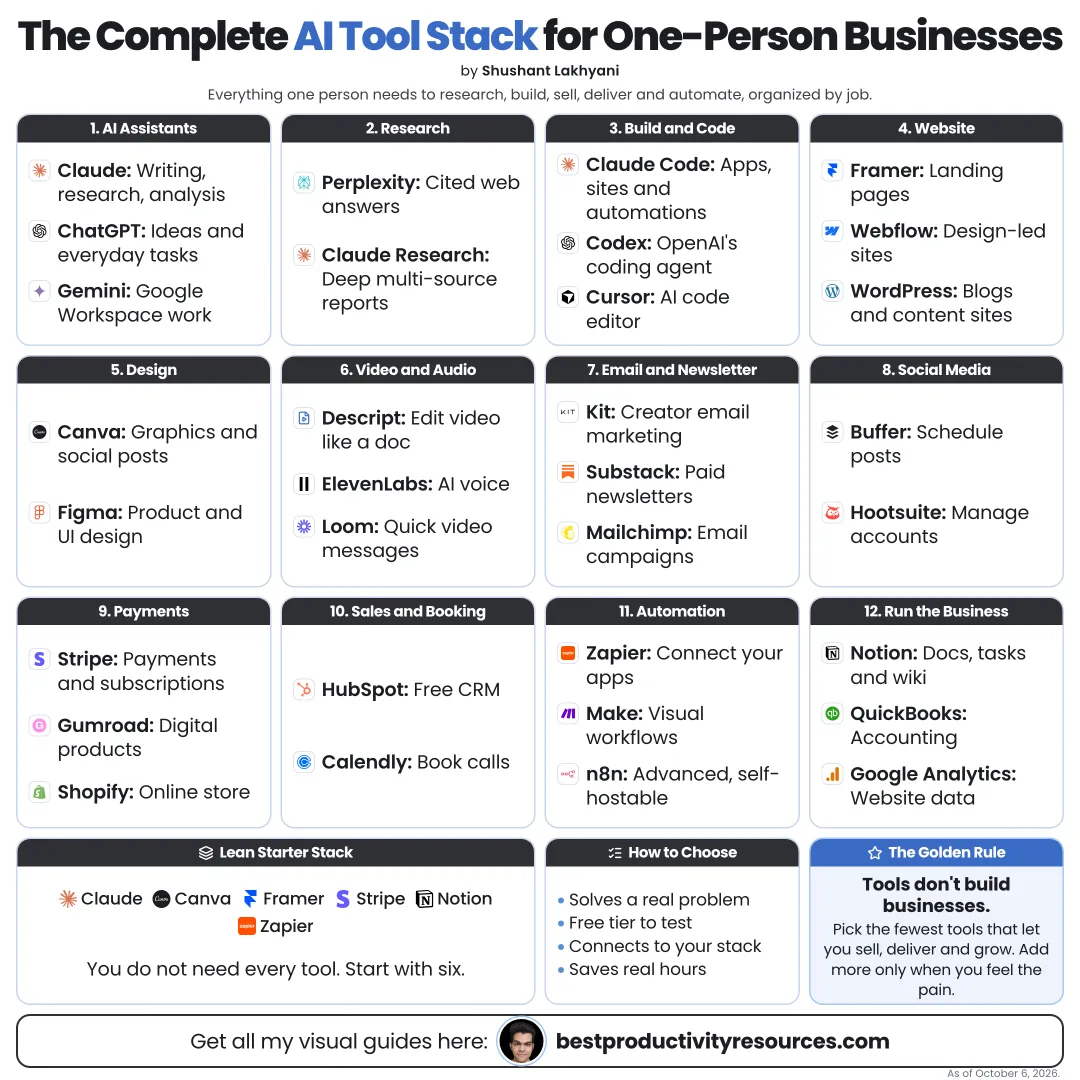
The whole guide on one page

The same guide as one infographic. Save it, pin it or share it.

Frequently asked questions

The quick answers, if you just need the gist.

What does “Complete AI Tool Stack for One-Person Businesses” cover?
It has 20 sections, starting with “Understand what an AI tool stack is”, “Start with one main AI assistant”, “Pick research tools” and “Pick writing and content tools”, plus 16 more sections.
How long does it take to read?
About 4 minutes. Every section is a short, self-contained card, so you can jump straight to the part you need.
Is this guide free?
Yes. The full guide is free to read on this page, with no sign-up.
When was this guide last updated?
It was last updated in October 2026.

Keep reading

More free guides you might like. Still no signup.

Free Notion database

1,100+ ways people are making money online

Real online businesses, creators and projects, broken down by how they make money: apps, online stores, AI tools and more. Free on Gumroad.

Get the free database

Free Notion database

399+ ways to make money online

Hundreds of online income methods in one place, so you can compare options and pick one to try. Free on Gumroad.

Get the free list

For research and ideas only. Results vary and nothing here is a promise of income. See our Disclaimer.

Weekly newsletter

Everything new, every Monday.

One short email every Monday with everything shipped that week: new free tools and websites, new guides, new free browser tools and what's new in my free Gumroad libraries, plus how the site is growing. Free, and you can unsubscribe anytime.

Join the newsletter

You sign up on Gumroad, which stores your email to send the newsletter. See our Privacy Policy.