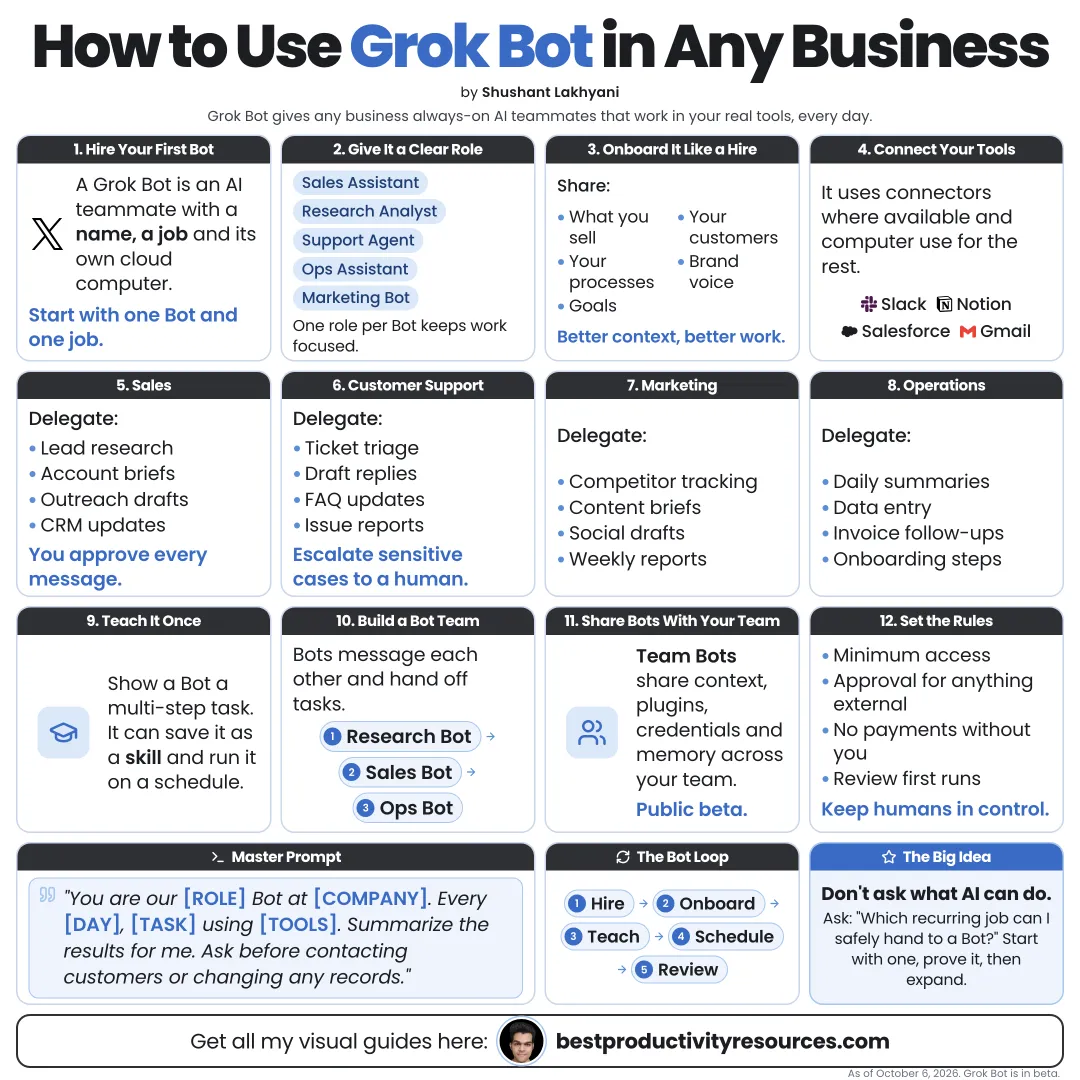
Turn Grok Bot into AI teammates that take repeatable work off your plate, in any industry
15 bite-sized sections
4 min read
Free, no signup
Short answer
A free guide to using xAI’s Grok Bot in any business: find repeatable work, create focused bots, give safe access, teach skills, run routines, use bots across sales, operations, finance, support, and HR, and keep approvals and security in place.
Grok Bot is xAI’s app for AI teammates, in beta since August 11, 2026. Every bot gets a name, a job, and memory, and it works on a cloud computer with a browser, files, and a terminal.
Unlike an ordinary chatbot, it can:
Sign in to the tools your business already runs on
Work across apps and websites, even where no connector exists
Keep going after you close your laptop
Learn a workflow you show it once
Run jobs on a set schedule
Coordinate with other bots
Ask for approval before any consequential action
Grok Bot earns its keep on work that repeats, follows steps, and eats your best hours.
02
Check who can use it
Grok Bot comes with Premium, Super, and Ultra on The X Subscription, existing SuperGrok plans, and paid Cursor plans including Teams, and through an Enterprise waitlist. It carries its own weekly usage allowance. Apps are available on macOS, Windows, Linux, iPhone, iPad, and Android.
03
Pick the right work to hand over
Shortlist tasks that are:
Repeated daily or weekly
Done in a browser or everyday apps
Rule-based, with clear steps
Easy to check once finished
Low risk if a draft goes wrong
Begin where mistakes are cheap and the time saved is real.
04
Map one workflow first
Write down each step you take today:
What triggers the task
Which tools you open
What information you gather
Which decisions you make
What the finished output should look like
Who gets it
If you cannot describe the steps, no bot can repeat them reliably.
05
Create a focused bot
Example
Name: Ops Assistant
Job: Invoice processing
Description: Pull new invoices from the shared inbox, extract the supplier, amount, and due date, log them in the tracker, and flag anything unusual. Never pay or reply.
One bot, one job, one clear finish line.
06
Grant safe access
Connect only the tools the job requires
Choose connectors over screen control wherever they exist
Enter passwords and two-factor codes yourself, never in chat
Remember that every bot on your account shares one cloud computer, its files, and its browser sessions
Revoke access the bot no longer needs
Bots act as whoever is signed in. They can reach anything that person can reach.
07
Teach skills by showing
Run the workflow once while the bot watches. It can save the repeatable path as a skill and rerun it on new inputs.
Watch the first few runs closely before you depend on it.
08
Schedule recurring routines
Every morning: sum up new leads and messages
Every Monday: build the weekly pipeline or sales report
Every Friday: write a draft of the team update
Every month: match invoices against the tracker
09
Apply it across the business
Sales
Research accounts, draft outreach, update the CRM, and set up demo environments.
Operations
Process invoices and orders, keep trackers current, and reconcile records.
Finance
Gather receipts, build reports, and flag unusual spending for review.
Support
Draft replies, reproduce bugs, and file tickets with steps and screenshots.
HR
Build onboarding checklists, book sessions, and set up accounts with approval.
Marketing
Study competitors, draft posts, and compile performance reports.
10
Match it to your business type
Agency
Weekly client reports plus campaign research
E-commerce
Order problems, supplier updates, and draft product listings
Consulting
Prospect research plus first-draft proposals
Local service
Booking follow-ups and draft replies to reviews
Software
Reproducing bugs and triaging tickets
Real estate
Listing research plus draft client updates
11
Keep approvals on what matters
Grok Bot sends drafts for approval and checks with you before consequential decisions. Always sign off personally on:
Payments and purchases
Messages to customers and partners
Public posts
Deletions
Changes to production systems
Anything that touches personal data
Turn on Auto-review in Settings → General → Auto-review and set risky actions to Ask first. Keep any Allow automatically rules tight.
12
Protect your business data
Grant each task the minimum access it needs
Keep sensitive files out of the shared bot workspace
Review customer data rules before connecting customer systems
Use team plans and admin controls when several people run bots
Pause routines and sign out of tools you no longer use
13
Measure the results
Hours saved each week
Tasks finished with no correction
Errors caught during review
Response speed for customers
Usage cost against time saved
If a bot creates more review work than it saves, simplify the task or shut it down.
14
Divide the work between you and the bots
Bots handle
Research, data entry, drafts, routine updates, reports, and prep work.
You handle
Strategy, customers, approvals, money, hiring calls, and quality.
15
Use the master business prompt
You are my [role] for [business], which [what the business does].
Your job: [workflow]. Use only: [tools]. Never use: [tools or data].
Every time, [steps]. Save the result in [location] and send me a short summary.
Always ask before you send, pay, post, delete, or change customer records.
If anything is unclear or unusual, stop and ask me.
The real opportunity
Do not ask: “What can Grok Bot do for my business?” Ask: “Which weekly task can one bot take off my plate, with my approval at the end?”
Find
Map
Create
Access
Teach
Schedule
Approve
Measure
Start with one bot and one workflow. Add a second only once the first saves real time.
Earnings note: nothing here promises income. Any figures or examples are illustrations, not typical results; what you earn depends on your skills, effort, market and luck, and many people earn little or nothing. This is general information, not financial, legal or tax advice. See our disclaimer.
What does “How to Use Grok Bot in Any Business” cover?
It has 15 sections, starting with “See what Grok Bot brings to a business”, “Check who can use it”, “Pick the right work to hand over” and “Map one workflow first”, plus 11 more sections.
How long does it take to read?
About 4 minutes. Every section is a short, self-contained card, so you can jump straight to the part you need.
Is this guide free?
Yes. The full guide is free to read on this page, with no sign-up.
For research and ideas only. Results vary and nothing here is a promise of income. See our Disclaimer.
See you Monday!
Weekly newsletter
Everything new, every Monday.
One short email every Monday with everything shipped that week: new free tools and websites, new guides, new free browser tools and what's new in my free Gumroad libraries, plus how the site is growing. Free, and you can unsubscribe anytime.
You sign up on Gumroad, which stores your email to send the newsletter. See our Privacy Policy.
Cookies and your choices
Visits are counted by Cloudflare Web Analytics, which sets no cookies and stores nothing on your device. An affiliate tracking script from Impact.com also loads on our pages and can set its own cookies so partner companies can credit us for sign-ups. Essential storage is always on so pages load and work correctly. You decide whether your browsing preferences are saved on your device. Read the Privacy Policy.