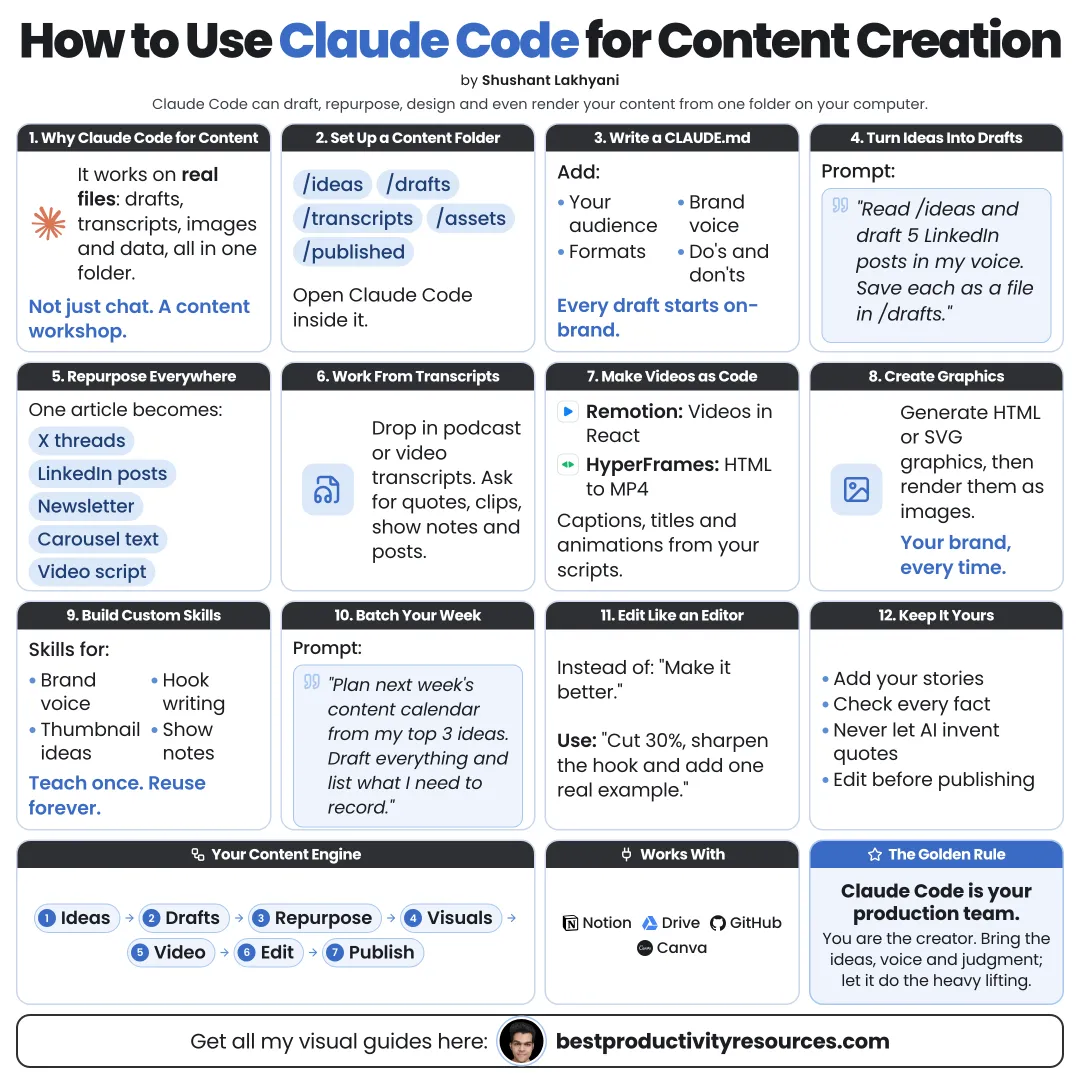
Turn Claude Code into a content studio that researches, writes, designs, and repurposes from one folder
15 bite-sized sections
4 min read
Free, no signup
Short answer
A free guide to using Claude Code for content creation: set up a content folder, write CLAUDE.md with your voice, research with sources, draft articles, newsletters, and scripts, build visuals and videos with code, repurpose content, use skills, plugins, and routines, and review everything before publishing.
Claude Code is Anthropic’s agentic tool for working with the files on your computer. Most people point it at software, yet a content library is files too: notes, drafts, images, and scripts.
Unlike a regular chat, Claude Code can:
Read your entire content library
Apply your voice rules in every session
Create and organize many files in one go
Research the web and cite sources
Build images, slides, and videos from content with code
Repurpose one piece into many formats
Package repeatable content workflows as skills
A chat helps you with one post. Claude Code helps you run an entire content system.
02
Set it up
Every paid Claude plan includes Claude Code, starting with Pro at $20 a month. On macOS or Linux, install it with:
curl -fsSL https://claude.ai/install.sh | bash
Rather skip the terminal? Open the Code tab in the Claude desktop app.
03
Create a content folder
Example structure
brand: voice guide, audience, and examples
research: sources and notes
ideas: the backlog
drafts: work in progress
published: final versions
assets: images, logos, and audio
templates: reusable formats
Track the folder in Git so you can undo any change.
04
Write your voice into CLAUDE.md
Run /init, then spell out:
Who your audience is
Your tone and go-to words
Words and phrases you avoid
Formatting rules per platform
Three samples of your best content
Your fact-checking rules
Where each file belongs
The sharper your CLAUDE.md, the more each draft sounds like you.
05
Research with sources
Research [topic] for an article aimed at [audience]. Use current, reputable sources. Save your notes to research/[topic].md with a link for each claim, and flag anything uncertain.
Open and verify the key sources yourself before anything goes live.
06
Draft long-form content
Articles and blog posts
Newsletters
Guides and ebooks
Case studies
Video and podcast scripts
Request an outline first. Approve it, then request the draft. Edit in your own stories and opinions.
07
Spin one piece into many
Starting from one article, have Claude Code produce:
A LinkedIn post
A short X thread
An Instagram carousel script
A newsletter section
A short video script
Three quote graphics
An email for your list
Have it save every format as a separate file in drafts.
08
Create visuals with code
Carousels and infographics built in HTML and exported to PNG
Slides built from your outline
Charts built from your data
Thumbnails and social cards built in your brand colors
Plugins such as Canva and Adobe for Creativity can link Claude Code to those design tools.
09
Make videos with code
Code-based video tools such as HyperFrames and Remotion turn scripts into motion graphics, captions, and explainers, all of which Claude Code can write and edit.
Check every frame for accuracy, spelling, and the rights to any images or music.
10
Package repeat work as skills
A skill is a folder with a SKILL.md file that packages one workflow. Strong content skills include:
A newsletter from this week’s notes
An article repurposed into five formats
A brand voice check
A fact-check of a draft
A carousel in house style
Ask Claude Code to help you write each skill, then refine it after every use.
Claude Code routines can run scheduled jobs in the cloud, even while your computer is off:
Monday: gather trending topics in your niche
Wednesday: draft the newsletter from your notes
Friday: sum up what performed best
Publishing stays a human step.
13
Review before publishing
Verify every fact and number
Read it aloud
Add your own experience
Confirm image and music rights
Follow each platform’s AI disclosure rules
Cut anything you would not say yourself
14
Run a weekly content workflow
Monday
Research and pick topics
Tuesday
Outline and write the main draft
Wednesday
Edit and build visuals
Thursday
Repurpose into short formats
Friday
Review performance and refresh ideas
15
Use a master content prompt
Read CLAUDE.md and follow my voice rules to the letter.
Topic: [topic]. Audience: [audience]. Goal: [goal].
Research current sources and save notes with links. Then propose an outline and wait until I approve it.
Once approved, write the main piece and repurpose it into a LinkedIn post, an X thread, a newsletter section, and a short video script. Save each one in drafts.
List every factual claim with its source so I can verify it. Never publish anything.
The golden rule
Do not use Claude Code to publish more content. Use it to put your best ideas in more places, in your own voice.
Folder
CLAUDE.md
Research
Draft
Repurpose
Visuals
Skills
Review
Start with one article this week and repurpose it into five formats. Then turn that process into a skill.
What does “How to Use Claude Code for Content Creation” cover?
It has 15 sections, starting with “See why Claude Code fits content work”, “Set it up”, “Create a content folder” and “Write your voice into CLAUDE.md”, plus 11 more sections.
How long does it take to read?
About 4 minutes. Every section is a short, self-contained card, so you can jump straight to the part you need.
Is this guide free?
Yes. The full guide is free to read on this page, with no sign-up.
For research and ideas only. Results vary and nothing here is a promise of income. See our Disclaimer.
See you Monday!
Weekly newsletter
Everything new, every Monday.
One short email every Monday with everything shipped that week: new free tools and websites, new guides, new free browser tools and what's new in my free Gumroad libraries, plus how the site is growing. Free, and you can unsubscribe anytime.
You sign up on Gumroad, which stores your email to send the newsletter. See our Privacy Policy.
Cookies and your choices
Visits are counted by Cloudflare Web Analytics, which sets no cookies and stores nothing on your device. An affiliate tracking script from Impact.com also loads on our pages and can set its own cookies so partner companies can credit us for sign-ups. Essential storage is always on so pages load and work correctly. You decide whether your browsing preferences are saved on your device. Read the Privacy Policy.