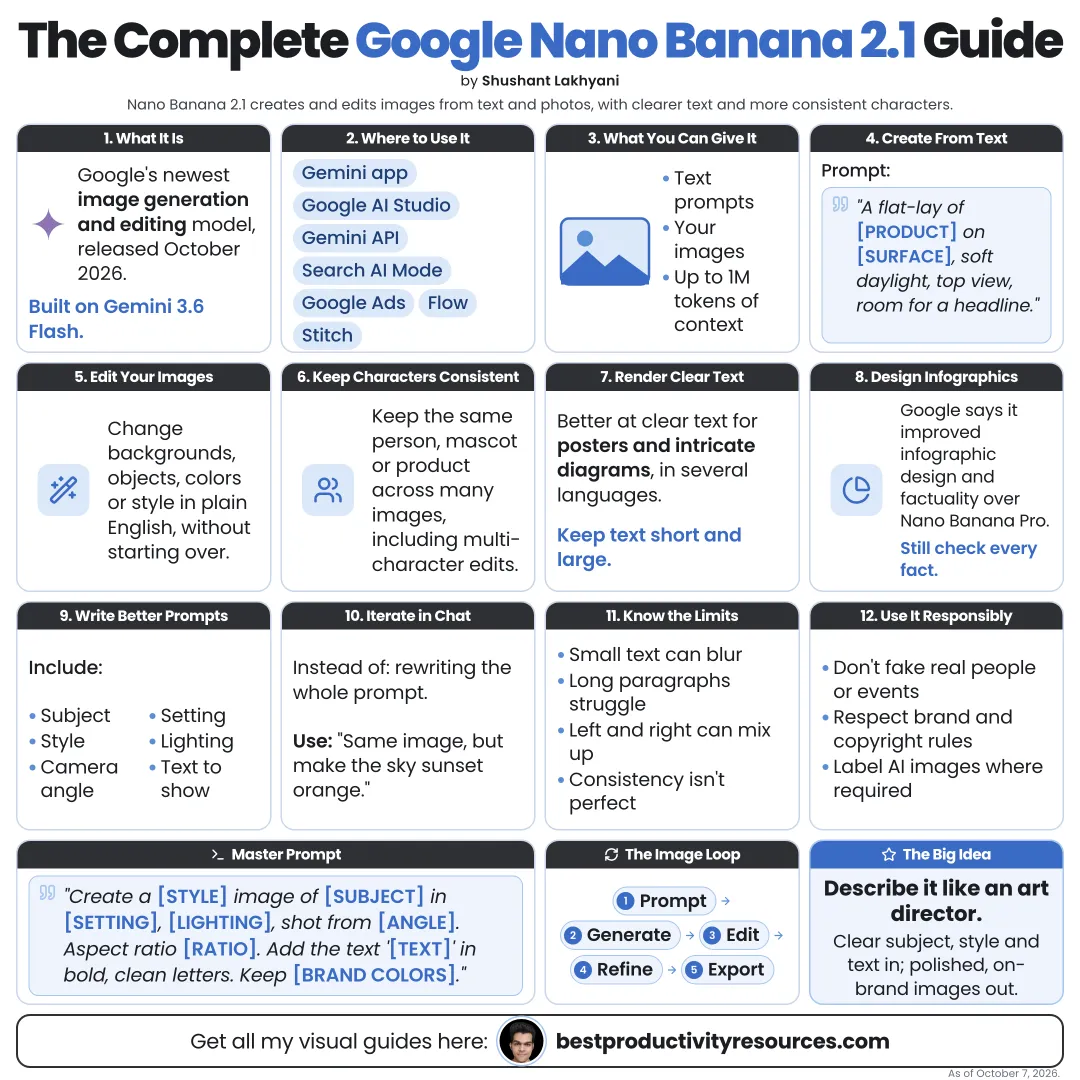
Turn Google’s newest image model into precise, on-brand visuals, from first prompt to 4K edits
15 bite-sized sections
5 min read
Free, no signup
Short answer
A free Google Nano Banana 2.1 guide for October 2026: what it is, where to use it, 4K output, 14 reference images, character consistency, mask editing, text rendering, search grounding, thinking, API pricing, prompts, known limitations, and responsible use.
Nano Banana 2.1 is Google’s image generation and editing model, released on October 6, 2026. It belongs to the Gemini 3 series and runs on Gemini 3.6 Flash.
Unlike a simple image generator, it can:
Create and edit images with pro-level precision
Render legible text for posters, diagrams, and infographics
Render text in several languages
Keep characters and products consistent across a series
Take up to 14 reference images
Edit just the area you mark
Pull from Google Search for real-world accuracy
Think before drawing on harder prompts
It grasps what you mean, not only what you type.
02
Find where to use it
Gemini app
Create and edit images right in chat
Search AI Mode
Generate images inside Google Search itself
Google Flow
Google’s AI tool for filmmaking and creative work
Google Stitch
Google’s AI tool for interface design
Google Ads
Build ad creative directly in Ads
Google AI Studio and Gemini API
Built for developers and automation
03
Check the key specs
Resolution
1K, 2K, and 4K
Aspect ratios
Anywhere from 1:1 to ultra-wide 8:1
References
As many as 14 reference images
Consistency
As many as 4 characters and 10 objects
Context
Up to 1 million input tokens, according to Google
Knowledge
Most domains through March 2026
04
See what improved
In Google’s own human-preference tests against Gemini 3.1 Flash, Nano Banana 2.1 scored higher for:
Overall image preference
Infographic layout and factual accuracy
General editing
Single- and multi-character consistency
Mask and ink-based editing
Thinking mode beat no-thinking mode on every measure. These are Google’s own evaluations, so test the model on your own work.
05
Write better prompts
Write the prompt like a creative brief:
Subject: who or what appears
Action: what is happening
Setting: where and when
Style: photo, illustration, 3D, or flat design
Composition: angle, framing, and layout
Lighting and color: mood and palette
Text: the exact words, in quotes
Format: aspect ratio plus resolution
A flat-style infographic titled “5 Habits of Focused Teams”, with five numbered cards in a grid, navy and white, clean sans-serif text, 4:5, 2K.
06
Render text people can read
Put the exact wording in quotes
Keep headlines brief
Name a font style, such as bold sans-serif
Choose 2K or 4K for small text
Proofread every word
Google notes that small text can blur at 1K, and long paragraphs remain a weak spot. Add long copy in a design tool afterward.
07
Hold characters and products steady
Upload sharp reference images
Give each character or product a name
Spell out what must not change
Change only one thing per edit
Reuse the same references for the whole series
Consistency is strong, not perfect. Compare every output against your references.
08
Edit precisely
Mark or describe exactly which area to change:
Swap a background
Recolor a product
Remove an object
Add an element in one spot
Restyle the entire image
Google flags partial instruction following in mask-based edits and occasional left-right mix-ups. Be explicit and check every result.
09
Ground images in real-world facts
Nano Banana 2.1 can draw on Google Search and Image Search to ground images in real information, such as landmarks, products, or current data for infographics.
Verify facts, numbers, and logos yourself before you publish.
10
Turn on thinking for harder images
Thinking lets the model plan before it generates. Raise thinking for complex layouts, infographics, and multi-character scenes, and lower it for quick drafts.
11
Review API pricing for developers
1K image
$0.0336
2K image
$0.0504
4K image
$0.113
Batch
Roughly 50% off these rates
Text input
$1.50 for every million tokens
Image prices run about half those of Nano Banana 2, but input costs more. Google’s deprecation page lists no shutdown date for Nano Banana 2 as of October 2026. Confirm on Google’s pricing and deprecation pages before you plan.
12
Know its limitations
Small text and long paragraphs can come out unclear
Character consistency can drift
Masked edits can skip instructions
Left and right can get swapped
Invented details can still appear
3D reasoning and world knowledge stay limited
Generation can be slow or time out
13
Use it responsibly
Know that Google marks generated images with SynthID watermarks and Content Credentials
Never create misleading images of real people or events
Respect trademarks and copyrights
Disclose AI-generated images wherever platforms or laws require it
Follow Google’s generative AI use policy
14
Try these ten prompts
“A clean product shot of [product] on white marble, soft daylight, 1:1, 4K.”
“Turn this sketch into a polished flat illustration in navy and orange.”
“Design a poster titled “[title]” with the date “[date]”, bold sans-serif, 2:3.”
“Replace only the background with a modern office. Leave the person unchanged.”
“Use these three photos of my character to show her reading in a café.”
“An infographic that explains [topic] in four steps, with icons, 4:5.”
“A panoramic 8:1 banner of a city skyline at dusk, for a website header.”
“Make the jacket dark green. Leave everything else as it is.”
“Translate this poster’s text into Spanish and keep the layout.”
“Show this product in three settings: kitchen, office, and outdoors.”
15
Use the master image prompt
Create a [type of image] for [purpose and audience].
Subject: [subject]. Setting: [setting]. Style: [style]. Colors: [colors].
Composition: [layout or camera angle]. Text: “[exact text]” set in [font style].
Work from these references: [describe uploads] and keep [what must stay the same].
Format: [aspect ratio], [resolution].
Avoid: [things to avoid].
The golden rule
Do not ask Nano Banana 2.1 for “a nice image.” Hand it a brief, references, exact text, and a format.
Brief
References
Text
Edit
Ground
Think
Verify
Start with one image you need this week. Refine it with small edits until it is right.
It has 15 sections, starting with “Learn what Nano Banana 2.1 is”, “Find where to use it”, “Check the key specs” and “See what improved”, plus 11 more sections.
How long does it take to read?
About 5 minutes. Every section is a short, self-contained card, so you can jump straight to the part you need.
Is this guide free?
Yes. The full guide is free to read on this page, with no sign-up.
For research and ideas only. Results vary and nothing here is a promise of income. See our Disclaimer.
See you Monday!
Weekly newsletter
Everything new, every Monday.
One short email every Monday with everything shipped that week: new free tools and websites, new guides, new free browser tools and what's new in my free Gumroad libraries, plus how the site is growing. Free, and you can unsubscribe anytime.
You sign up on Gumroad, which stores your email to send the newsletter. See our Privacy Policy.
Cookies and your choices
Visits are counted by Cloudflare Web Analytics, which sets no cookies and stores nothing on your device. An affiliate tracking script from Impact.com also loads on our pages and can set its own cookies so partner companies can credit us for sign-ups. Essential storage is always on so pages load and work correctly. You decide whether your browsing preferences are saved on your device. Read the Privacy Policy.