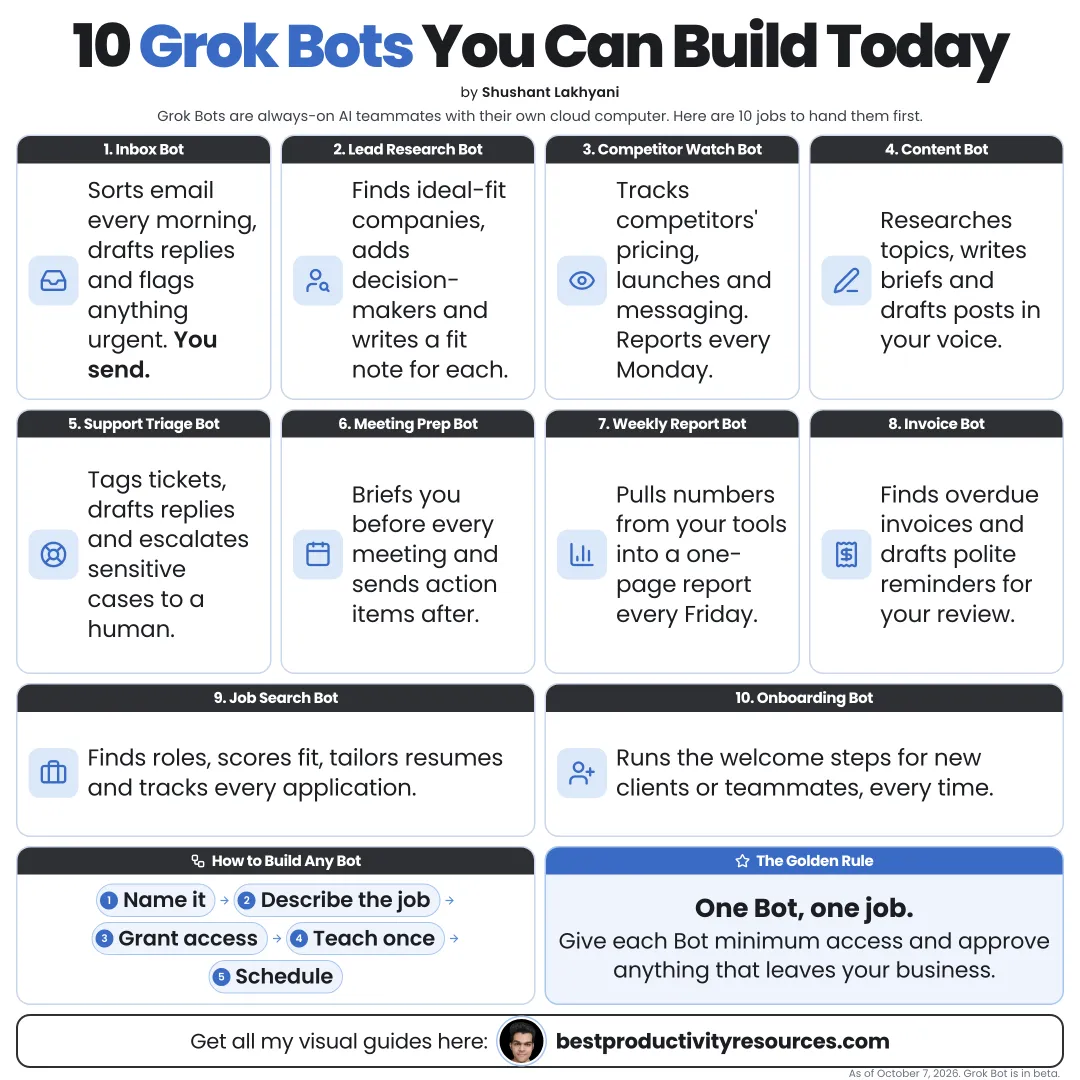
Turn Grok Bot into ten useful AI teammates, each with a clear job, a routine, and an approval rule
11 bite-sized sections
4 min read
Free, no signup
Short answer
Ten Grok Bot ideas you can build in October 2026: inbox, research, lead, CRM, content, invoice, bug, meeting, competitor, and personal admin bots, with job descriptions, routines, approval rules, and how to set them up safely.
Grok Bot is xAI’s app for AI teammates. Each bot gets a name, a job, and memory, and runs on a cloud computer that can sign in to your tools and keep working while your laptop is closed.
A good bot has:
One clear job
Only the tools it needs
A routine or trigger
A defined output and destination
An approval rule
A narrow bot you trust beats a general bot you have to babysit.
02
Check the basics before you build
Grok Bot comes with Premium, Super, and Ultra plans, existing SuperGrok plans, paid Cursor plans, and team plans
Usage draws on its own separate weekly allowance
Every bot you make shares one cloud computer, its files, and its browser sessions
Passwords and two-factor codes get typed by you, never in chat
Auto-review should be set to Ask first for sending, paying, posting, and deleting
03
Build communication bots
1 · Inbox Bot
Job: Email triage
What it does: Each morning, ranks unread email by priority, summarizes threads, and drafts replies in your tone.
Approval rule: Drafts only. Never sends.
2 · Meeting Bot
Job: Meeting preparation and follow-up
What it does: Writes a brief before each meeting, then drafts follow-ups and action items afterward.
Approval rule: Sends every follow-up to you for approval.
04
Build research bots
3 · Research Bot
Job: Research briefs
What it does: Researches companies, people’s public work, or topics, then writes one-page briefs with source links.
Approval rule: Flags anything it could not confirm.
4 · Competitor Bot
Job: Competitor tracking
What it does: Checks competitor sites and announcements on a schedule and logs any change in pricing, features, or messaging.
Approval rule: Messages you only about important changes.
05
Build sales bots
5 · Lead Bot
Job: Lead research
What it does: Finds companies that fit your ideal customer, notes one recent signal, and scores the fit with reasons.
Approval rule: Sticks to public business sources. Never contacts anyone.
6 · CRM Bot
Job: CRM hygiene
What it does: Logs calls and emails, updates deal stages and next steps, and flags deals that have stalled.
Approval rule: Asks first before changing deal values or deleting records.
06
Build a content bot
7 · Content Bot
Job: Content repurposing
What it does: Turns articles, transcripts, or notes into posts, threads, and newsletter sections written in your voice.
Approval rule: Saves drafts for review. Never publishes.
07
Build operations bots
8 · Invoice Bot
Job: Invoice processing
What it does: Gathers invoices from email, copies the details into a tracker, and flags duplicates or odd amounts.
Approval rule: Never pays suppliers or replies to them.
9 · Bug Bot
Job: Bug reproduction
What it does: Reproduces reported bugs, captures steps and screenshots, and files tickets in your tracker.
Approval rule: Never touches production systems.
08
Build a personal bot
10 · Admin Bot
Job: Personal admin
What it does: Tracks renewals and subscriptions, plans trips within budget, and fills in routine forms for you to review.
Approval rule: Never buys, books, or submits a form without your approval.
09
Build any bot on this list
Create the bot with a name and a job description
Share your preferences and limits in the first conversation
Connect only the tools the job needs
Run the workflow once while it watches, then save it as a skill
Schedule the skill as a routine
Review the first few runs closely
10
Combine bots into a team
Bots can share a group chat and pass work to one another. For example, the Research Bot spots a signal, the Lead Bot scores it, and the Content Bot drafts outreach for your approval.
Add a bot only when a real job calls for one. Every extra bot drains your weekly allowance faster.
11
Use the job description template
Name: [name].
Job: [one job].
Description: You help me with [work] for [business or life area]. Use only [tools]. Every time, [steps]. Save the result in [location] and send me a short summary.
Never [forbidden actions]. Ask before sending, paying, posting, deleting, or sharing data. If anything is unclear, stop and ask.
The golden rule
Do not build ten bots at once. Build one, learn to trust it, then build the next.
Job
Tools
Routine
Output
Approval
Team
This week, start with the Inbox Bot or the Research Bot. Both save time from the first day with very little risk.
It has 11 sections, starting with “Know what makes a good Grok bot”, “Check the basics before you build”, “Build communication bots” and “Build research bots”, plus 7 more sections.
How long does it take to read?
About 4 minutes. Every section is a short, self-contained card, so you can jump straight to the part you need.
Is this guide free?
Yes. The full guide is free to read on this page, with no sign-up.
For research and ideas only. Results vary and nothing here is a promise of income. See our Disclaimer.
See you Monday!
Weekly newsletter
Everything new, every Monday.
One short email every Monday with everything shipped that week: new free tools and websites, new guides, new free browser tools and what's new in my free Gumroad libraries, plus how the site is growing. Free, and you can unsubscribe anytime.
You sign up on Gumroad, which stores your email to send the newsletter. See our Privacy Policy.
Cookies and your choices
Visits are counted by Cloudflare Web Analytics, which sets no cookies and stores nothing on your device. An affiliate tracking script from Impact.com also loads on our pages and can set its own cookies so partner companies can credit us for sign-ups. Essential storage is always on so pages load and work correctly. You decide whether your browsing preferences are saved on your device. Read the Privacy Policy.