Turn Google’s newest image model into product photos, ads, social posts, and infographics for any business
14 bite-sized sections
3 min read
Free, no signup
Short answer
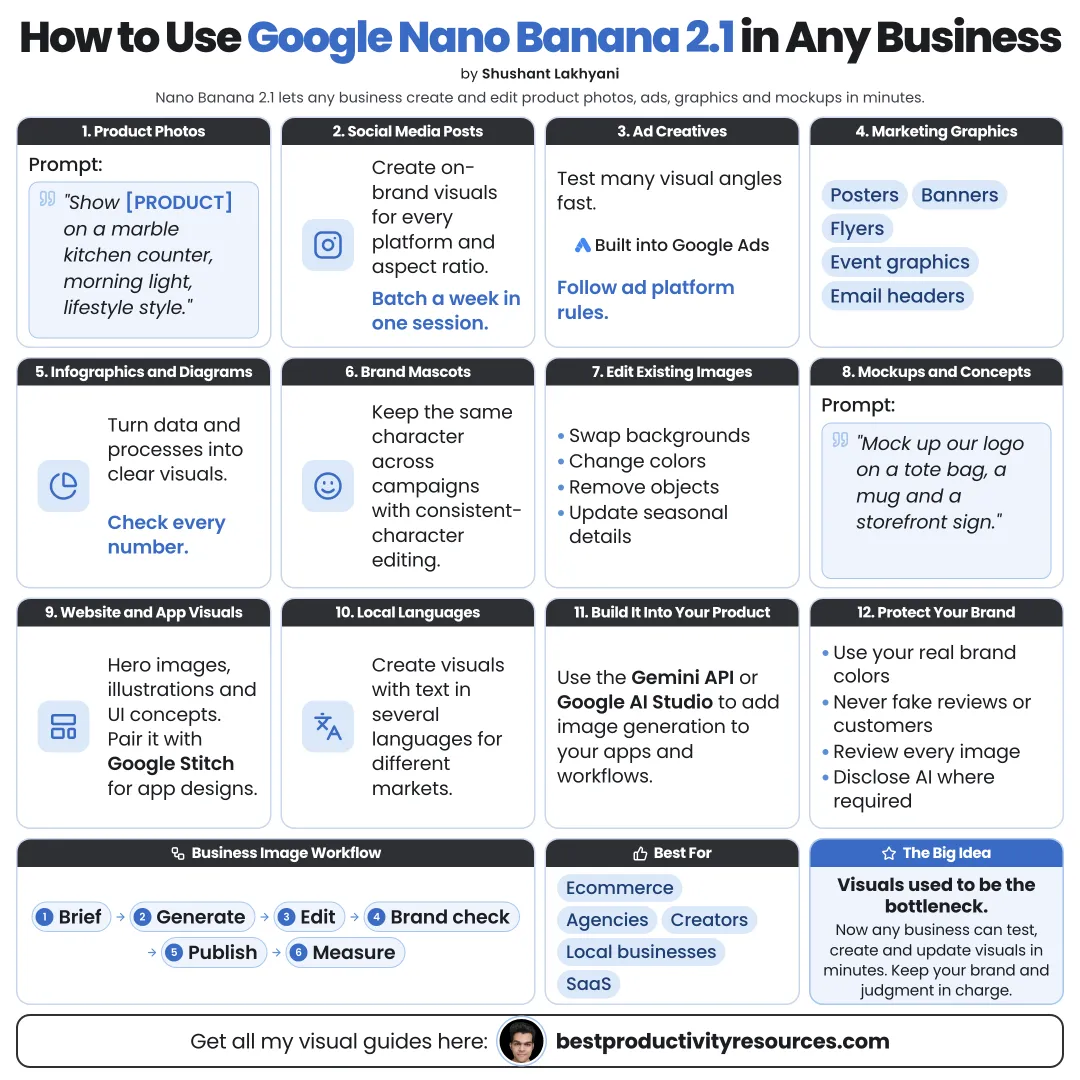
A free guide to using Google Nano Banana 2.1 in any business: brand kits, product images, ad creative, social content, infographics, presentations, local marketing, e-commerce, consistent characters, localization, costs, approvals, and responsible use.
Google released Nano Banana 2.1 on October 6, 2026. It creates and edits images with legible text, consistent products and characters, and resolution up to 4K. You can use it in the Gemini app, Google Ads, Flow, Stitch, Search AI Mode, Google AI Studio, and the Gemini API.
Any business can put it to work on:
Product photos and mockups
Ad creative
Social media posts
Infographics and diagrams
Presentation visuals
Website images
Marketing localized into other languages
Visuals that once took days can now take minutes. Your judgment still decides what ships.
02
Set up a brand kit first
Save a short brand brief and a set of references to reuse in every prompt:
Brand colors, with hex codes
Font style
Logo files
Photography or illustration style
Three sample images you love
Words and visuals that are off-limits
Add up to 14 reference images to keep results on brand.
03
Create product images
Clean studio shots on a white background
Lifestyle scenes in real-world settings
Seasonal variations
Color and material variants
Packaging mockups
Upload real product photos as references. Never depict features your product lacks.
04
Make ad creative
Multiple visual concepts for one offer
A version for every aspect ratio
Headline text placed inside the image
Variations for A/B testing
Seasonal and local versions
Nano Banana 2.1 also runs inside Google Ads. Follow each ad platform’s rules on claims and AI-generated content.
05
Produce social content
Quote graphics
Carousel slides
Event announcements
Behind-the-scenes illustrations
Wide header banners
Hold one consistent style so your whole feed reads as a single brand.
06
Explain with infographics
Google reports stronger infographic design and factual accuracy than in earlier models. Use it to show:
How your service works
Step-by-step guides
Side-by-side comparisons
Simple data visuals
Check every number and word. Turn on search grounding for real-world facts, then verify them yourself.
07
Upgrade presentations and documents
Slide backgrounds and section images
Process diagrams
Proposal cover images
Report illustrations
08
Localize for new markets
Translate the text in images without breaking the layout
Adapt scenes to local settings
Make versions for local holidays
Ask a fluent speaker to review every translated image.
09
Borrow ideas by business type
Restaurant
Menu visuals, posters for specials, and event graphics
E-commerce
Product scenes, variants, and banners
Real estate
Listing graphics and infographics about the neighborhood
Fitness
Class posters and exercise diagrams
Consulting
Proposal covers and process diagrams
Education
Lesson illustrations and explainer graphics
Local services
Flyers, before-and-after concepts, and special offers
10
Keep mascots and characters consistent
If your brand uses a mascot or recurring characters, Nano Banana 2.1 can keep up to 4 characters and 10 objects consistent across images. Save your strongest references and reuse them.
11
Control costs
Gemini app
Fine for occasional use within your plan’s limits
API
Roughly $0.0336 per 1K image, $0.0504 per 2K, and $0.113 per 4K
Batch API
Roughly half price for large jobs that are not urgent
Draft at 1K, then render finals at 2K or 4K. Confirm Google’s current pricing first.
12
Set up a review step
Proof spelling, numbers, and prices
Compare each product with the real item
Look for strange hands, text, or objects
Confirm rights to any logos or people shown
Approve every image before publishing
13
Use it responsibly
Google tags images with SynthID watermarks and Content Credentials
Never fake reviews, testimonials, or customer photos
Never imitate a competitor’s brand
Never create misleading images of real people
Disclose AI images wherever required
14
Run the master business prompt
Create a [type of visual] for [business], which sells [offer] to [audience].
Purpose: [ad, post, banner, infographic]. Key message: [one key message].
Brand: colors [hex codes], style [style], references [describe uploads].
Text in the image: “[exact text]”. Format: [aspect ratio], [resolution].
Keep the product exactly as it appears in the reference photos. Avoid: [things to avoid].
The real opportunity
Do not use Nano Banana 2.1 just to make more images. Use it to make the right image for each product, platform, and market.
Brand kit
Products
Ads
Social
Infographics
Localize
Review
Pick one product or offer this week, and turn the work into a reusable prompt and reference set.
Earnings note: nothing here promises income. Any figures or examples are illustrations, not typical results; what you earn depends on your skills, effort, market and luck, and many people earn little or nothing. This is general information, not financial, legal or tax advice. See our disclaimer.
What does “How to Use Google Nano Banana 2.1 in Any Business” cover?
It has 14 sections, starting with “See why Nano Banana 2.1 matters for business”, “Set up a brand kit first”, “Create product images” and “Make ad creative”, plus 10 more sections.
How long does it take to read?
About 3 minutes. Every section is a short, self-contained card, so you can jump straight to the part you need.
Is this guide free?
Yes. The full guide is free to read on this page, with no sign-up.
For research and ideas only. Results vary and nothing here is a promise of income. See our Disclaimer.
See you Monday!
Weekly newsletter
Everything new, every Monday.
One short email every Monday with everything shipped that week: new free tools and websites, new guides, new free browser tools and what's new in my free Gumroad libraries, plus how the site is growing. Free, and you can unsubscribe anytime.
You sign up on Gumroad, which stores your email to send the newsletter. See our Privacy Policy.
Cookies and your choices
Visits are counted by Cloudflare Web Analytics, which sets no cookies and stores nothing on your device. An affiliate tracking script from Impact.com also loads on our pages and can set its own cookies so partner companies can credit us for sign-ups. Essential storage is always on so pages load and work correctly. You decide whether your browsing preferences are saved on your device. Read the Privacy Policy.