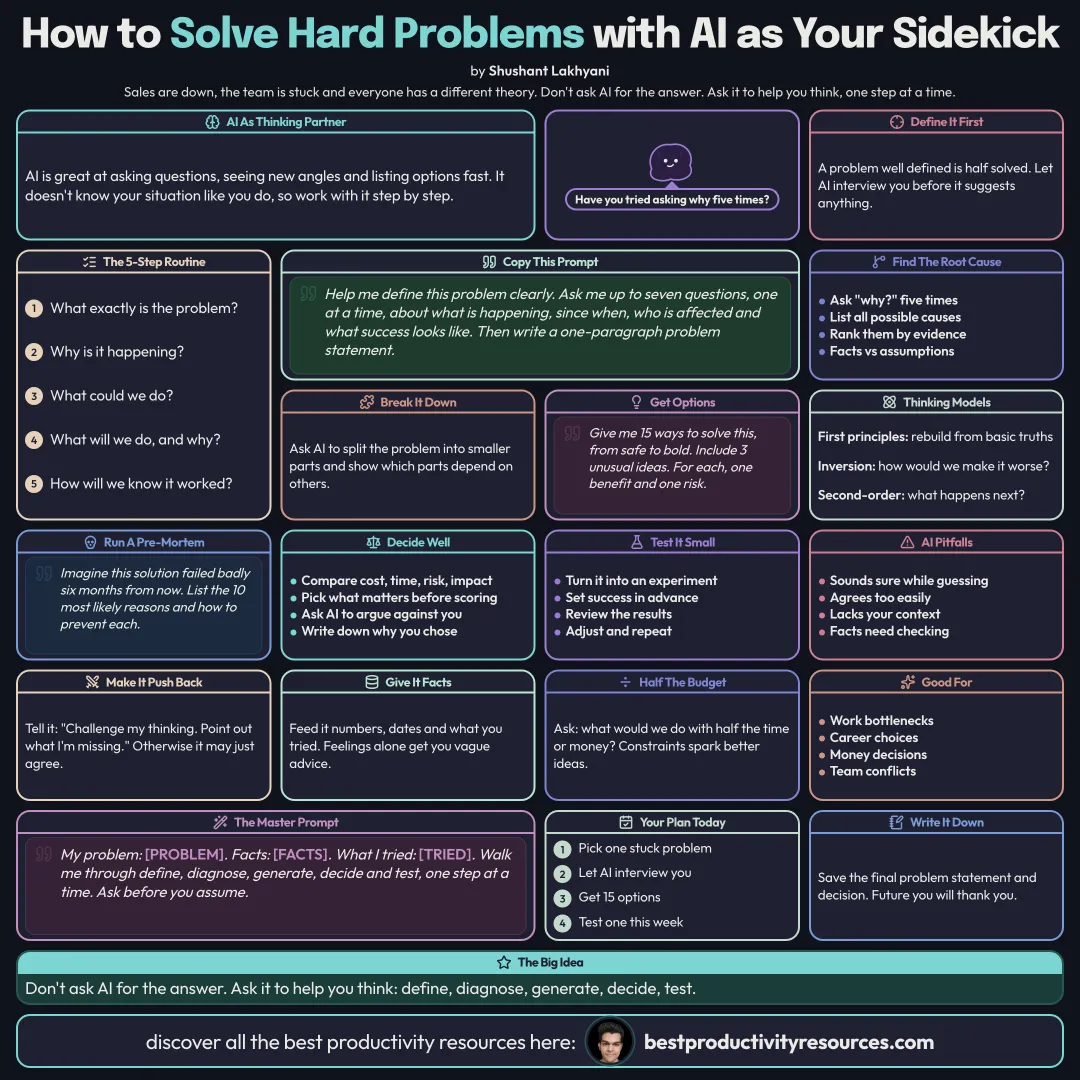
Use AI as a thinking partner to define problems, find causes, generate options, and decide well
11 bite-sized sections
2 min read
Free, no signup
Short answer
A free guide to using AI for problem-solving in 2026: defining the problem, root cause analysis, the five whys, breaking problems down, generating options, thinking models, pre-mortems, testing solutions, decision making, avoiding AI pitfalls, prompts, and a simple problem-solving routine.
AI excels at asking questions, looking at a problem from new angles, and generating options fast. It does not know your situation the way you do, so you get the best results by working through it step by step.
A well-defined problem is half solved, and AI is excellent at helping you define it.
02
Define the problem
Help me define this problem clearly. Ask me up to seven questions, one at a time, covering what is happening, since when, who is affected, and what success looks like. Then write a one-paragraph problem statement.
03
Find the root cause
Ask “why?” five times to dig beneath the symptoms
List every possible cause, then rank each by evidence
Keep facts apart from assumptions
Ask AI which causes are most likely and how to test each
04
Break it into parts
Big problems feel impossible. Have AI split the problem into smaller parts you can solve one by one, and show which parts depend on others.
05
Generate options
Give me 15 different ways to solve this problem, ranging from safe to bold. Include at least three unusual ideas. For each one, name one benefit and one risk.
Quantity first, judgment later.
06
Apply thinking models
First principles
Strip it down to basic truths, then rebuild
Inversion
Ask how to make the problem worse, then avoid exactly that
Second-order thinking
Ask what follows after the first effect
Constraints
Ask what you would do with half the time or half the money
Have AI apply one model at a time to your problem.
07
Run a pre-mortem
Imagine we picked this solution and it failed badly six months from now. List the ten most likely reasons, and how we could prevent each one.
08
Decide
Compare the top options in a table: cost, time, risk, and impact
Settle what matters most before you score anything
Have AI argue against your favorite option
Make the final call yourself, and write down why
09
Test small
Turn the solution into a small experiment
Define success before you see the results
Review the results and adjust
10
Avoid AI pitfalls
AI can sound confident even when it is guessing
It can agree with you too easily, so ask it to push back
It lacks your full context, so feed it facts, not just feelings
Verify any facts it brings in
11
Follow a simple routine
Define
What exactly is the problem?
Diagnose
Why is it happening at all?
Generate
What could we try?
Decide
What will we do, and for what reason?
Test
How will we know it has worked?
Keep the golden rule
Do not ask AI for the answer. Ask it to help you think: define, diagnose, generate, decide, and test.
Define
Root cause
Options
Models
Pre-mortem
Decide
Test
Choose one problem you are stuck on and work it through the five steps with AI today.
What does “How to Use AI for Problem-Solving” cover?
It has 11 sections, starting with “Treat AI as a thinking partner”, “Define the problem”, “Find the root cause” and “Break it into parts”, plus 7 more sections.
How long does it take to read?
About 2 minutes. Every section is a short, self-contained card, so you can jump straight to the part you need.
Is this guide free?
Yes. The full guide is free to read on this page, with no sign-up.
For research and ideas only. Results vary and nothing here is a promise of income. See our Disclaimer.
See you Monday!
Weekly newsletter
Everything new, every Monday.
One short email every Monday with everything shipped that week: new free tools and websites, new guides, new free browser tools and what's new in my free Gumroad libraries, plus how the site is growing. Free, and you can unsubscribe anytime.
You sign up on Gumroad, which stores your email to send the newsletter. See our Privacy Policy.
Cookies and your choices
Visits are counted by Cloudflare Web Analytics, which sets no cookies and stores nothing on your device. An affiliate tracking script from Impact.com also loads on our pages and can set its own cookies so partner companies can credit us for sign-ups. Essential storage is always on so pages load and work correctly. You decide whether your browsing preferences are saved on your device. Read the Privacy Policy.