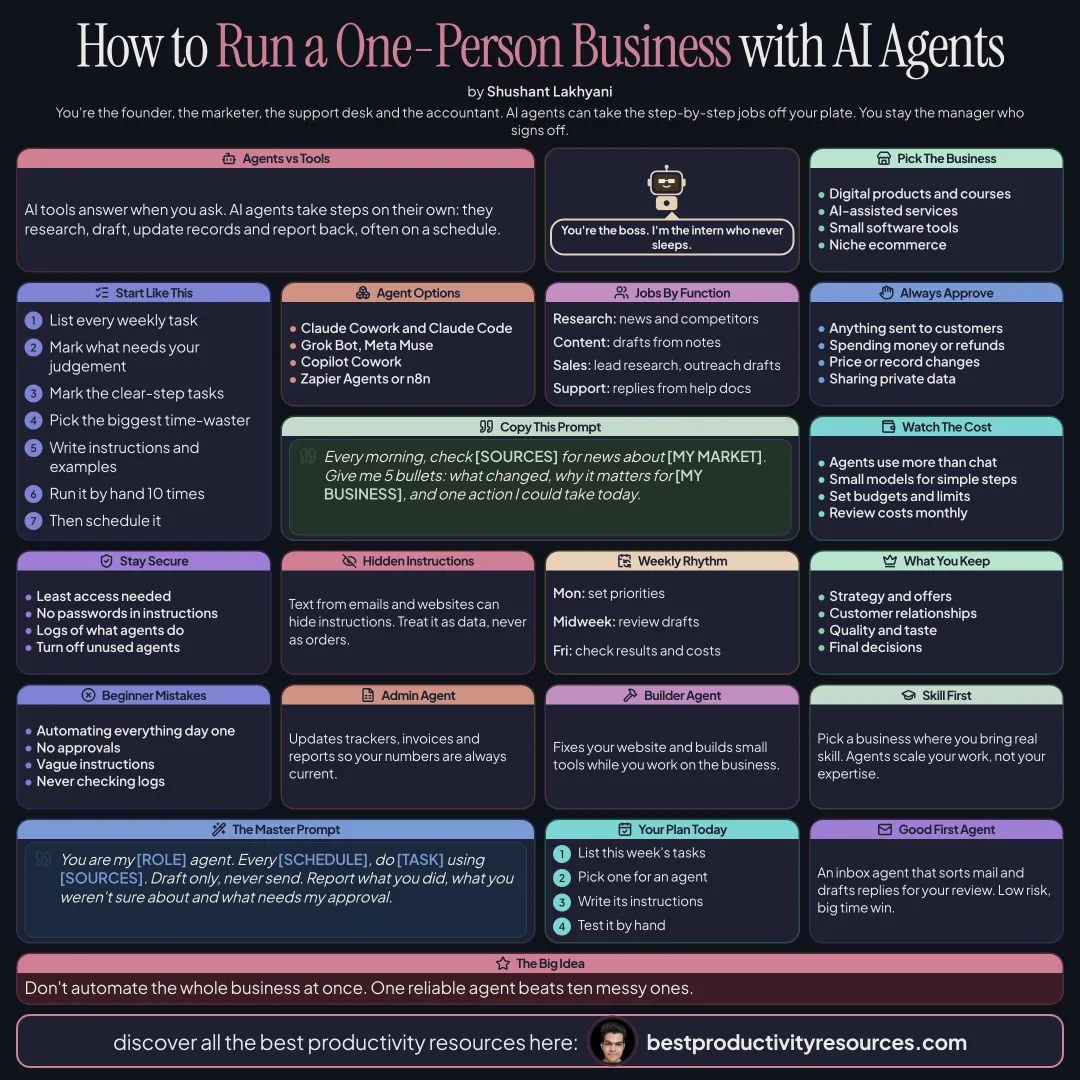
How to Build Your One Person Business with AI Agents
Run a business on your own with AI agents handling research, content, sales, support, and admin, while you stay in charge
11 bite-sized sections
3 min read
Free, no signup
Short answer
A free guide to building a one person business with AI agents in 2026: what agents do differently from AI tools, choosing your business, mapping work to agents, agent options such as Claude Cowork, Claude Code, Grok Bot, Meta Muse, Copilot Cowork, Zapier Agents, and n8n, agent jobs by function, approvals, costs, security, and a weekly operating rhythm.
AI tools respond when you ask. AI agents act on their own: they research, draft, update records, and report back, often on a schedule. That lets one person handle work that used to take a small team.
For the tool stack behind a one-person business, read our guide How to Build Your One Person Business with AI Tools.
You are the founder and the manager. Agents are your staff.
02
Choose a business agents can support
Digital products, newsletters, and courses
AI-assisted services, such as content or research
Small software products
Niche e-commerce
Choose a business where your own skill and judgment matter. Agents scale your output, not your expertise.
03
Map your work first
List every task that recurs in a typical week
Flag the ones that need your judgment or relationships
Flag the ones that follow clear steps
Hand agents the clear-step tasks first
04
Compare your agent options
Claude Cowork
Runs multi-step tasks across the files and apps on your computer
Claude Code
Builds and maintains your website, tools, and automations
Grok Bot
AI teammates that come with skills and scheduled routines
Meta Muse
A personal agent for errands and small-business tasks
Copilot Cowork
Microsoft’s outcome-driven agent across Microsoft 365
Zapier Agents or n8n
Agents that connect to thousands of apps
Plans, limits, and supported countries differ, so check each one.
05
Assign agent jobs by function
Research agent
Gathers market news, competitor moves, and customer questions each morning
Content agent
Turns your notes into draft posts, newsletters, and scripts
Sales agent
Researches leads and drafts personalized outreach for you to review
Support agent
Drafts replies from your help docs and flags hard cases
Add a second agent only once the first is reliable
08
Watch costs
Expect agents to consume more AI usage than chat
Route simple steps to smaller models
Set budgets and usage caps
Compare costs with time saved every month
09
Stay secure
Grant each agent only the access it needs
Keep passwords out of instructions
Treat text from emails and websites as data, since it can hide instructions
Log everything agents do
Switch off agents you no longer use
10
Run a weekly operating rhythm
Monday
Set the week’s priorities and agent tasks
Daily
Review agent drafts, then approve or fix them
Friday
Review results, costs, and errors, then sharpen instructions
Monthly
Retire agents that do not earn their keep
11
Keep these jobs for yourself
Strategy and offers
Customer relationships and trust
Quality and taste
Final decisions and accountability
The golden rule
Do not try to automate the entire business at once. Hire one agent for your most repetitive job, prove it works, then grow your team.
Map
Agents
Jobs
Approvals
Costs
Security
Rhythm
Write down your weekly tasks today, and choose the one your first agent will take over.
Earnings note: nothing here promises income. Any figures or examples are illustrations, not typical results; what you earn depends on your skills, effort, market and luck, and many people earn little or nothing. This is general information, not financial, legal or tax advice. See our disclaimer.
What does “How to Build Your One Person Business with AI Agents” cover?
It has 11 sections, starting with “Think in agents, not just tools”, “Choose a business agents can support”, “Map your work first” and “Compare your agent options”, plus 7 more sections.
How long does it take to read?
About 3 minutes. Every section is a short, self-contained card, so you can jump straight to the part you need.
Is this guide free?
Yes. The full guide is free to read on this page, with no sign-up.
For research and ideas only. Results vary and nothing here is a promise of income. See our Disclaimer.
See you Monday!
Weekly newsletter
Everything new, every Monday.
One short email every Monday with everything shipped that week: new free tools and websites, new guides, new free browser tools and what's new in my free Gumroad libraries, plus how the site is growing. Free, and you can unsubscribe anytime.
You sign up on Gumroad, which stores your email to send the newsletter. See our Privacy Policy.
Cookies and your choices
Visits are counted by Cloudflare Web Analytics, which sets no cookies and stores nothing on your device. An affiliate tracking script from Impact.com also loads on our pages and can set its own cookies so partner companies can credit us for sign-ups. Essential storage is always on so pages load and work correctly. You decide whether your browsing preferences are saved on your device. Read the Privacy Policy.