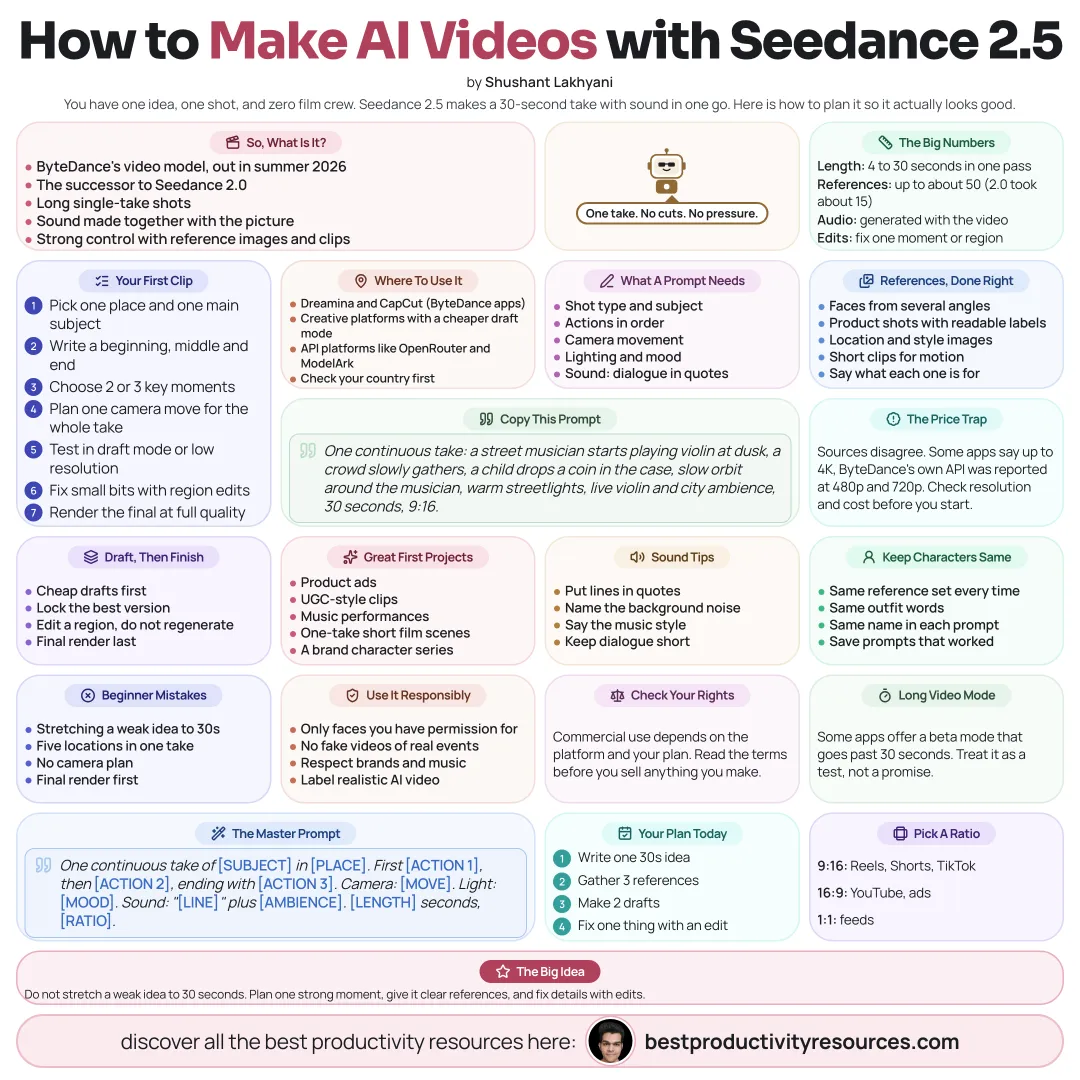
ByteDance’s video model for 30-second shots with sound, lots of references, and precise edits
10 bite-sized sections
2 min read
Free, no signup
Short answer
A free Seedance 2.5 guide as of October 2026: what Seedance 2.5 is, 30-second clips with joint audio, up to 50 references, region and timestamp edits, resolution and pricing reality, where to use it, prompting, references, workflows, and responsible use.
Seedance 2.5 is ByteDance’s video generation model, released in summer 2026 to succeed Seedance 2.0. It stands out for long single-take shots, sound generated alongside the video, and tight control through reference images and clips.
Seedance 2.5 is made for one long, controlled shot with sound.
02
Review the headline features
Length
Clips of 4 to 30 seconds in a single pass
Audio
Sound and video generated at the same time
References
Up to roughly 50 reference inputs, versus roughly 15 for Seedance 2.0
Editing
Edit chosen moments or regions within a clip
Prompt following
Reportedly follows prompts better than 2.0
Some apps also offer a beta long-video mode that runs past 30 seconds.
03
Check resolution and pricing
Sources disagree on resolution and price. Some platforms advertise up to 4K, while ByteDance’s own API has reportedly offered 480p and 720p. Prices also differ widely between platforms. Confirm the exact resolution and cost on your platform before you start a project.
04
Find where to use it
Dreamina and CapCut, ByteDance’s own creative apps
Creative platforms like Higgsfield, which added a Seedance 2.5 Draft Mode for cheaper test runs
API platforms like OpenRouter and ByteDance’s ModelArk
Availability differs by country, so check your region.
05
Plan a 30-second shot
A single location and one main subject
A clear start, middle, and end
Two or three key beats
A camera plan for the entire take
06
Write strong prompts
Shot type and subject
Actions in order
Camera movement
Lighting and mood
Sound: dialogue in quotes, sound effects, and ambience
Length and aspect ratio
One continuous take: at dusk a street musician begins playing violin, a crowd gathers slowly, a child drops a coin into the case, slow orbit around the musician, warm streetlights, live violin and city ambience, 30 seconds, 9:16.
07
Use references with purpose
Character images taken from several angles
Product shots with legible labels
Location and style references
Short clips that show motion or camera style
A stated role for each reference in the prompt
08
Draft first, then finish
Test ideas in draft mode or at low resolution
Lock in the strongest version
Fix small problems with region edits instead of regenerating
Render the final at the highest quality you need
09
Put it to the right uses
Product ads and videos in a UGC style
Music video performances
Short film scenes shot in one take
Social clips that include dialogue
Consistent brand characters across a series
10
Use it responsibly
Use only faces and references you have permission for
Never create misleading videos of real people or events
Respect copyrighted characters, music, and brands
Label realistic AI video wherever platforms require it
Confirm commercial rights on your platform and plan
Follow the golden rule
Do not stretch a weak idea to 30 seconds. Plan one strong moment, give Seedance clear references, and fix the details with edits.
30 seconds
Audio
50 references
Edits
Draft
Prompts
Rights
This week, plan one 30-second single-take shot and test it in draft mode first.
It has 10 sections, starting with “Meet Seedance 2.5”, “Review the headline features”, “Check resolution and pricing” and “Find where to use it”, plus 6 more sections.
How long does it take to read?
About 2 minutes. Every section is a short, self-contained card, so you can jump straight to the part you need.
Is this guide free?
Yes. The full guide is free to read on this page, with no sign-up.
For research and ideas only. Results vary and nothing here is a promise of income. See our Disclaimer.
See you Monday!
Weekly newsletter
Everything new, every Monday.
One short email every Monday with everything shipped that week: new free tools and websites, new guides, new free browser tools and what's new in my free Gumroad libraries, plus how the site is growing. Free, and you can unsubscribe anytime.
You sign up on Gumroad, which stores your email to send the newsletter. See our Privacy Policy.
Cookies and your choices
Visits are counted by Cloudflare Web Analytics, which sets no cookies and stores nothing on your device. An affiliate tracking script from Impact.com also loads on our pages and can set its own cookies so partner companies can credit us for sign-ups. Essential storage is always on so pages load and work correctly. You decide whether your browsing preferences are saved on your device. Read the Privacy Policy.