Use YouTube’s own AI tools and other AI apps to plan, make, and improve videos that grow your channel
11 bite-sized sections
2 min read
Free, no signup
Short answer
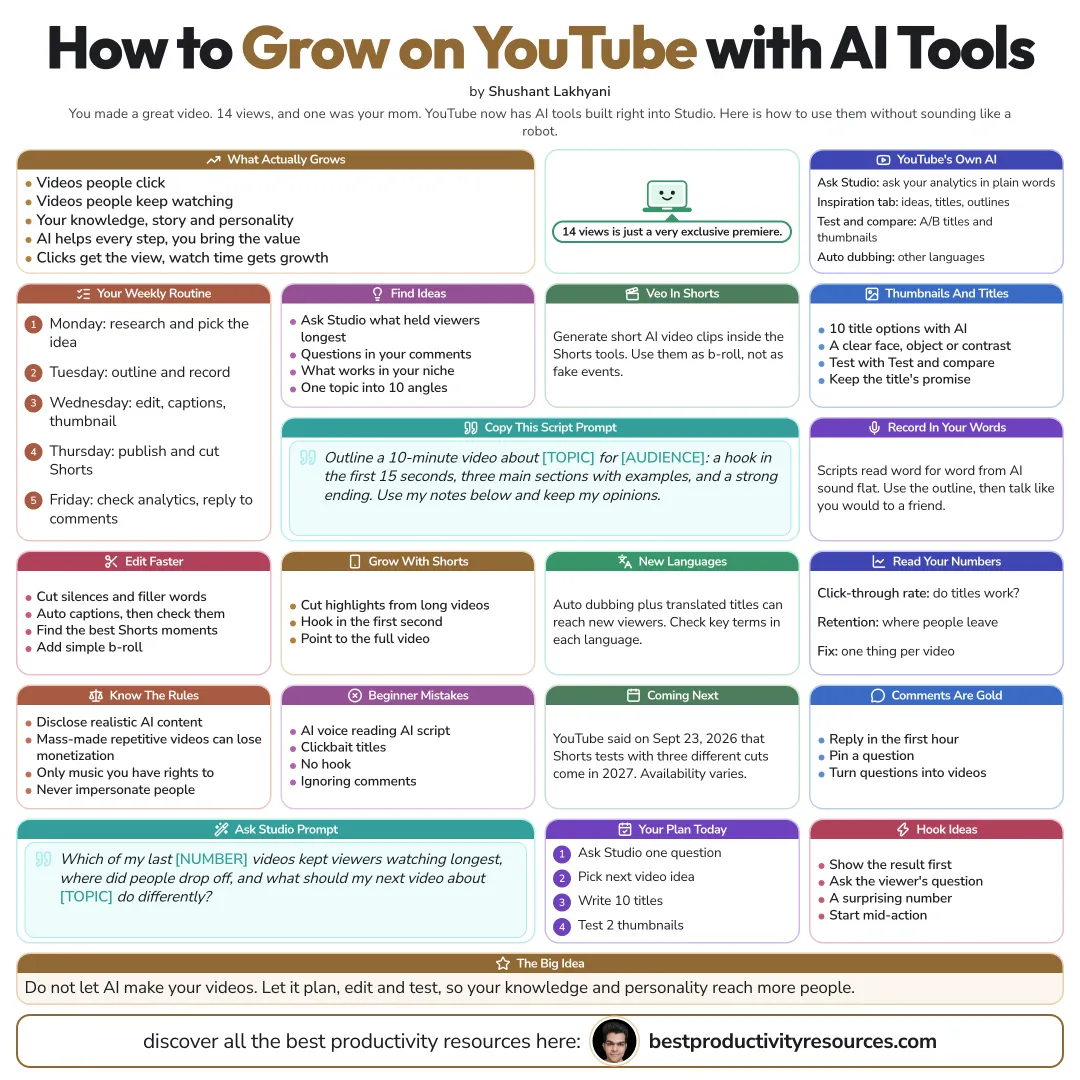
A free guide to growing on YouTube with AI tools in October 2026: YouTube’s built-in AI (Ask Studio, the Inspiration tab, title and thumbnail tests, auto dubbing, Veo in Shorts), research, scripting, editing, thumbnails, Shorts, analytics, YouTube’s AI and originality rules, and a weekly routine.
YouTube rewards videos that people click and keep watching. AI can assist at every step, but the value has to come from your knowledge, your stories, and your personality.
Clicks earn the view. Watch time earns the growth.
02
Use YouTube’s built-in AI tools
Ask Studio
Query your channel analytics in plain language
Inspiration tab
Ideas, titles, and outlines tailored to your channel
Test and compare
Run A/B tests on titles and thumbnails
Auto dubbing
Translate your videos into other languages
Veo in Shorts
Create short AI video clips inside the Shorts tools
On September 23, 2026, YouTube announced more, including Shorts tests of three different cuts arriving in 2027 and pilots of live auto dubbing. Availability depends on your country and channel.
03
Find video ideas
Ask Studio which of your videos hold viewers longest
Mine your comments for questions
Study what works for channels in your niche
Have AI turn one topic into ten specific video angles
04
Script with AI help
Outline a 10-minute video on [topic] for [audience]: a hook within the first 15 seconds, three main sections with examples, and a strong close. Build on my notes below and keep my opinions intact.
Record it in your own words. Reading an AI script word for word sounds flat.
05
Sharpen thumbnails and titles
Brainstorm ten title options with AI
Design thumbnails around a clear face, object, or contrast
Run YouTube’s title and thumbnail tests
Deliver on the title’s promise inside the video
06
Edit faster
Cut silences and filler words with AI editors
Generate captions, then check them
Spot the strongest moments for Shorts
Layer in b-roll and simple motion graphics
07
Grow with Shorts
Clip highlights from long videos into Shorts
Hook viewers in the first second
Point Shorts viewers to your full videos
08
Reach new languages
Auto dubbing, plus translated titles and descriptions, can bring your videos to viewers in other languages. Double-check how key terms are translated.
09
Know YouTube’s rules
Disclose realistic altered or synthetic content where YouTube requires it
Avoid mass-produced, repetitive videos, which YouTube’s inauthentic content policy can demonetize
Use only music and footage you have the rights to
Never use AI to impersonate real people
10
Learn from analytics
Read click-through rate to see whether titles and thumbnails work
Read audience retention to see where viewers drop off
Ask Studio or AI to explain changes and suggest fixes
Improve one thing in each video
11
Follow a weekly routine
Monday
Research and choose the video idea
Tuesday
Outline and record
Wednesday
Edit, add captions, and make the thumbnail
Thursday
Publish and cut the Shorts
Friday
Review analytics and answer comments
The golden rule
Do not let AI make your videos for you. Use it to plan, edit, and test, so your knowledge and personality reach a wider audience.
Ask Studio
Ideas
Scripts
Thumbnails
Shorts
Dubbing
Rules
Ask YouTube Studio’s AI which of your videos kept viewers longest, and plan your next video around the answer.
What does “How to Use AI Tools to Grow on YouTube” cover?
It has 11 sections, starting with “Know what grows on YouTube”, “Use YouTube’s built-in AI tools”, “Find video ideas” and “Script with AI help”, plus 7 more sections.
How long does it take to read?
About 2 minutes. Every section is a short, self-contained card, so you can jump straight to the part you need.
Is this guide free?
Yes. The full guide is free to read on this page, with no sign-up.
For research and ideas only. Results vary and nothing here is a promise of income. See our Disclaimer.
See you Monday!
Weekly newsletter
Everything new, every Monday.
One short email every Monday with everything shipped that week: new free tools and websites, new guides, new free browser tools and what's new in my free Gumroad libraries, plus how the site is growing. Free, and you can unsubscribe anytime.
You sign up on Gumroad, which stores your email to send the newsletter. See our Privacy Policy.
Cookies and your choices
Visits are counted by Cloudflare Web Analytics, which sets no cookies and stores nothing on your device. An affiliate tracking script from Impact.com also loads on our pages and can set its own cookies so partner companies can credit us for sign-ups. Essential storage is always on so pages load and work correctly. You decide whether your browsing preferences are saved on your device. Read the Privacy Policy.