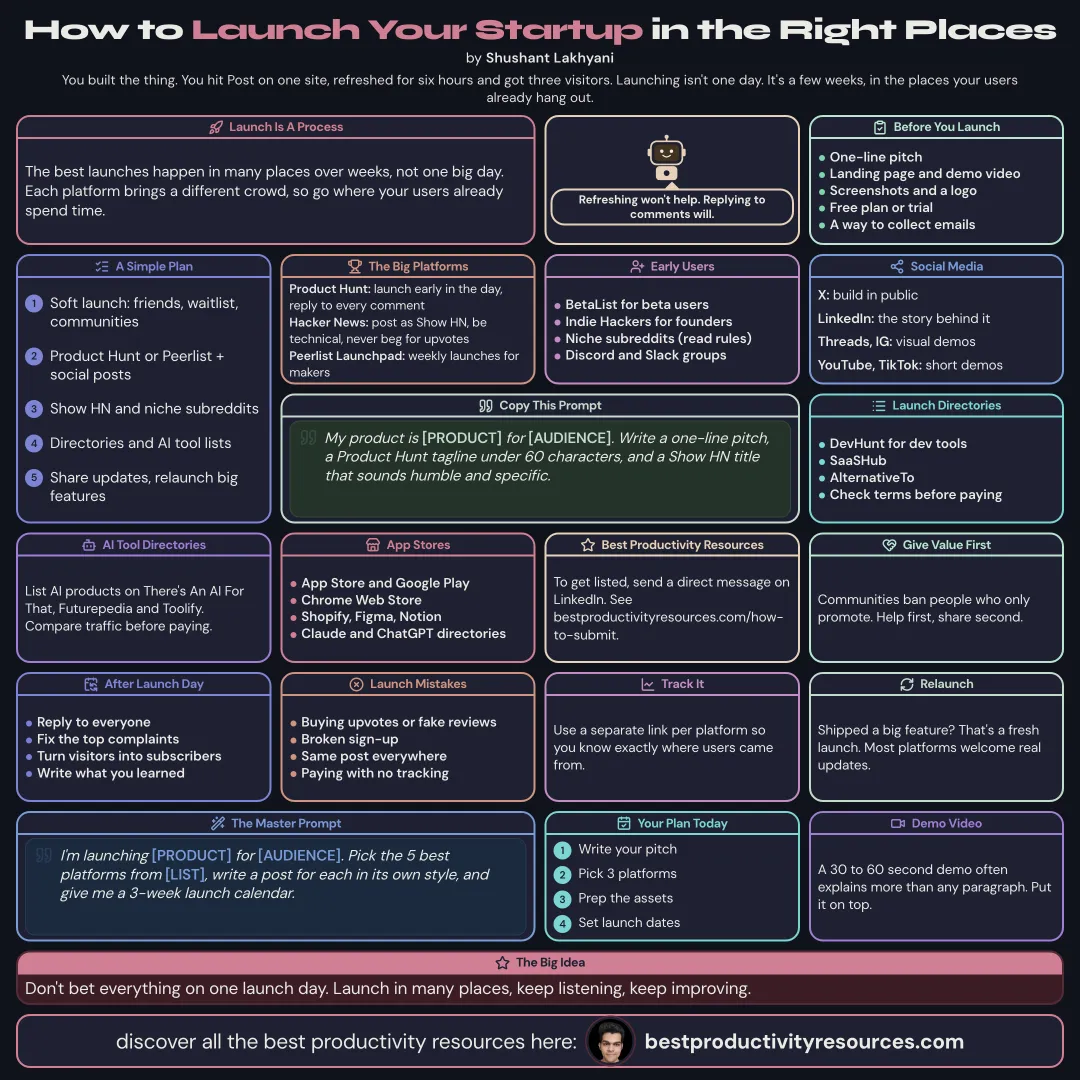
The best places to launch your startup or product, and how to get real users from each one
12 bite-sized sections
3 min read
Free, no signup
Short answer
A free guide to where to launch your startup in 2026: preparing for launch, Product Hunt, Hacker News, Peerlist Launchpad, BetaList, Indie Hackers, Reddit, X and LinkedIn, launch directories, AI tool directories, app stores, Best Productivity Resources, a launch plan, and what to do after launch day.
Strong launches run across many places over weeks, not one big day. Every platform reaches a different audience. Pick the ones where your users already spend their time.
Launch early, launch often, and launch where your users already are.
02
Prepare before you launch
A clear one-line pitch
A simple landing page with a demo video
Screenshots and a logo
A free plan or trial people can start instantly
A way to gather emails and feedback
03
Use the big launch platforms
Product Hunt
The best-known launch site for tech products. Polish your page, launch early in the day, and answer every comment
Hacker News
Post it as Show HN. Best for developer and technical products. Stay humble and technical, and never ask for upvotes
Peerlist Launchpad
Weekly launches aimed at makers and professionals
BetaList
For early-stage startups hunting for beta users
04
Join communities
Indie Hackers
Share your story and your numbers with fellow founders
Reddit
Niche subreddits where your users gather. Read every subreddit’s self-promotion rules first
Discord and Slack groups
Industry communities, approached with care
Hacker and maker forums
Smaller communities in your niche
Give value first. Communities ban people who only promote.
05
Show up on social media
X: build in public with regular progress updates
LinkedIn: tell the story behind the product
Threads and Instagram: share visual demos
YouTube and TikTok: post short demo videos
06
Submit to launch directories
Plenty of smaller launch sites can bring early users and backlinks:
Some are free, and some charge for faster or featured listings. Read the terms before you pay.
07
List on AI tool directories
For AI products, list on AI directories such as There’s An AI For That, Futurepedia, and Toolify. Many offer paid options, so compare their traffic before you pay.
08
Publish in app stores and marketplaces
Apple App Store and Google Play, for mobile apps
Chrome Web Store, for browser extensions
Shopify App Store, Figma Community, or Notion templates, for add-ons
The Claude and ChatGPT plugin directories, for AI integrations
09
Submit to Best Productivity Resources
Best Productivity Resources lists useful tools, apps, and resources for a large audience. To submit, send a direct message on LinkedIn. Check bestproductivityresources.com/how-to-submit for what to include.
10
Follow a simple launch plan
Week 1
Soft launch to friends, your waitlist, and communities
It has 12 sections, starting with “Treat launch as a process, not a day”, “Prepare before you launch”, “Use the big launch platforms” and “Join communities”, plus 8 more sections.
How long does it take to read?
About 3 minutes. Every section is a short, self-contained card, so you can jump straight to the part you need.
Is this guide free?
Yes. The full guide is free to read on this page, with no sign-up.
For research and ideas only. Results vary and nothing here is a promise of income. See our Disclaimer.
See you Monday!
Weekly newsletter
Everything new, every Monday.
One short email every Monday with everything shipped that week: new free tools and websites, new guides, new free browser tools and what's new in my free Gumroad libraries, plus how the site is growing. Free, and you can unsubscribe anytime.
You sign up on Gumroad, which stores your email to send the newsletter. See our Privacy Policy.
Cookies and your choices
Visits are counted by Cloudflare Web Analytics, which sets no cookies and stores nothing on your device. An affiliate tracking script from Impact.com also loads on our pages and can set its own cookies so partner companies can credit us for sign-ups. Essential storage is always on so pages load and work correctly. You decide whether your browsing preferences are saved on your device. Read the Privacy Policy.