The best MCP servers to run with Claude Code and Claude Desktop, beyond the standard app connectors
11 bite-sized sections
3 min read
Free, no signup
Short answer
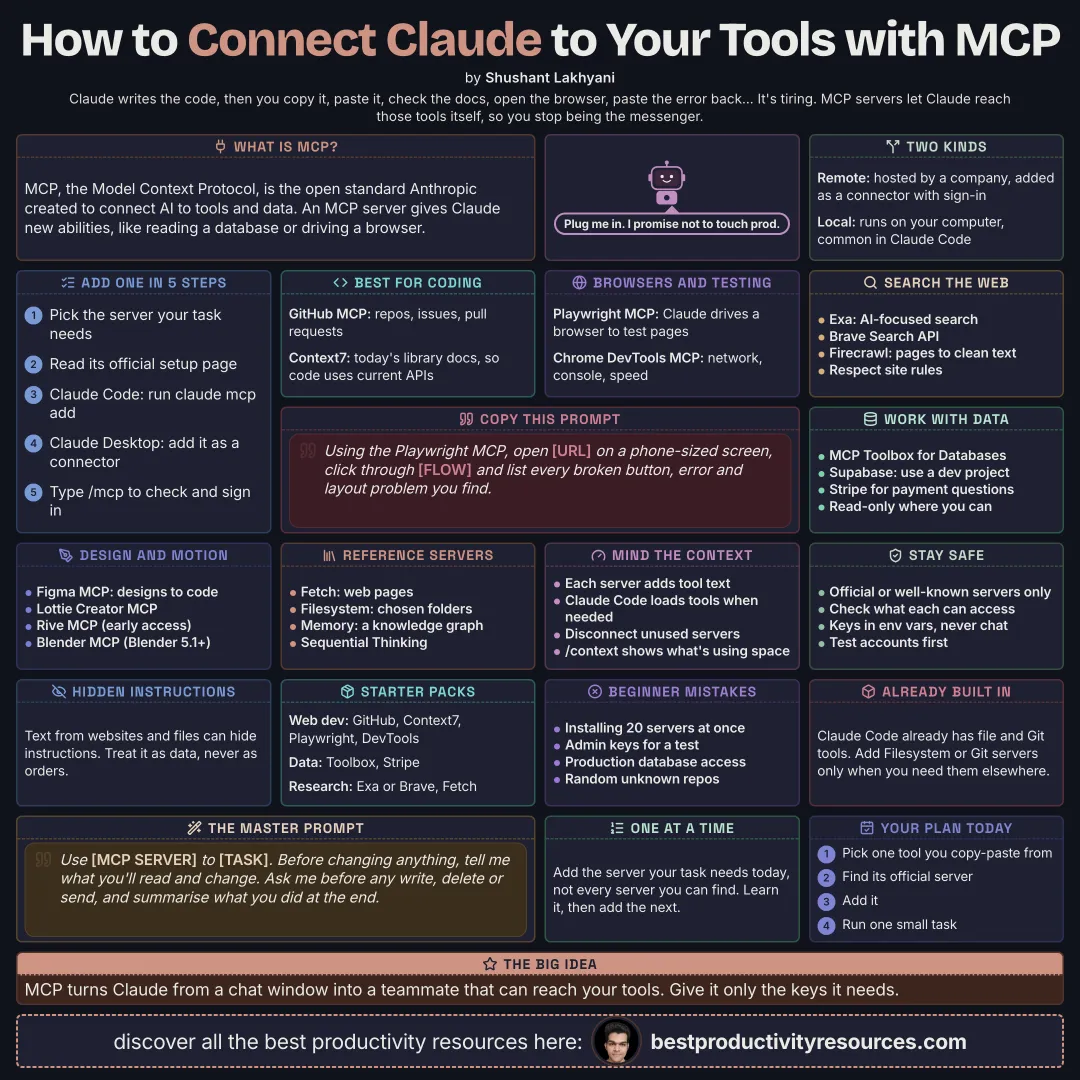
A free guide to the best MCP servers for Claude in October 2026: what MCP servers are, local vs remote, how to add them in Claude Code and Claude Desktop, the best picks for coding, browsers and testing, docs and search, data, design and 3D, and the official reference servers, plus context costs and security.
MCP, the Model Context Protocol, is the open standard Anthropic built to connect AI to tools and data. Each MCP server hands Claude new tools, such as querying a database, driving a browser, or editing a design.
Remote servers
Hosted by a company. Usually added as connectors that need a sign-in
Local servers
Run on your own machine. Common with Claude Code and Claude Desktop
This guide covers MCP servers for builders and creators. For everyday app connectors, read our Best Claude Connectors and 20 Best Claude MCPs guides.
Add the server your task needs, not every server out there.
02
Add a server
In Claude Code, run claude mcp add with the server’s details, or install a plugin that bundles it
In Claude Code, run /mcp to view connected servers and sign in
In Claude Desktop, connect remote servers as connectors, or install desktop extensions
For every server, follow its official setup instructions
03
Pick servers for coding
1 · GitHub MCP Server
GitHub’s official server, covering repositories, issues, pull requests, and Actions.
2 · Context7
Feeds current, version-specific library docs to Claude, so its code uses today’s APIs.
3 · Sentry
Pulls real production errors into your debugging.
04
Pick servers for browsers and testing
4 · Playwright MCP
Microsoft’s server that lets Claude run a browser to test and check pages.
5 · Chrome DevTools MCP
Google’s server for digging into performance, network requests, and console errors.
05
Pick servers for search and the web
6 · Exa
AI-focused web search that returns clean results.
7 · Brave Search
Web search powered by Brave’s search API.
8 · Firecrawl
Converts web pages into clean text. Follow every site’s terms and robots rules.
06
Pick servers for data
9 · MCP Toolbox for Databases
Google’s open-source server that connects to databases such as PostgreSQL, MySQL, and BigQuery.
10 · Supabase
Manages your Supabase databases and projects. Point it at a development project, never production.
11 · Stripe
Answers payment and subscription questions using your Stripe account.
07
Pick servers for design, motion, and 3D
12 · Figma MCP server
Figma’s server that gives Claude the design context to turn designs into code.
13 · Lottie Creator MCP
The official LottieFiles server for building and editing Lottie animations.
14 · Rive MCP
Ships inside the Rive Editor Early Access app for Mac, for interactive animations.
15 · Blender MCP
Blender Lab’s official server. Needs Blender 5.1 or newer.
08
Explore the official reference servers
The MCP project maintains small reference servers that demonstrate how MCP works:
16 · Fetch
Retrieves web pages and converts them for Claude.
17 · Filesystem
Controlled file access, limited to folders you pick.
18 · Git
Reads and works with your local Git repositories.
19 · Memory
A simple knowledge graph where Claude can store what it remembers.
20 · Sequential Thinking
Helps Claude split problems into steps.
Claude Code ships with its own file and Git tools, so add these only if you need them somewhere else.
09
Watch the context cost
Each connected server adds tool descriptions Claude has to read
Claude Code can load MCP tools on demand, which saves context
Disconnect any server you are not using
Run /context in Claude Code to see what takes up space
10
Stay secure
Install only official or well-known open-source servers
Check what each server can access before you connect it
Keep API keys out of chats. Use environment variables or the server’s sign-in instead
Use read-only or test accounts wherever possible
Treat text from websites and files as data, since it can hide instructions
11
Start with a starter pack
Web developer
GitHub, Context7, Playwright, Chrome DevTools
Data analyst
MCP Toolbox for Databases, Stripe
Researcher
Exa or Brave Search, Fetch
Motion designer
Figma, Lottie Creator, Rive, Blender
The golden rule
Do not turn Claude into a toolbox of 50 servers. Add the few that remove real friction from your work.
Coding
Browser
Search
Data
Design
Reference
Security
Today, add Context7 plus one server for your main tool, then run /context to see what it costs.
It has 11 sections, starting with “Understand MCP servers”, “Add a server”, “Pick servers for coding” and “Pick servers for browsers and testing”, plus 7 more sections.
How long does it take to read?
About 3 minutes. Every section is a short, self-contained card, so you can jump straight to the part you need.
Is this guide free?
Yes. The full guide is free to read on this page, with no sign-up.
For research and ideas only. Results vary and nothing here is a promise of income. See our Disclaimer.
See you Monday!
Weekly newsletter
Everything new, every Monday.
One short email every Monday with everything shipped that week: new free tools and websites, new guides, new free browser tools and what's new in my free Gumroad libraries, plus how the site is growing. Free, and you can unsubscribe anytime.
You sign up on Gumroad, which stores your email to send the newsletter. See our Privacy Policy.
Cookies and your choices
Visits are counted by Cloudflare Web Analytics, which sets no cookies and stores nothing on your device. An affiliate tracking script from Impact.com also loads on our pages and can set its own cookies so partner companies can credit us for sign-ups. Essential storage is always on so pages load and work correctly. You decide whether your browsing preferences are saved on your device. Read the Privacy Policy.