Skip to content
Day 69: new resources are added every day. See what's new

Free guide

Best Claude Plugins

The best plugins for Claude Cowork and the Claude apps, by job, so Claude works like a specialist on your team

  • 11 bite-sized sections
  • 3 min read
  • Free, no signup

Short answer

A free guide to the best Claude plugins in October 2026, focused on Claude Cowork and knowledge work: what plugins contain, how to install them, the best official plugins for productivity, sales, marketing, support, product, design, finance, legal, data, HR, operations, and small business, partner plugins, customizing, and safety.

Updated

Built with love by Shushant Lakhyani. Building bestproductivityresources.com

Inside this guide

Short cards you can read in order or jump straight to. Tap the link icon on any card to share just that part.

01

Understand Claude plugins

A plugin makes Claude a specialist for one job. Each one packages skills, slash commands, connectors to your tools, and sometimes sub-agents. Anthropic introduced plugins for Claude Cowork in January 2026 and has released many more since.

Skills
Know-how Claude applies on its own when it is relevant
Commands
Actions you trigger yourself, such as /sales:call-prep
Connectors
Links into tools like Slack, HubSpot, or Notion

Plugins teach Claude how your team works, not only what the world knows.

02

Install a plugin

  • Browse plugins for Claude Cowork at claude.com/plugins or inside the app
  • Get plugins on any paid plan: Pro, Max, Team, and Enterprise
  • Add the Anthropic marketplace in Claude Code with claude plugin marketplace add anthropics/knowledge-work-plugins
  • Install a plugin next, for example claude plugin install sales@knowledge-work-plugins

This guide focuses on plugins for everyday knowledge work. For coding plugins, read our 20 Best Claude Plugins guide for Claude Code.

03

Start with plugins for everyone

1 · Productivity

Handles tasks, calendars, daily workflows, and personal context, using connectors like Slack, Notion, Asana, and Linear.

2 · Enterprise Search

Ask one question across email, chat, docs, and wikis at once.

3 · Small Business

Prebuilt workflows for running and growing a small business. You approve each step that involves money or customers.

04

Equip your growth teams

4 · Sales

Researches prospects, prepares for calls, reviews the pipeline, drafts outreach, and builds battlecards.

5 · Marketing

Writes content drafts, plans campaigns, holds the brand voice, and reports on results.

6 · Brand Voice

A partner plugin that keeps all writing on-brand.

7 · Apollo

A partner plugin that supplies sales prospecting data.

05

Support product and design work

8 · Product Management

Drafts specs, plans roadmaps, distills research, and keeps stakeholders updated.

9 · Design

Covers design critique, design systems, UX writing, accessibility audits, and developer handoff.

10 · Engineering

Supports engineering teams in their day-to-day workflows.

06

Serve customers and run operations

11 · Customer Support

Sorts tickets, drafts replies, bundles escalations, and turns resolved issues into help articles.

12 · Operations

Supports processes and daily operations.

13 · Human Resources

Supports HR teams with people workflows and documents.

08

Add tools for specialists and builders

17 · Bio-Research

Links to life sciences research tools for literature search and genomics.

18 · Slack and Zoom

Partner plugins that pull your chats and meetings into Claude’s work.

19 · Common Room

A partner plugin that surfaces community and customer signals.

20 · Plugin Management

Builds new plugins or tailors existing ones to your company.

09

Make plugins yours

  • Swap in connectors that match your tools
  • Add your own terms, processes, and examples to the skill files
  • Adapt workflows to how your team actually works
  • Share the customized plugins across your team

Plugins are mostly plain files, so you can change them without any code.

10

Pick a starter pack

Solo founder
Productivity, Small Business, Marketing
Sales rep
Sales, Productivity, Enterprise Search
Product manager
Product Management, Design, Data
Support lead
Customer Support, Enterprise Search
Finance team
Finance, Data
11

Use plugins safely

  • Install only from Anthropic or developers you trust
  • Check the connectors every plugin relies on
  • Approve any action that sends, spends, or edits records
  • Disable unused plugins, since each one adds context

The golden rule

Do not install a plugin for every task. Install the two or three that fit your daily work, then tailor them.

  • Skills
  • Commands
  • Connectors
  • Sales
  • Marketing
  • Finance
  • Customize

Install the plugin for your main role today and run its first command on real work.

Share this guide

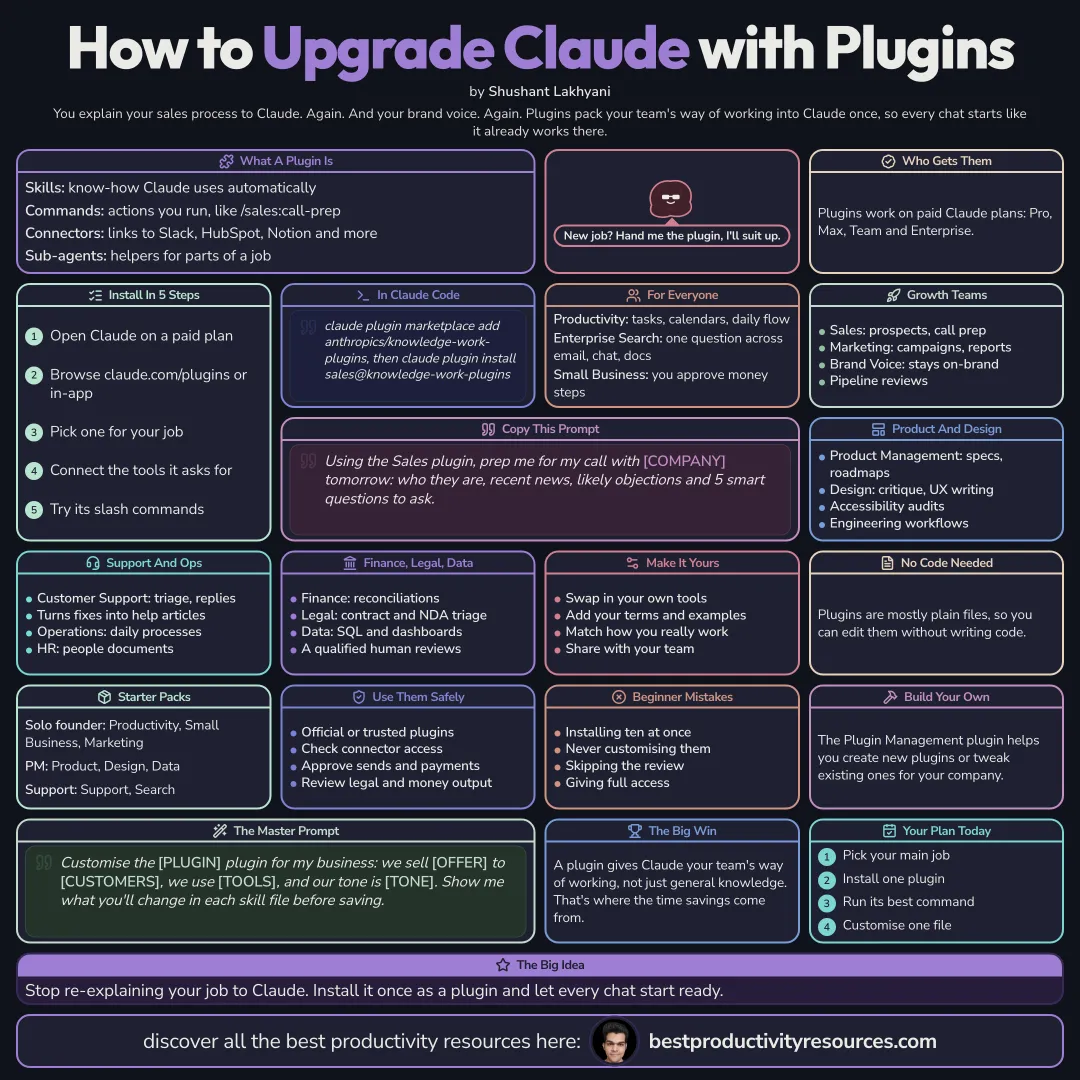
The whole guide on one page

The same guide as one infographic. Save it, pin it or share it.

Frequently asked questions

The quick answers, if you just need the gist.

What does “Best Claude Plugins” cover?
It has 11 sections, starting with “Understand Claude plugins”, “Install a plugin”, “Start with plugins for everyone” and “Equip your growth teams”, plus 7 more sections.
How long does it take to read?
About 3 minutes. Every section is a short, self-contained card, so you can jump straight to the part you need.
Is this guide free?
Yes. The full guide is free to read on this page, with no sign-up.
When was this guide last updated?
It was last updated in October 2026.

Keep reading

More free guides you might like. Still no signup.

Free Notion database

1,100+ ways people are making money online

Real online businesses, creators and projects, broken down by how they make money: apps, online stores, AI tools and more. Free on Gumroad.

Get the free database

Free Notion database

399+ ways to make money online

Hundreds of online income methods in one place, so you can compare options and pick one to try. Free on Gumroad.

Get the free list

For research and ideas only. Results vary and nothing here is a promise of income. See our Disclaimer.

Weekly newsletter

Everything new, every Monday.

One short email every Monday with everything shipped that week: new free tools and websites, new guides, new free browser tools and what's new in my free Gumroad libraries, plus how the site is growing. Free, and you can unsubscribe anytime.

Join the newsletter

You sign up on Gumroad, which stores your email to send the newsletter. See our Privacy Policy.