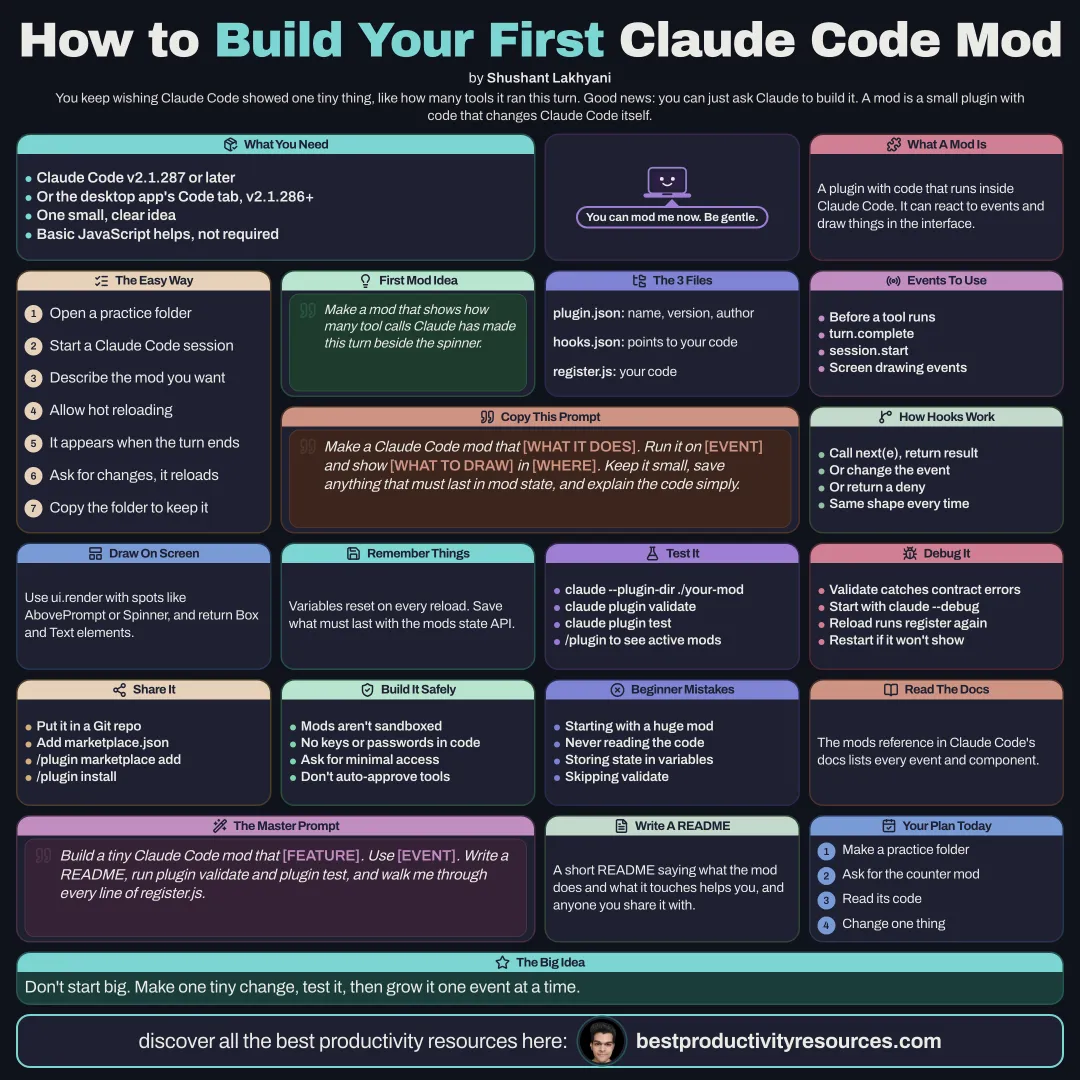
Build your first Claude Code mod, with or without writing code
12 bite-sized sections
3 min read
Free, no signup
Short answer
A free step-by-step guide to making a Claude Code mod in October 2026: requirements, asking Claude to write it, the file layout, plugin.json, hooks.json, the register function, events, drawing UI, keeping state, loading with --plugin-dir, validating, testing, debugging, sharing, and safety.
Claude Code v2.1.287 or later. Check by running claude --version
Or the Code tab in the Claude desktop app, from v2.1.286
A clear idea for a single small change
Basic JavaScript, which helps but is optional
A mod is a plugin whose code runs inside Claude Code.
02
Take the easy route and ask Claude
Open a Claude Code session in a practice folder
Describe the mod you have in mind
Approve hot reloading when Claude asks
Watch the mod appear when Claude’s turn ends
Ask for changes, and watch each one reload in place
Copy the folder somewhere safe to keep the mod
Build a mod that shows, beside the spinner, how many tool calls Claude has made this turn.
03
Learn the file layout
A small mod needs three files:
.claude-plugin/plugin.json
The plugin manifest, with name, version, description, and author
hooks/hooks.json
Points to your code file through a modules list
hooks/register.js
Your code, telling Claude Code which events to run on
In hooks.json:
{ "modules": ["./register.js"] }
04
Write the register function
Your file exports register(on). Every hook takes the same shape:
export function register(on) {
on("tool.call", async ($, e, next) => {
// $ is the mods API, e is the event, next continues as normal
return next(e);
});
}
Observe
Call next(e), inspect the result, and return it
Rewrite
Call next with a modified event
Answer
Return your own result, such as a deny, without calling next
05
Pick your events
tool.call
Just before Claude uses a tool
turn.complete
Once Claude finishes a turn
session.start
As a session starts
ui.render
Whenever Claude Code draws part of the screen, such as the spinner or the band above the prompt
Check the mods reference in Claude Code’s docs for the complete list.
06
Draw in the interface
Use ui.render with a component, such as AbovePrompt or Spinner, and return elements such as Box and Text. You can add panes, buttons, and text fields too. Return next(e) whenever you have nothing to draw.
07
Keep state
Variables in your file reset on every reload. Store anything you want to keep with the mods state API, and declare its shape in a types file. Read state while drawing, and the interface updates whenever that state changes.
08
Load and test the mod
Start a session with claude --plugin-dir ./your-mod
Save a change, and the mod reloads with no restart
Run claude plugin validate ./your-mod to check the mod and list its hooks
Run claude plugin test ./your-mod to execute your test files
Run /plugin to see every active mod
09
Debug problems
Run claude plugin validate to catch any contract errors
Launch with claude --debug and read the log
Remember that every reload reruns register and session start
Restart Claude Code if the mod is still missing after /reload-plugins
10
Share it
Put the mod in a Git repository that has a .claude-plugin/marketplace.json file
Others add it by running /plugin marketplace add your-org/your-repo
They then install it with /plugin install mod-name@marketplace-name
Or you submit it to the Claude directory
11
Build it safely
Mods run with your permissions and have no sandbox
Never put API keys or passwords in your code
Request only the access your mod needs
Never auto-approve tool calls unless you are certain
Write a short README explaining what the mod does
12
Use the master mod prompt
Build a Claude Code mod that [what it does].
Run it on [event] and show [what to draw, if anything] in [where].
Keep it small, store anything that must persist in mod state, never auto-approve tool calls, and include a README and one test.
Then load it with hot reload so I can try it out.
Keep the golden rule
Do not start with a big mod. Make one tiny change, test it, then grow it one event at a time.
Describe
Files
register
Events
State
Validate
Share
Have Claude build the tool call counter mod today, then read the code it writes.
It has 12 sections, starting with “Gather what you need”, “Take the easy route and ask Claude”, “Learn the file layout” and “Write the register function”, plus 8 more sections.
How long does it take to read?
About 3 minutes. Every section is a short, self-contained card, so you can jump straight to the part you need.
Is this guide free?
Yes. The full guide is free to read on this page, with no sign-up.
For research and ideas only. Results vary and nothing here is a promise of income. See our Disclaimer.
See you Monday!
Weekly newsletter
Everything new, every Monday.
One short email every Monday with everything shipped that week: new free tools and websites, new guides, new free browser tools and what's new in my free Gumroad libraries, plus how the site is growing. Free, and you can unsubscribe anytime.
You sign up on Gumroad, which stores your email to send the newsletter. See our Privacy Policy.
Cookies and your choices
Visits are counted by Cloudflare Web Analytics, which sets no cookies and stores nothing on your device. An affiliate tracking script from Impact.com also loads on our pages and can set its own cookies so partner companies can credit us for sign-ups. Essential storage is always on so pages load and work correctly. You decide whether your browsing preferences are saved on your device. Read the Privacy Policy.