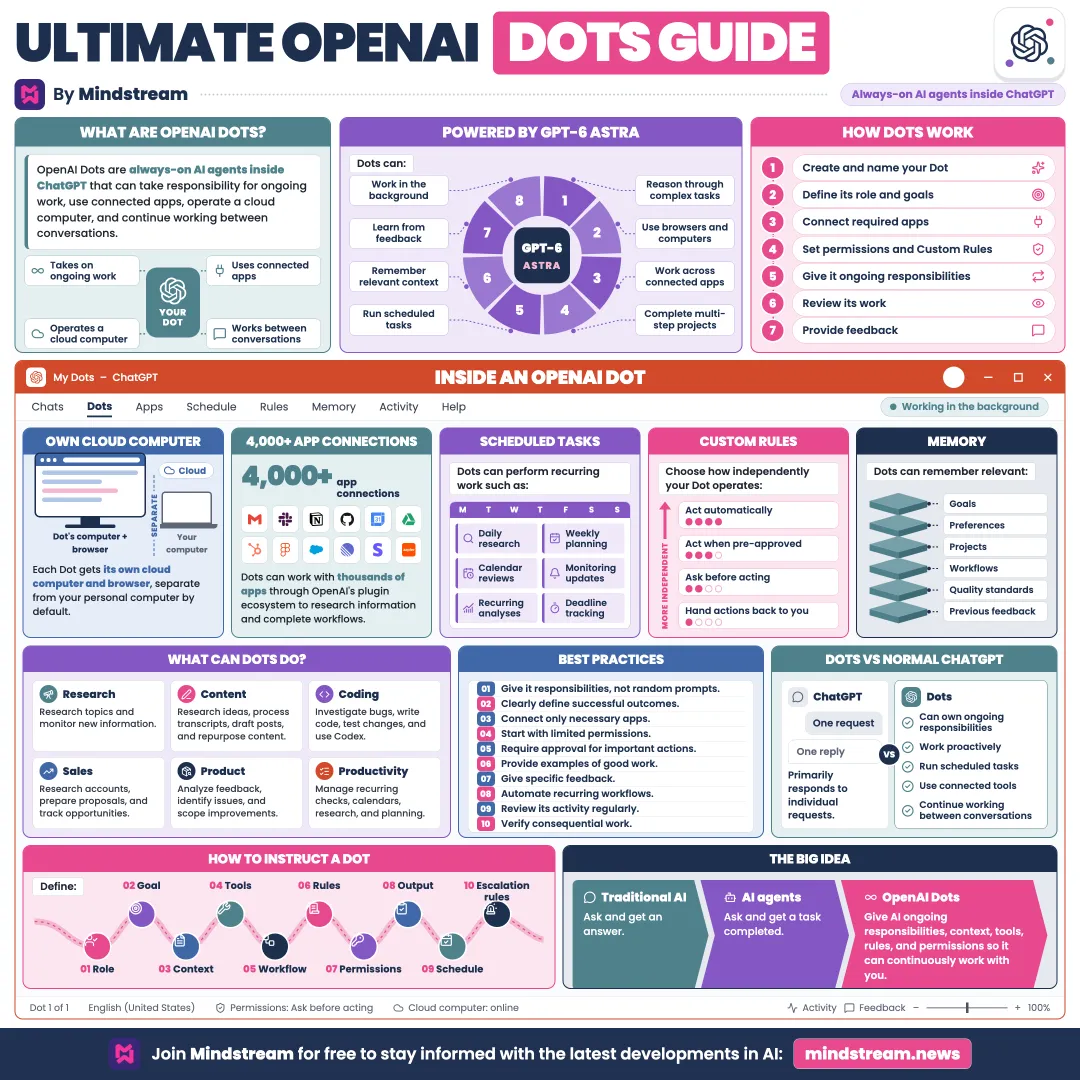
The complete field guide to OpenAI Dots: persistent AI agents inside ChatGPT designed to own ongoing work, stay in context, and return when your judgment matters.
A standard chatbot replies when you message it. A Dot can own work over time. It can keep going between conversations, monitor connected information, run recurring tasks, and bring back results or decisions.
Persistent
keeps working
Connected
uses approved apps
Visible
activity you can inspect
Bounded
asks when needed
02
See how Dots differ by design
Dots can manage ongoing tasks, remember relevant context, use connected apps, and report their progress, rather than only answering the prompt in front of them.
03
Know the model: GPT-6 Astra
Astra provides the planning and agentic reasoning inside a Dot. It interprets goals, uses tools, adapts to new information, and knows when to ask.
04
Use its own cloud computer
Each Dot gets a cloud computer, a browser, and supported tools. It can keep working while your own computer is switched off.
05
Connect apps: 4,000+
Subject to availability and permissions, a Dot can work across tools like Drive, Calendar, GitHub, Slack, Teams, Codex, Docs, Sheets, and Slides.
06
Let it research proactively
Dots can scan connected information for useful work. Background research runs with read-only access, so it cannot send, edit, or take control.
07
Schedule recurring tasks
Assign recurring responsibilities, such as morning calendar briefs, ongoing research, reminders, and project monitoring, and manage them from the Dot profile.
08
Build memory that compounds
Your Dot can draw on ChatGPT memory and its own saved context to learn your preferences, workflows, goals, standards, and past feedback.
09
Reach it across channels
Where supported, you can pick up the same thread across ChatGPT desktop, web, mobile, Slack, Teams, and voice, without starting from scratch.
10
Understand the shift
ChatGPT helps with one conversation. A Dot can own an entire responsibility.
Regular ChatGPT
Replies to the current conversation
Usually waits for your next instruction
Mostly works inside the interaction
Your Dot
Keeps working between conversations
Runs recurring work and watches context
Uses approved tools, apps, and a cloud computer
Escalates decisions that need human judgment
11
Find where Dots can help
Continuity ties it all together. A Dot can own a defined slice of your workflow instead of handling one isolated request after another.
Content creation
Review transcripts, pick clips, prepare show notes and social drafts, learn a voice, track work, and stage material for approval.
Software development
Monitor feedback, investigate bugs, scope improvements, build fixes, run tests, prepare pull requests, and coordinate work in Codex.
Marketing
Learn your positioning, research competitors, draft campaigns, update launch materials, repurpose content, and raise decisions.
Research
Track open questions, review new information, analyze data, dig into unexpected results, and update analyses, figures, and documents.
Sales
Review account history, customer and technical requirements, proposals, test plans, and open concerns, while every commitment still gets approved.
Specialist work
Organizations can set up focused Dots for defined duties such as procurement, invoice processing, email marketing, support, and contracting.
12
Keep a hand on the steering wheel
You control what a Dot can reach, how independently it works, what needs approval, and when work should stop. Dots can make mistakes, so review consequential output and actions.
Custom Rules. Set which actions run automatically, only when pre-approved, after asking, or only by you.
Auto-review. Actions that could matter are checked against your instructions, permissions, Custom Rules, and safety requirements.
Watch and redirect. Inspect In Progress, Scheduled, and Completed work, then open the cloud computer and change course when needed.
Pause or reset. Pause background work at any time. A reset deletes the Dot along with its conversations, memories, and scheduled tasks.
Personal computer stays separate. Local access is off by default, needs an explicit desktop-app connection and permission, and can be revoked later.
Privacy and access. You choose which applications a Dot can use. Disconnecting an app does not necessarily delete information already obtained from it.
13
Start with a practical job
Hand it a job, not a vague prompt.
Spell out the outcome, the information available, the actions it may take alone, the approval boundaries, what to monitor, the cadence, what good looks like, and when to bring you in.
The big idea
AI that keeps the project moving. OpenAI Dots turn AI from something you prompt again and again into an always-available agent that works alongside you, with context, tools, permissions, memory, and clear guardrails.
Persistent
Connected
Visible
Bounded
Hand it a job, not a vague prompt, and review consequential output before it acts.
It has 13 sections, starting with “Shift from answers to ongoing work”, “See how Dots differ by design”, “Know the model: GPT-6 Astra” and “Use its own cloud computer”, plus 9 more sections.
How long does it take to read?
About 4 minutes. Every section is a short, self-contained card, so you can jump straight to the part you need.
Is this guide free?
Yes. The full guide is free to read on this page, with no sign-up.
For research and ideas only. Results vary and nothing here is a promise of income. See our Disclaimer.
See you Monday!
Weekly newsletter
Everything new, every Monday.
One short email every Monday with everything shipped that week: new free tools and websites, new guides, new free browser tools and what's new in my free Gumroad libraries, plus how the site is growing. Free, and you can unsubscribe anytime.
You sign up on Gumroad, which stores your email to send the newsletter. See our Privacy Policy.
Cookies and your choices
Visits are counted by Cloudflare Web Analytics, which sets no cookies and stores nothing on your device. An affiliate tracking script from Impact.com also loads on our pages and can set its own cookies so partner companies can credit us for sign-ups. Essential storage is always on so pages load and work correctly. You decide whether your browsing preferences are saved on your device. Read the Privacy Policy.