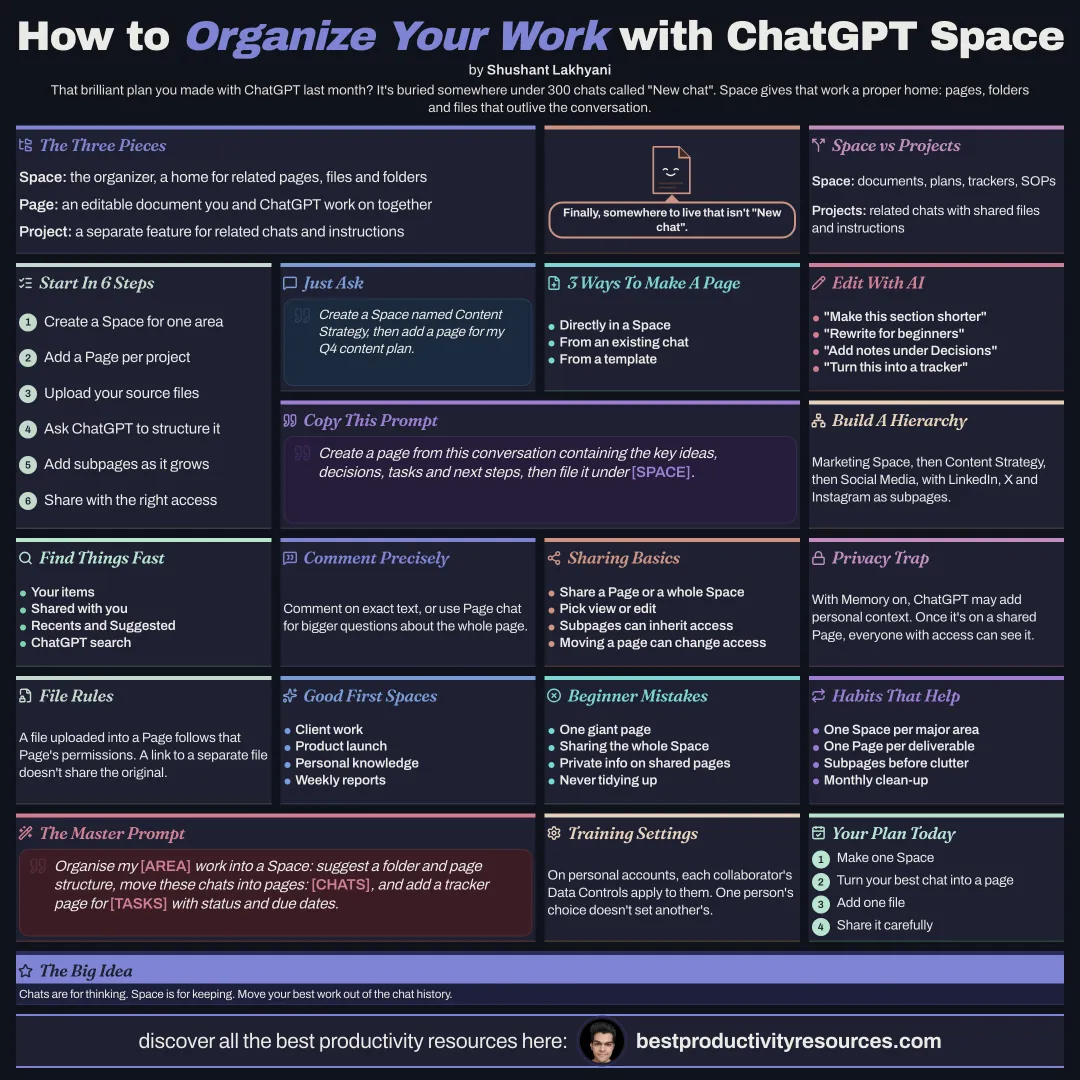
This is everything you need to understand ChatGPT Space, a dedicated home for pages, files, knowledge, and work that should outlive a chat. It explains Space, Page, and Project, reads every feature with privacy first, and includes practical prompts.
02
The basics: learn what ChatGPT Space is
ChatGPT Space is a dedicated home inside ChatGPT for your pages, uploaded files, and organized work. Treat it as a collaborative AI workspace where you create documents, organize knowledge, work with ChatGPT, and share results. On eligible accounts, Space replaces Library.
Space · the organizer
A container that groups related work, pages, files, and folders.
Page · the document
An editable document inside a Space that you and ChatGPT can create, edit, organize, and work on together.
Project · the chat hub
A separate ChatGPT feature that holds related chats, files, and instructions for one project.
Space ≠ Projects
The two coexist. Use Space for work centered on documents and Projects for workflows centered on chats.
03
The features: see what Space can do
Create & shape
Build editable pages, nested subpages, folders, and structured content.
Work with AI
Write, edit, analyze, chart, transform, and build trackers.
Keep source material
Upload files, connect content, search, and come back to past work.
Collaborate precisely
Comment on exact text, or use Page chat for wider reasoning.
Share intentionally
Share one Page or a whole Space with view/edit permissions.
Turn chats into assets
Convert a conversation into a structured Page you can use.
04
Create & edit: start with one simple ask
Ask ChatGPT to make a Space: “Create a Space named Content Strategy.” Then add a Page inside it: “Create a page in Content Strategy for my Q4 content plan.”
Helpful Space categories include Content Business, Client Work, Product Launch, Marketing, Research, Personal Knowledge, and Company Operations.
Three ways to create a Page
Straight from a Space.
From an existing ChatGPT chat.
From a template offered in Space.
Create a page from this conversation that captures the key ideas, decisions, tasks, and next steps.
Edit with ChatGPT
Request precise changes: “Make this section more concise,” “Rewrite the introduction for beginners,” “Add meeting notes under Decisions,” “Compare these proposals,” “Turn these numbers into a chart,” or “Create a project tracker from these tasks.” Comment on a specific passage, and use Page chat for changes that touch the whole document.
05
Structure: organize it like a knowledge system
A Space can hold folders, Pages, files, and nested Pages. Pages can contain subpages, which let work grow without turning one document into a cluttered wall of text.
Example hierarchy
Marketing Space → Content Strategy → Social Media → LinkedIn / X / Instagram, alongside SEO, Analytics, and Weekly Reports.
With edit access, you can ask ChatGPT to rename Pages or nest one Page under another. Keep in mind that moving a Page can change who sees it through inherited permissions.
Find your work
Browse Your items, Shared with you, Pages, Suggested, Recents, and Images. Broader ChatGPT search can also help you locate content.
06
Files, sharing & privacy: share the work, not the confusion
Files
A file uploaded into a Page takes on that Page’s permissions. Linking to a file stored elsewhere does not grant access to the original. Files from a connected service keep that service’s permissions. Anything copied or summarized into a shared Page becomes visible to everyone who can open it.
Permissions
Access can come from sharing the Page directly, from a parent Page, or from the Space that contains it. Subpages may inherit access. Removing a direct invite leaves any access inherited from a parent or Space in place.
Click Share on a Page to grant view or edit access, or share an entire Space when several Pages and files belong to one workflow. Every collaborator works in their own ChatGPT, and sharing a Page does not automatically share private chats or personal Memory.
A practical privacy rule
With Memory turned on, ChatGPT may draw on relevant personal context while helping on a Page. Once personal details are written into a shared Page, everyone with access can read them. Check AI-generated content and permissions before you share.
On personal accounts, each person’s Data Controls decide training. One collaborator’s setting never changes another’s. According to OpenAI, Business and Enterprise data is not used for training by default.
07
Choose the right tool: Space vs. Projects, in practice
Use Space for
Editable documents and lasting deliverables
Structured knowledge across Pages, subpages, and folders
Collaboration and shared work material
Content plans, launch plans, research, SOPs, trackers, and meeting notes
Use Projects for
Related ChatGPT chats
Files specific to one project
Instructions for one project
Lasting context around a body of ChatGPT work
The simple workflow
Create a Space for one area of work.
Add Pages for each project or topic.
Add the files and source material that matter.
Have ChatGPT structure, write, analyze, or transform it.
Add subpages as the work expands.
Share with care, using the right view/edit permissions.
08
Work well: build ten habits that keep Space useful
Keep one Space per major area of work.
Give each deliverable or knowledge area its own Page.
Split into subpages before large Pages get cluttered.
Name Pages clearly so search works for you.
Upload key source files instead of scattering context.
Use comments for precise edits and Page chat for wider work.
Check AI-generated facts, figures, names, dates, and sources.
Confirm permissions before adding confidential information.
Review inherited access before you move or share Pages.
Keep chats in Projects and documents in Space.
Availability & platform support
As of September 30, 2026, OpenAI says creating and editing Space content is available on ChatGPT Pro, Business, and Enterprise. In managed workspaces, admin and organization settings can limit sharing. On the web and in the ChatGPT desktop app, you can create and edit Pages. Mobile lets you find, read, share, and navigate Pages/subpages, but does not currently support Page editing. Slides, Sheets, and automatic “Keep updated” Page updates are not available at launch.
The big idea
Work starts in chats. It lives in Space.
Space
Pages
Projects
Privacy
Sharing
Use Space for document work that should outlive a chat, and keep Projects for the conversations themselves.
It has 8 sections, starting with “The idea: make room for work that lasts”, “The basics: learn what ChatGPT Space is”, “The features: see what Space can do” and “Create & edit: start with one simple ask”, plus 4 more sections.
How long does it take to read?
About 5 minutes. Every section is a short, self-contained card, so you can jump straight to the part you need.
Is this guide free?
Yes. The full guide is free to read on this page, with no sign-up.
For research and ideas only. Results vary and nothing here is a promise of income. See our Disclaimer.
See you Monday!
Weekly newsletter
Everything new, every Monday.
One short email every Monday with everything shipped that week: new free tools and websites, new guides, new free browser tools and what's new in my free Gumroad libraries, plus how the site is growing. Free, and you can unsubscribe anytime.
You sign up on Gumroad, which stores your email to send the newsletter. See our Privacy Policy.
Cookies and your choices
Visits are counted by Cloudflare Web Analytics, which sets no cookies and stores nothing on your device. An affiliate tracking script from Impact.com also loads on our pages and can set its own cookies so partner companies can credit us for sign-ups. Essential storage is always on so pages load and work correctly. You decide whether your browsing preferences are saved on your device. Read the Privacy Policy.