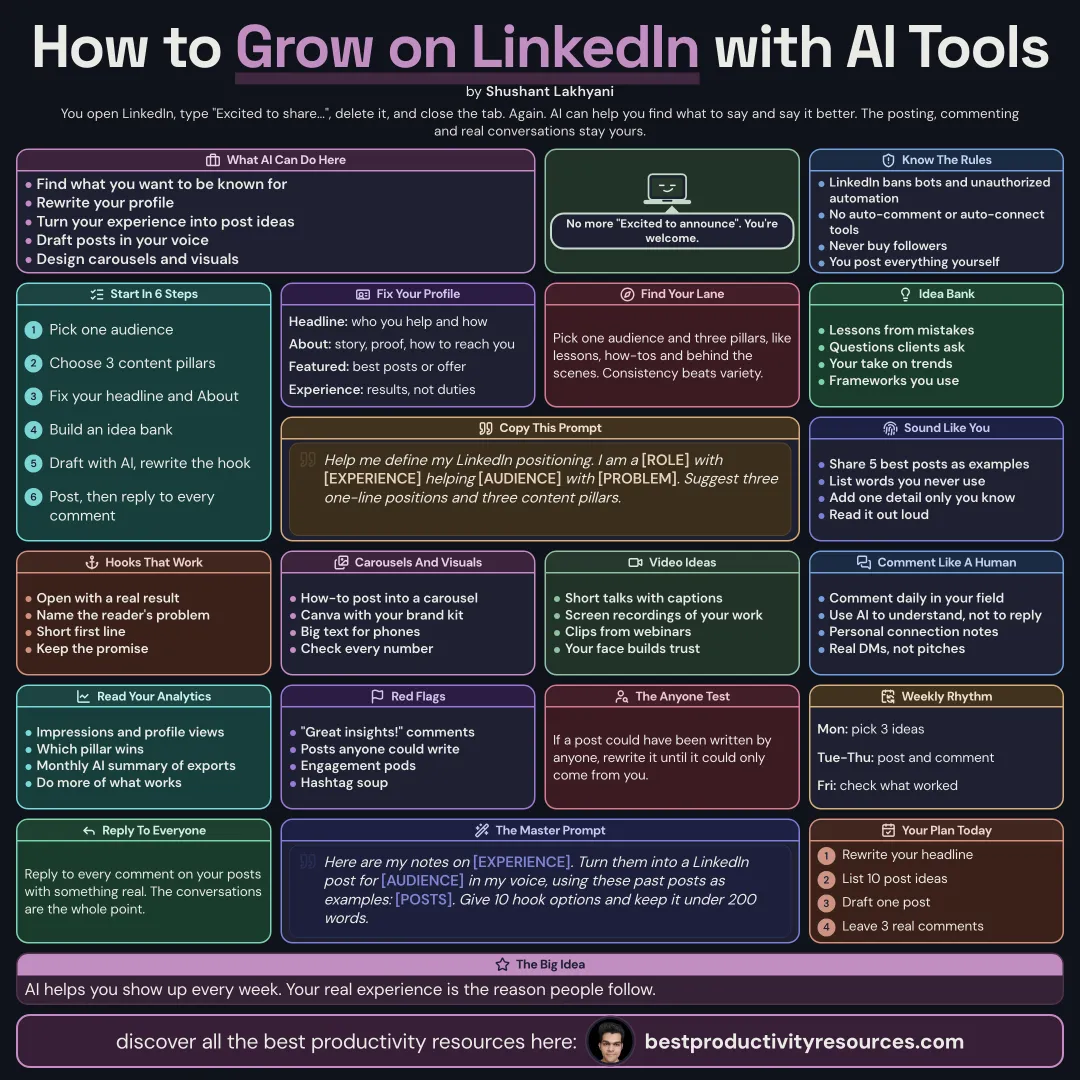
Turn your expertise into a LinkedIn presence that grows, with AI handling the heavy lifting and you staying human
13 bite-sized sections
3 min read
Free, no signup
Short answer
A free guide to growing on LinkedIn with AI tools in 2026: positioning, profile optimization, content pillars, post ideas, writing in your voice, carousels and visuals, video, comments, networking, analytics, LinkedIn’s automation rules, and a weekly routine.
LinkedIn growth comes from a clear position, useful posts, and real conversations. AI tools can speed up the work behind all three.
AI can help you:
Pin down what you want to be known for
Rewrite your profile
Turn your experience into post ideas
Draft posts in your own voice
Design carousels and visuals
Prepare thoughtful comments
Analyze what performs
AI helps you show up consistently. Your experience is the reason people follow.
02
Know the rules first
LinkedIn’s User Agreement bans bots and unauthorized automation on the platform
Never use tools that auto-comment, auto-connect, or auto-message
Never pay for followers or engagement
Write and approve everything you publish yourself
Let AI help you prepare. Post, comment, and message yourself.
03
Define your position
Help me define my LinkedIn positioning. I am a [role] with [experience], helping [audience] with [problem]. Suggest three one-line positions, each with three content pillars.
Choose one audience and three content pillars, such as lessons, how-tos, and behind the scenes.
04
Optimize your profile
Headline: who you help, and how
About: your story, your proof, and why to contact you
Featured: your strongest posts, work, or offer
Experience: results, not duties
Photo and banner: clear, professional, and on brand
Ask AI for five headline options, then pick one and edit it yourself.
If anyone could have written the post, rewrite it.
07
Write strong hooks
Open with a specific result or a surprising fact
Name the reader’s problem
Keep the opening line short
Make a clear promise, and keep it
Ask AI for ten hook options, then pick the most honest one.
08
Create carousels and visuals
Turn any how-to post into a carousel
Use Canva or other design tools with your brand kit
Create visuals with Nano Banana 2.1 or GPT Image
Keep text large and easy to read on phones
Check every single word and number
09
Add video
Short talking-head videos with captions
Screen recordings that show how you work
Clips cut from webinars and podcasts
AI tools can cut clips, add captions, and suggest titles. Your own face and voice earn the most trust.
10
Comment and connect as a human
Leave thoughtful comments on posts in your field every day
Use AI to understand a post, never to write generic comments
Send personal notes with connection requests
Answer every comment on your posts
Start real conversations in your messages
11
Learn from analytics
Track impressions, engagement, profile views, and follower growth
Note which pillars and formats perform best
Have AI summarize monthly patterns from your exported data
Double down on what works
12
Follow a weekly routine
Monday
Choose three ideas from your bank
Tuesday
Draft and edit your posts with AI
Wednesday
Make one carousel or visual
Daily
Comment on five posts and answer comments on yours
Friday
Review analytics and add fresh ideas
13
Use a master LinkedIn prompt
Act as my LinkedIn ghostwriting partner.
I help [audience] with [problem]. My pillars: [pillars]. Voice examples: [paste posts].
Using this experience: [story or lesson], write three post drafts under 200 words, each with a different hook, one specific detail, and a clear takeaway.
Do not make up facts or results. Mark the spots where I should add my own details.
Follow the golden rule
Do not use AI to post more. Use it to share your real experience more clearly and more often.
Position
Profile
Ideas
Voice
Visuals
Comments
Analytics
Update your headline today, and publish one post from your own experience this week.
What does “How to Use AI Tools to Grow on LinkedIn” cover?
It has 13 sections, starting with “See what AI can do for your LinkedIn”, “Know the rules first”, “Define your position” and “Optimize your profile”, plus 9 more sections.
How long does it take to read?
About 3 minutes. Every section is a short, self-contained card, so you can jump straight to the part you need.
Is this guide free?
Yes. The full guide is free to read on this page, with no sign-up.
For research and ideas only. Results vary and nothing here is a promise of income. See our Disclaimer.
See you Monday!
Weekly newsletter
Everything new, every Monday.
One short email every Monday with everything shipped that week: new free tools and websites, new guides, new free browser tools and what's new in my free Gumroad libraries, plus how the site is growing. Free, and you can unsubscribe anytime.
You sign up on Gumroad, which stores your email to send the newsletter. See our Privacy Policy.
Cookies and your choices
Visits are counted by Cloudflare Web Analytics, which sets no cookies and stores nothing on your device. An affiliate tracking script from Impact.com also loads on our pages and can set its own cookies so partner companies can credit us for sign-ups. Essential storage is always on so pages load and work correctly. You decide whether your browsing preferences are saved on your device. Read the Privacy Policy.